


Maintaining a secure and well-controlled corporate network is not optional; it's a fundamental aspect of any operation that takes security seriously. Lumiun DNS adds an essential layer of protection by directly monitoring DNS traffic , helping to block malicious domains , inappropriate categories , and access that violates company policy.
At the same time, each environment has its own particularities: segmented network, multiple units, different suppliers, varied equipment, teams with different access levels... and that's where the need for more granular control .
Where does ActiveNet fit into this story?
ActiveNet is the Lumiun DNS agent that enhances the level of organization and control within the network. With it, you can:
-
Segment devices into groups (by department, function, risk profile, unit, etc.)
-
Apply different policies by group and, when necessary, by device.
-
Gain visibility into the behavior and access patterns of connected assets.
-
policy management
In practice, ActiveNet helps transform access control into something closer to reality: different people and machines need different permissions .
Control by groups and devices in Lumiun DNS
Each company has specific needs when it comes to access control. Therefore, Lumiun DNS offers different ways to implement policies, adapting to various scenarios.
Location-based control (broader application)
Locations feature remains an efficient approach: policies are configured at the edge point and then apply to the entire segment within that Location.
When it makes sense: smaller networks, less segmented environments, or when the intention is to apply a "standard" policy to everyone.
Control by groups and devices (granular layer with ActiveNet)
With ActiveNet , the logic becomes more detailed. Instead of applying the same rule to all devices in that segment, you can organize assets into groups and define specific policies for each context.
This allows, for example:
-
A "Financial" group with more restricted access
-
An "IT" group with broader permissions
-
Visitor/third-party devices with limited browsing
-
Specific exceptions for equipment (when a case truly calls for it)
Result: more control over access, more organized management, and policies aligned with the company's structure, without relying on "one-size-fits-all rules" for the entire network.
How does ActiveNet extend this control in practice?
ActiveNet installation was designed to be simple and quick, with a focus on integration.
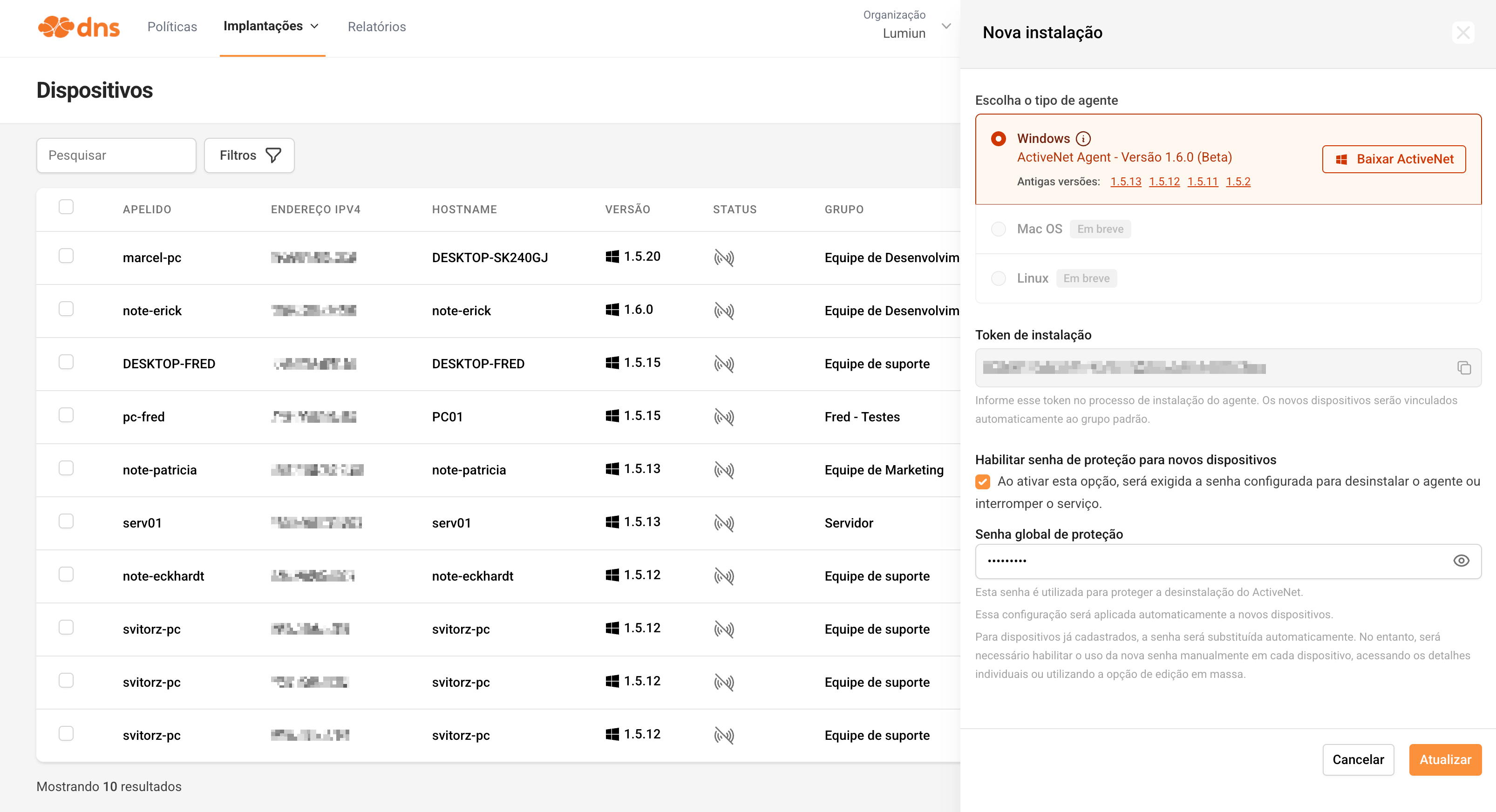
The installation is performed using a file made available by clicking on “New Device” in the platform's device menu. Currently available for Windows, the installer, when run, requests a unique token from the organization, also accessible in the same menu. After entering the token, the process is completed and the device is automatically integrated into the Lumiun DNS .
With the device linked, the IT team gains complete control over its management. It's possible to define a personalized name, associate it with a specific group, and determine which policy will be applied. Furthermore, the device's group can be changed whenever necessary, ensuring administrative flexibility.
One of the key advantages is that the control is independent of the network the device is connected to. DNS queries continue to be filtered according to the defined policy, even outside the corporate network. This means that if the employee uses the device on another network, such as their home network, the access rules remain active .
It can be used in networks with Active Directory Domain Services (AD DS)
ActiveNet can be used in environments with Active Directory Domain Services (AD DS) without compromising communication between devices and the domain controller.
In conjunction with the Groups and Devices feature, DNS Forwarding , ensuring that queries destined for the internal server continue to be routed correctly. This way, domain name resolution and other communications with Active Directory remain uninterrupted.
Furthermore, ActiveNet can be installed on a large scale via GPO (Group Policy) , using a startup script. The installation can be performed silently, allowing the agent to be distributed without requiring end-user intervention.
Can the user remove ActiveNet from the computer?
A common question is whether a user can remove ActiveNet from their device. If this happens, the device is no longer integrated with the platform and will no longer follow the defined policies, compromising the applied control.
To avoid this scenario, ActiveNet has protection mechanisms. It's possible to set a Protection Password , configured directly in Lumiun DNS New Device menu . This password will be required whenever there is an attempt to uninstall the agent or interrupt the service on the system.
Furthermore, the agent performs periodic checks to ensure that the settings remain active. One example is the recurring validation of DNS settings, preventing unauthorized changes to the configured server. In this way, even users with greater technical knowledge encounter additional barriers to circumventing the established policies.
How control is reflected in the company
The control possibilities with ActiveNet are extensive, allowing adaptation to different scenarios and operating models.
It is possible to create groups and organize devices according to the company's needs, by department, function, or access level, for example. Each group can follow a specific policy, aligned with the routine and responsibilities of that sector.
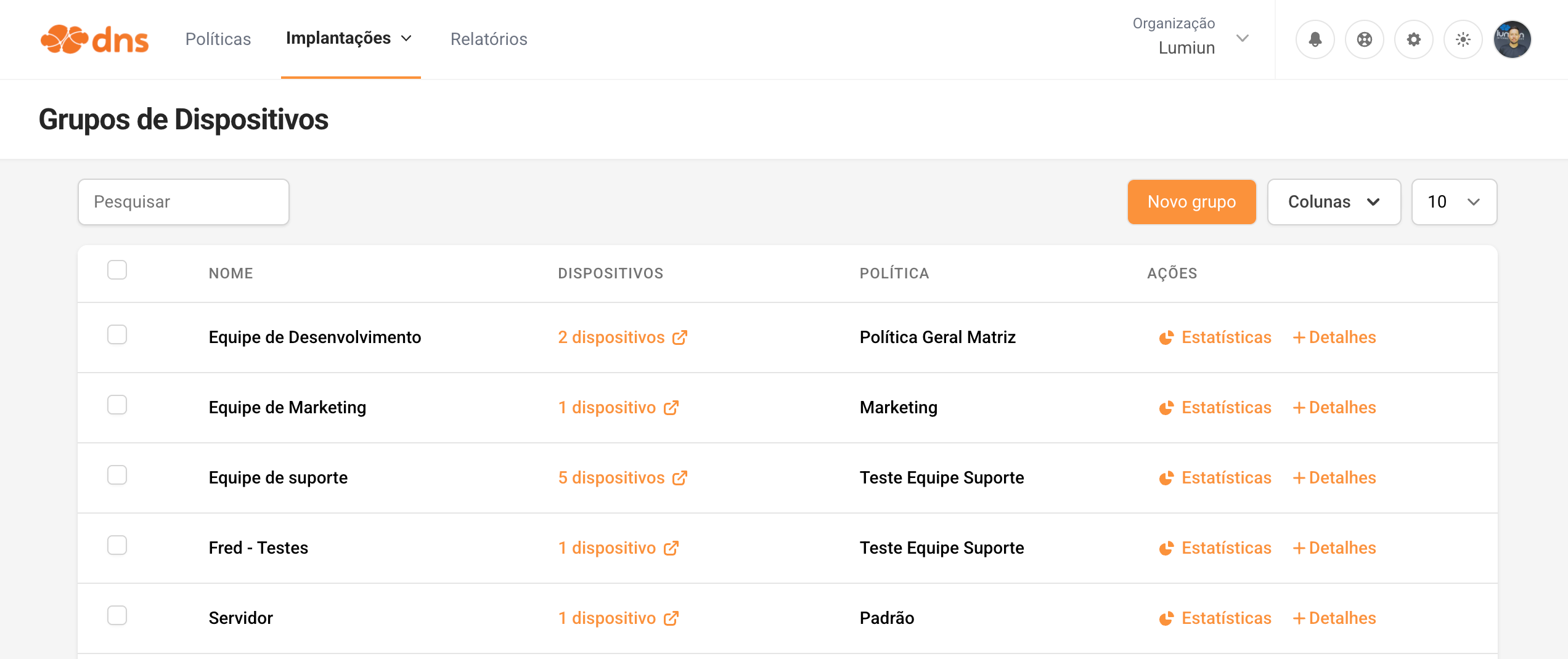
When a device is added to a specific group, it automatically follows the defined blocking policy. However, the feature remains flexible: if necessary, a different policy can be applied to a specific device, even if it belongs to a group. All this management is done directly in the Lumiun DNS , in a centralized manner.
In practice, this allows access rules to move beyond being generic and instead reflect the reality of each team, making control more organized and aligned with the company's daily operations.
If you need help defining the best group and policy for your environment, our support team is available to assist you.
Who benefits from this feature?
Without a doubt, the IT team is one of the main beneficiaries.
In addition to the ease of installation, management, and policy application already mentioned, visibility has also improved significantly. Reports are becoming more specific, allowing filtering by device groups or individual devices , as well as other criteria available on the platform. This helps transform monitoring into something more practical in daily life: less time "hunting" for information and more time making evidence-based decisions.
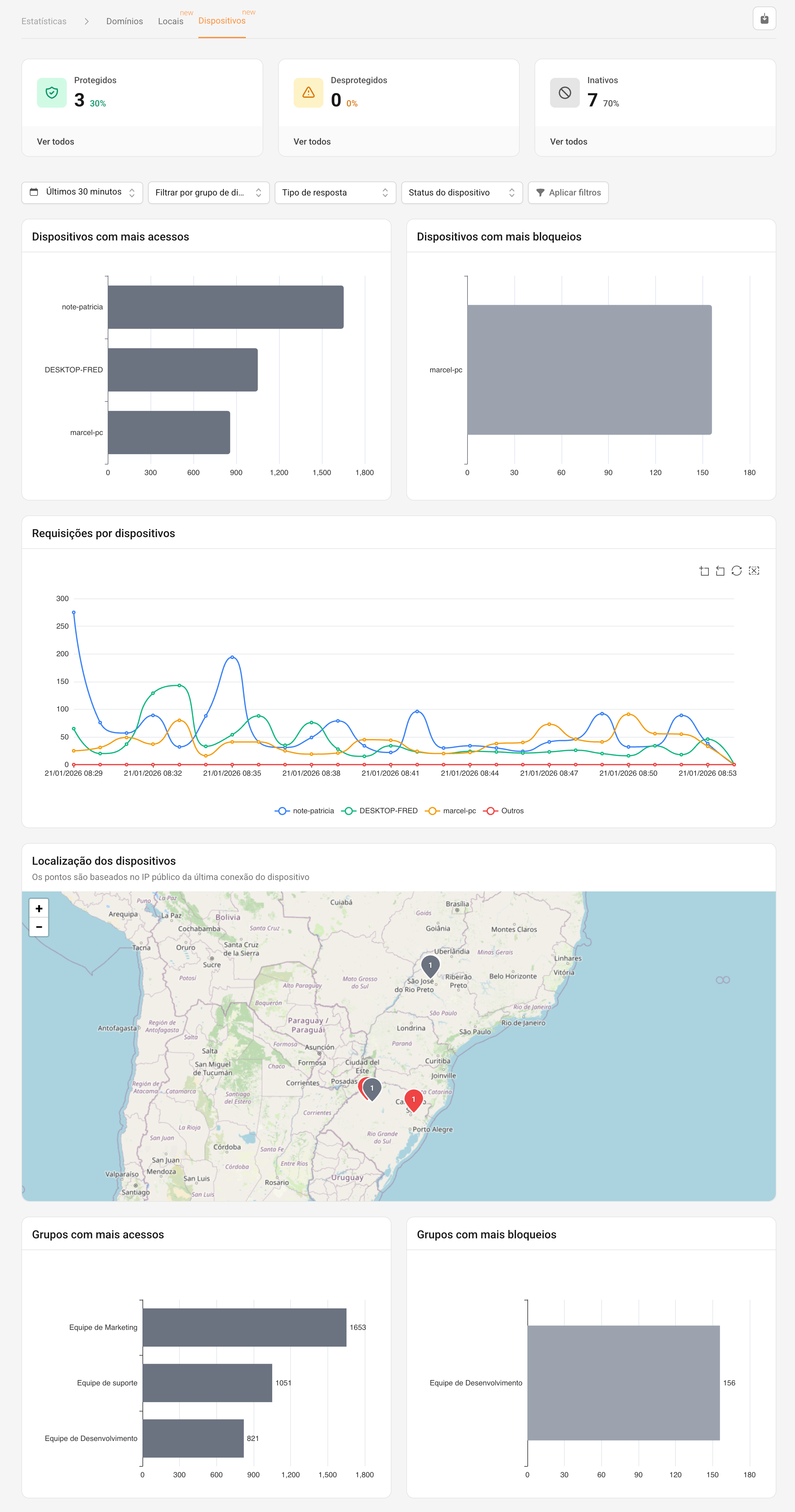
In practice, this dashboard helps the team answer common operational and security questions, such as: which endpoints are accessed most frequently , where the blocks are concentrated , if there are peaks at specific times , and which machines are outside the group's standard .
Types of reports and views that are most helpful in daily routines
-
Device status (protected, unprotected, and inactive): a quick overview of the environment's coverage. Great for identifying endpoints without active protection, devices that have stopped reporting, and potential installation or connectivity issues.
-
Devices with the most accesses: ranking to understand which machines generate the most DNS queries. Helps detect unusual consumption, "noisy" automations, applications generating higher-than-expected traffic, and patterns that deserve investigation.
-
Devices with more blocks: quickly highlights where policies are having the biggest impact. Useful for both troubleshooting (legitimate blocking vs. necessary exception) and risk assessment (recurring attempts to access inappropriate/malicious domains).
-
Device requests (timeline): a temporal graph highlighting peaks, times of highest usage, and changes after policy adjustments. It is especially useful for correlating events with software updates, rule changes, user routines, or incidents.
-
Device location (map by public IP): adds context in distributed environments and remote work. Helps to understand where devices are connecting from and identify unexpected behavior for that asset.
-
Rankings by group (most accesses and most blocks): an "executive" and easy-to-read view of behavior by department/profile. Useful for governance, prioritizing adjustments, and comparing areas.
Filters that make the investigation faster
In addition to filtering by group or device , it is possible to refine the analysis by:
-
Timeframe (e.g., recent window for quick investigation or longer periods to identify trends);
-
Response type (to separate normal responses, blocks, and other returns);
-
Device status (focusing on inactive/unprotected devices when the goal is to check coverage).
Ultimately, this makes monitoring more precise and organized, facilitating the identification of access patterns, exceptions, and potential impacts on productivity. With more detailed data at hand, the network administrator can adjust policies quickly and present clearer information to management, guiding decisions based on concrete data collected from the environment.
Register
If you want to apply this control model to your environment, you can test Lumiun DNS for free and explore in practice how control by groups and devices can bring more organization, productivity, and predictability to your network management.


