


It is a fact that pornography is responsible for a large volume of internet traffic worldwide. An endless number of websites, 24 hours a day, seven days a week, 365 days a year, without a break on leap years, on the web, deep web and dark web, for all tastes (the vast majority of which are in very bad taste) and in all languages, paid or free formats and media (photos, videos, drawings) and, in some cases, live online chat rooms.
Generally speaking, it's not suitable for children or teenagers, or even for the unwary. And that's just one of the problems: it's a type of explicit content that's very easily accessible, without filter or control . All you need is an electronic device with internet access, and anyone between 8 and 80 years old (or more or less) can access it.
Furthermore, another very serious problem is the far-reaching economic impact, of great value, for companies of all sizes . The losses are, in fact, incalculable and certainly exceed one billion dollars globally.
And, regarding the economic and financial aspect, the issue lies in cyber threats. In short, a large part of these websites were very well thought out and executed to exploit any and all loopholes, vulnerabilities, and security flaws. They are loaded with malicious files, ready to invade and damage your, my, and the computers and devices of the entire world.
The potential for problems is, without a doubt, enormous. Viruses, Trojans, and malware such as ransomware are just some of the cyber threats that pornographic and erotic content websites can cause.
Even worse is when this type of content is accessed by employees through company devices and the internet. Besides harming productivity and diverting the team's focus , it causes enormous losses through attacks that steal sensitive company information .
But stay calm. In this article, I will share several ways to block pornography websites in the workplace . There are, indeed, practical, quick, efficient, and analytical ways for employees and companies to remain safe and productive .
Also check out the complete tutorial with practical tips for blocking pornography websites in your company, school environment, or even at home!
Block pornography websites in Google Chrome
To block websites in Google Chrome, you need to install an extension. There are several, but I recommend BlockSite . To install it, simply go to the website and click the blue " Add to Chrome" . After installation, you need to accept the terms and click the green button .
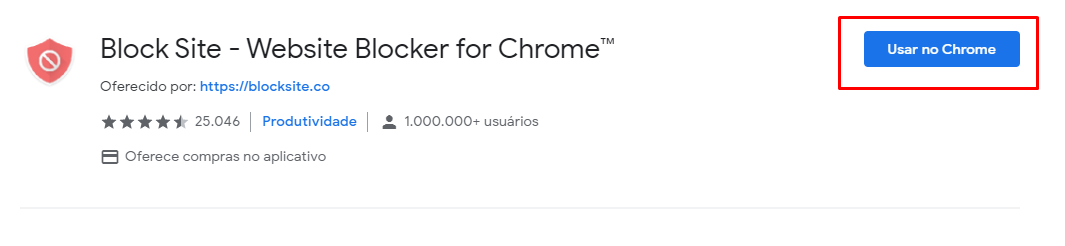
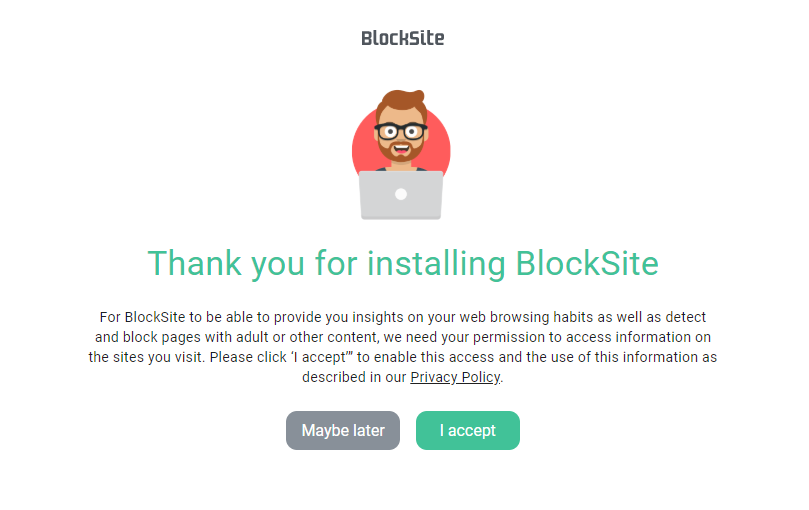
A new red icon will be added next to the URL bar. Click on it to display a new tab, click on “Add block list”, select the “Adult” category and click on “Done”.
Now, pornographic content will be blocked in this browser.
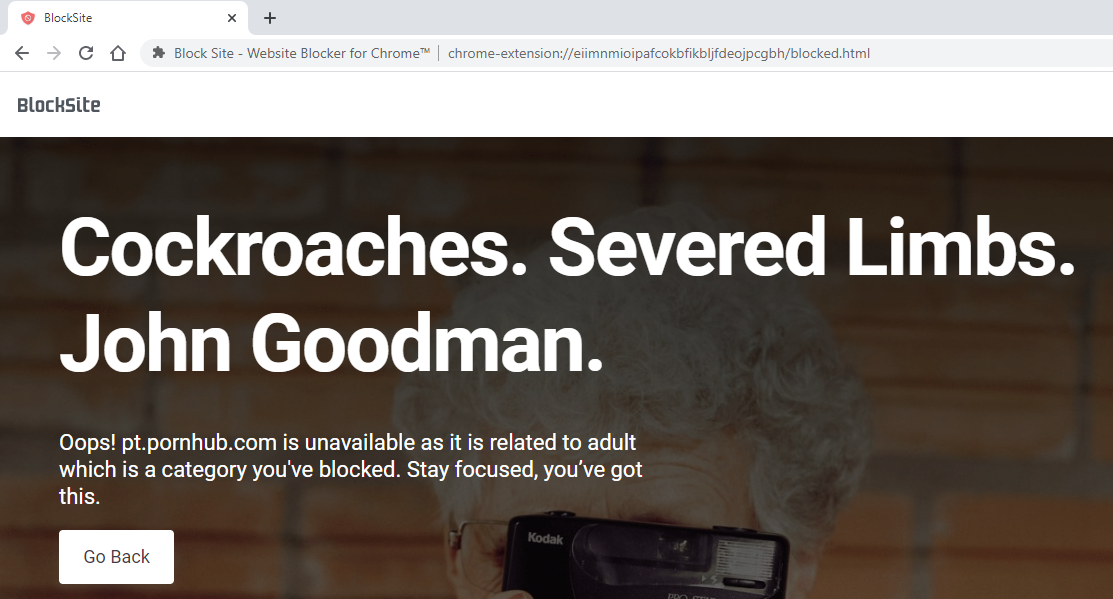
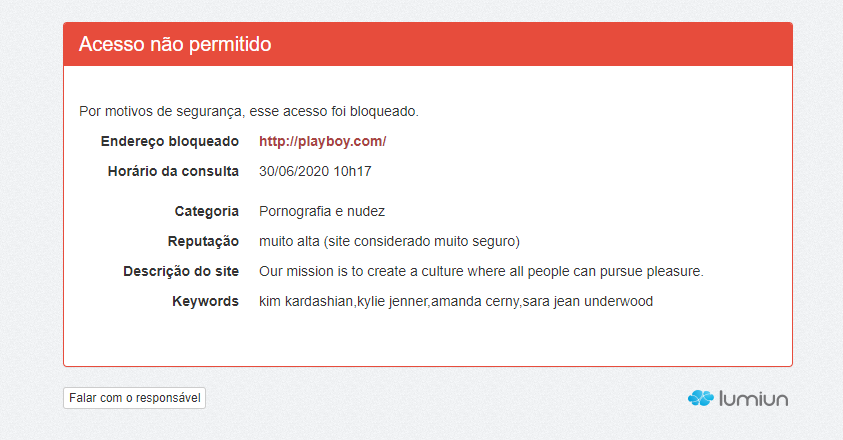
Any user attempting to access an adult website will be redirected to a blocking page like the one below, which details information about the blocked website and its category.
Block pornography websites on Windows
By changing the DNS server , a resource management system connected to the internet, it is possible to block websites containing pornography, nudity, or adult content on your Windows system.
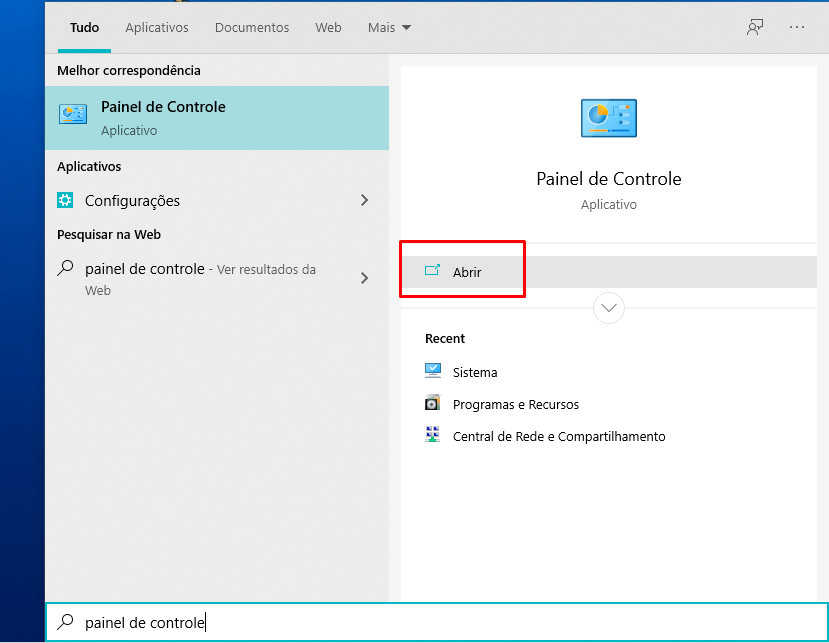
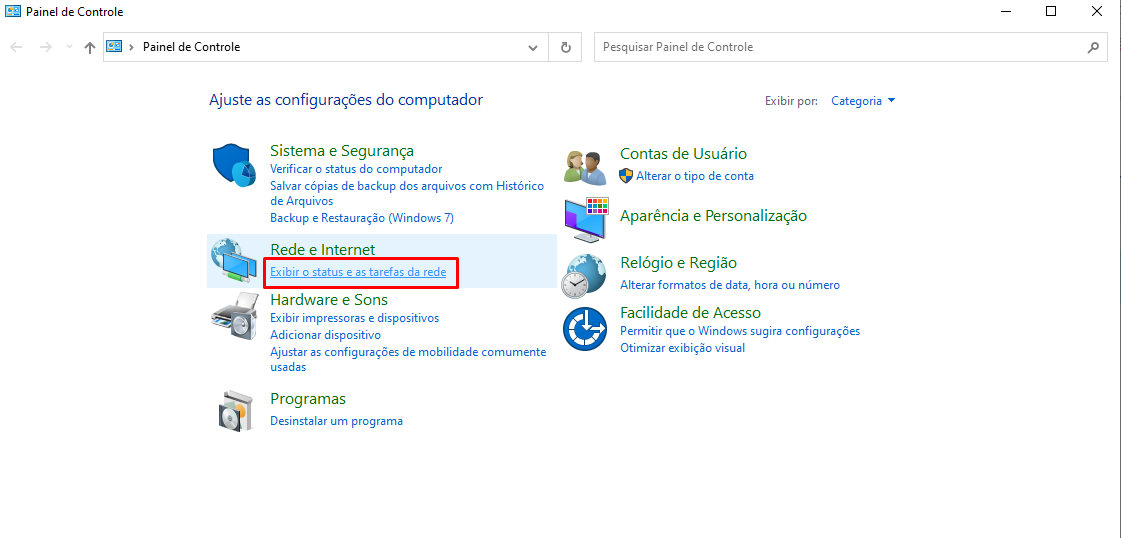
First, press the Windows , type " Control Panel ," and click " Open ."
Then, in the window that opens, click on “ View network status and tasks ” in the Network and Internet .
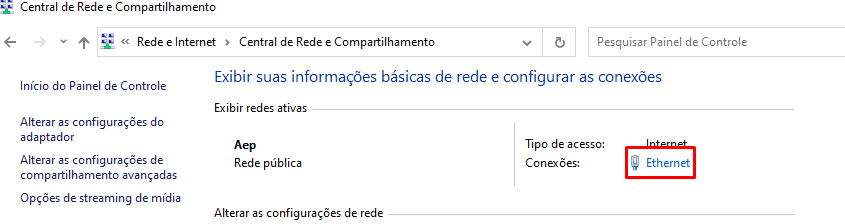
Click on the Connections option: Ethernet , if you are using a cable, or Wi-Fi connection for wireless internet.
In the window that opens, click on “ Properties ” → select the option “ Internet Protocol Version 4 (TCP/IPv4) ” → click on the “ Properties ” button → select the option “ Use the following DNS server addresses ” → and enter the IP addresses of the DNS services .
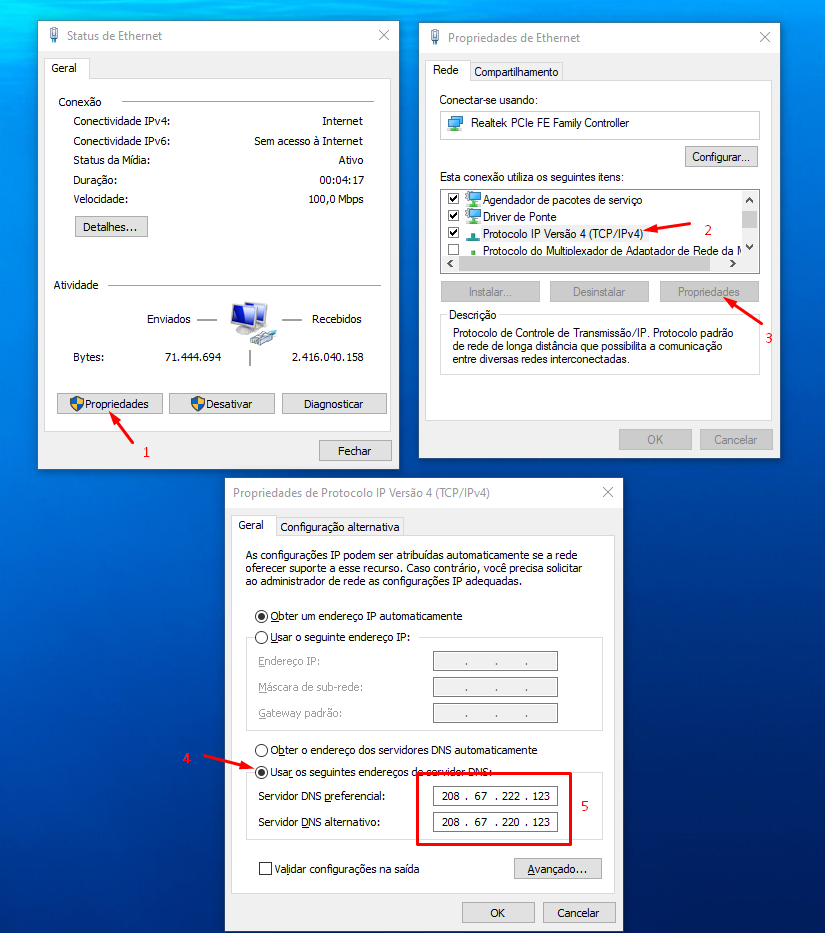
For DNS addresses, I suggest two free options:
- OpenDNS FamilyShield
- Preferred DNS server: 208.67.222.123
- Alternative DNS server: 208.67.220.123
- Cloudflare
- Preferred DNS server: 1.1.1.3
- Alternative DNS server: 1.0.0.3
Block pornography websites across the entire network

When the goal is to pornographic websites for all devices connected to the company network, simply use the same services suggested in the previous topic (FamilyShield or Cloudflare) at the edge of your network and change the router settings.
This means that your entire network will operate based on the DNS server you define. PCs, smartphones, tablets, consoles—everyone will connect automatically. This type of configuration frees you from the work of configuring each device connected to the network one by one.
To do this, access your router's administrative interface . Usually, the information to access this interface is located on the bottom of the device. If this is not the case, search online for " how to access the administrative interface of router model X ".
In the administrative interface, you'll find the DNS server configuration menu in the WAN section . If you can't find it, or if there's no WAN option, search for it in the LAN , DHCP, or Internet .
How to restrict explicit search results in search engines

As we've already written in another article , major search engines (like Google and Bing) have a feature called SafeSearch . It allows users to filter search results from Google, Bing, and YouTube to prevent the display of explicit content .
With the feature enabled, results are filtered and much of the inappropriate content is blocked . The idea of activating protected search for your company's devices is very good, because search engines are the gateway to inappropriate websites .
Furthermore, the filter is especially useful for preventing wasted time and reduced productivity among employees within small and medium-sized enterprises . This leads to better engagement and efficient use of work time.
Setting up SafeSearch is very simple. It can be done directly in your browser, through your Google account settings. The steps to activate SafeSearch in Google are:
- Search Settings page .
- In the “ SafeSearch Filters ” section, check or uncheck the option located next to the “Enable SafeSearch” option.
- At the bottom of the page, click Save .
This way, the service will be activated for the Google account to which it was configured. You can also activate the service on Bing Android devices , or your iPhone and iPad .
Disadvantages of the options above

You've just learned about the main ways to block pornographic websites in your company. However, as nothing is perfect, there are some drawbacks to these options. Let's look at each of them.
Disadvantages of the extension in Google Chrome:
- The user can easily disable or uninstall the extension.
- The user can use another browser such as Firefox, IE, Opera, or Microsoft Edge.
- It took a lot of work to install the extension on each browser on the company's computers.
Negative points in Windows:
- If the user has permission, they can change the DNS server settings.
- It's a lot of work to configure the DNS server on each Windows machine.
- The configuration must be redone if you format the computer.
Negative points in the router :
- The services used may block websites that are normally useful, and there is no option to unblock them.
- The user can change the DNS settings on their device and bypass the control.
- There are no analytical reports to track the performance and effectiveness of restricted access.
Disadvantages of SafeSearch :
- The same points as in Windows.
As we have seen, these traditional methods are not as effective for companies that have many devices connected to the network .
But don't worry! Now, I'm going to show you a way to get around all the drawbacks and continue blocking inappropriate websites in the company, on all devices.
How to block efficiently and replicably
Before showing you the solution, I'd like to offer an important tip . We know there are various tools and software programs to restrict access to inappropriate websites within a company. However, something very important that a tool doesn't do is educate employees.
For managers, it is extremely important to educate their team so that they follow a series of basic and simple procedures to keep equipment free from any risk .
That being said, let's look at solutions that will help block pornographic websites in an easy, efficient, replicable, and analytical way .
The first recommended solution is Lumiun DNS , which allows you to manage your internet connection practically, quickly, and for free. Simply go to dns.lumiun.com/register and create your account.

After accessing your account, configure a policy and a location, and apply the desired rules.

With the rules applied and the locations configured, you can now check the blocking reports.

The second recommended option is Lumiun Box service ! It manages and controls internet access for small and medium-sized businesses. Lumiun Box device on your network and you're done!
All access from any device connected to the company network will be monitored through a single cloud platform. That's right, you can track, from anywhere and in real time , what employees are accessing.
Moreover, it's easy to implement access policies to improve company productivity and security .
With Lumiun Box , blocking pornographic websites is very easy. Simply access the main menu Access Control → Website Categories , select the equipment group, search for the Pornography and Nudity , and click the block .

From then on, if any device from the selected group attempts to access a pornographic website, it will be redirected to a blocking page .
Pornography and Nudity category , Lumiun Box offers 33 other categories to optimize the management and control of internet access in the company. Categories such as Social Networks , Games and Betting , and Shopping are the most used to increase employee productivity .
The categories Botnet , Hacking , Malware , and Phishing are specifically for blocking websites considered harmful .
One interesting feature of the Lumiun Box is the ability to allow access at specific times . For example, you can configure social media to be blocked and allow access only during certain short intervals throughout the day .
Furthermore, through the Lumiun Box very easy to activate SafeSearch for Google, Bing, and YouTube on all devices on the network.

How to obtain analytical reports on access
With Lumiun Box , it's easy to view internet access in your company. In the main Reports , you'll find several options such as Real-time Access , Security , Most Accessed Sites , Most Accessed Categories , and much more.
To find out details about access to pornography, simply access the Sites Accessed and filter by the category " Pornography and nudity ".

It is also possible to obtain more information through the report of a single application .
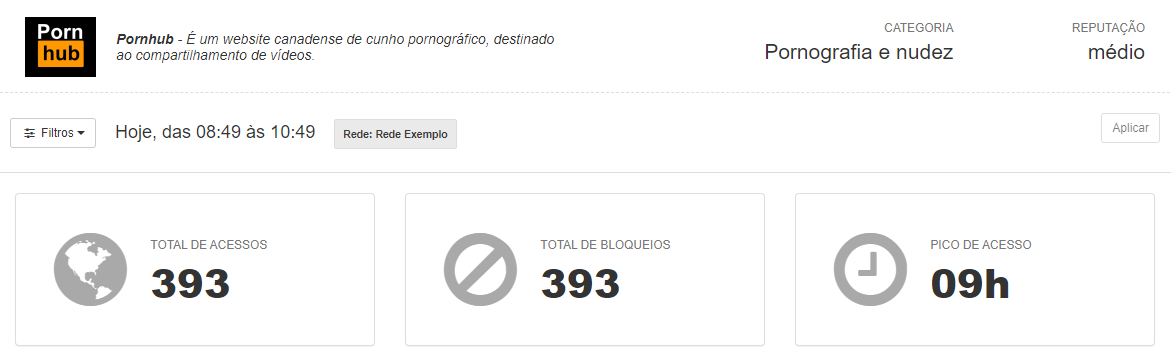
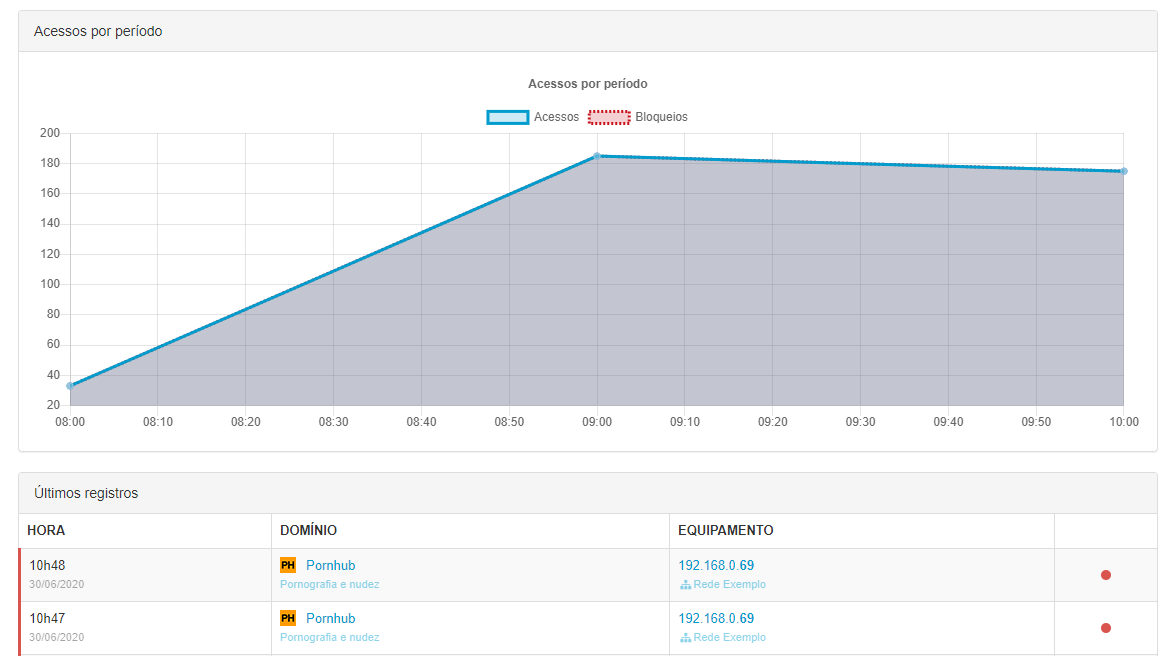
Without a doubt, Lumiun Box 's analytical reports make decision-making easier and more assertive, enabling companies to improve their safety and productivity.
In addition to Lumiun Box , there is another option, Lumiun DNS , for those seeking an even lower-cost solution and who can forgo some features.
To learn more about Lumiun's solutions, speak with a consultant or schedule a no-obligation demonstration.


2 comments
Comments closed