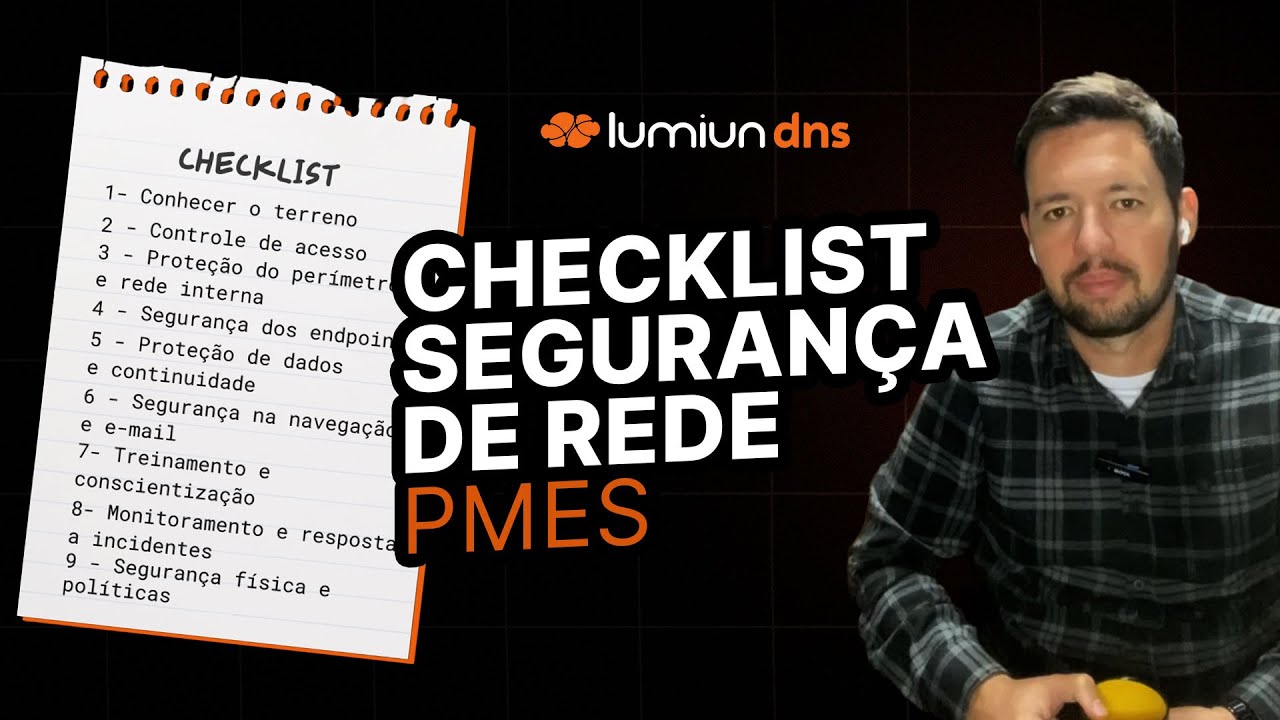
Maintaining a secure network for small and medium-sized enterprises (SMEs) is a constant challenge. Threats evolve, resources are not always abundant, and the daily rush can push security to the back burner. But neglecting this area is like leaving your front door open: an invitation for problems that can be costly, ranging from the loss of critical data to the paralysis of operations.
Whether you're an IT professional providing services to SMEs or the technical lead within a company, having a practical guide to assess and strengthen network security is essential. With that in mind, we've prepared this checklist. The idea is not just to be a to-do list, but a roadmap for us to look together, point by point, at the security of the network infrastructure, as if we were currently analyzing the network of a fictional company, "Alfa Tech," for example.
We'll use this checklist as a tool to identify strengths, areas for improvement, and ensure that digital defenses are truly prepared for current challenges. Grab your coffee, open your notepad (or use this article itself!), and let's begin this assessment!
Prefer to watch? We've prepared a complete video on the topic:
1. Initial Assessment and Network Inventory: Getting to Know the Terrain
Before protecting, we need to know what to protect. The first step is to conduct a complete X-ray of Alfa Tech's network. Without a clear map of the environment, it's impossible to make informed security decisions.
Infrastructure Mapping: Let's start by identifying all assets connected to the network. What are the servers (physical and virtual)? How many workstations? What laptops, printers, mobile devices ( BYOD ), access points, switches, routers? Where are they located? Having an up-to-date inventory, perhaps using a network discovery tool or even well-organized spreadsheets, is important. Without it, how can you ensure that all devices are receiving updates or have antivirus software installed?
Identifying Critical Data: Where does Alfa Tech's most important information reside? Customer data, financial information, intellectual property, employee data ( LGPD ). We need to know exactly where this data resides. On local servers, in the cloud, on specific workstations? Mapping the flow of this data also helps to understand the points of greatest risk of leakage or unauthorized access.
Vulnerability Analysis: With the inventory in hand, the next step is to check for known "open doors." Outdated software (operating system, browsers, business applications) is a prime target for cybercriminals. Vulnerability scanning tools can help automate this search. It's like checking if all the windows and doors of Alfa Tech's "house" are locked and if the locks are secure.
Specific Risk Assessment: Every business has its own particularities. Alfa Tech, for example, may have many employees working remotely, which increases the attack surface. Or perhaps it uses essential legacy software that no longer receives security updates. Understanding the specific risks of the business allows prioritizing security actions where they are most needed.
In practice: Imagine discovering, during Alfa Tech's inventory, an old server running an operating system that hasn't been supported for years, forgotten in a corner of the data center, but still connected to the network and storing historical customer data. This is a critical risk that only an initial mapping would reveal.
Keep your network mapped and secure!
Not sure where to start with your network asset inventory? Download our free Network Asset Inventory Template and take the first step towards a more secure infrastructure.
✓ Ready-to-use spreadsheet
✓ Predefined fields for all asset types
✓ Examples included to make filling out the form easier
2. Access and Identity Controls: Who Can Enter and Where?
Once we understand the environment, we need to control who has access to what. Managing identities and access is like having a strict doorman and an efficient badge system for each area of Alfa Tech.
Strong PasswordPolicy: It seems basic, but it's still a common weakness. Are we ensuring that all users (and service accounts) use complex passwords, combining uppercase and lowercase letters, numbers, and symbols? Is there a policy requiring periodic password changes? Password management tools can help users create and store strong passwords without having to write them down on sticky notes.
Multi-Factor Authentication (MFA): Even strong passwords can be compromised. MFA adds an extra layer of security, requiring a second form of verification (such as a code on a mobile phone, a physical token, or biometrics). Where are we using MFA at Alfa Tech? It's essential for remote access (VPN), access to critical systems (ERP, CRM, administrative email), and administrator accounts. Enabling MFA is one of the most impactful actions to hinder unauthorized access.
Image 1: Multifactor Authentication
User Account Management: How does Alfa Tech handle employee onboarding and offboarding? Is there a formal process for creating new accounts with the correct permissions and, crucially, for immediately deactivating accounts when someone leaves the company? Inactive or orphaned accounts are a huge risk, as they can be exploited without anyone noticing.
Principle of Least Privilege: Each user should only have access to the resources strictly necessary to perform their job. Does a finance employee need access to the engineering project folder? Probably not. Reviewing and applying the principle of least privilege drastically reduces the impact if an account is compromised.
Periodic Permission Review: Access needs change. It is essential to periodically review (every 3 or 6 months, for example) who has access to what at Alfa Tech. Has someone changed roles? Has a project ended? Adjusting permissions ensures that the principle of least privilege continues to be applied.
In practice: During a review of permissions at Alfa Tech, we realized that a former employee still had access to the VPN. Or that a marketing user had administrator permissions on the file server by mistake. These are the kinds of details that well-managed access controls prevent.
Image 2: VPN Tunnel Operation
3. Perimeter and Internal Network Protection: Digital Walls
With access now controlled, the focus shifts to the "walls" that protect Alfa Tech's network against external threats and also control internal traffic. A well-defended perimeter and an organized internal network are essential.
Firewall Configuration and Updates: The firewall is the first line of defense. Is it active and correctly configured at Alfa Tech? Do the rules allow only the traffic strictly necessary for the business? Are we blocking unnecessary ports and services? Just as important as the initial configuration is keeping the firewall firmware updated to fix vulnerabilities. Furthermore, periodically analyzing firewall logs can reveal attempted attacks or suspicious traffic.
Network Segmentation (VLANs): Not all sectors of Alfa Tech need to communicate directly. Separating the network into logical segments (VLANs), for example, one VLAN for servers, another for workstations, one for guest Wi-Fi, limits the reach of a potential attack. If a device in a VLAN is compromised, segmentation makes it difficult for the attacker to move laterally to other critical parts of the network. It's like having fire doors inside the building.
Image 3: Network segmentation
Wi-Fi Network Security: The wireless network is a convenient entry point for both employees and cybercriminals. Does Alfa Tech's main Wi-Fi network use strong encryption (WPA3 if devices support it, or at least WPA2)? Is the password robust and changed regularly? Is there a separate, isolated network for visitors, preventing them from accessing the company's internal network? Allowing visitors to use the same network as employees is an unnecessary risk.
Use of Secure VPNs: For employees accessing the Alfa Tech network remotely, how do we ensure connection security? The use of Virtual Private Networks (VPNs) with secure protocols (such as OpenVPN or Lumiun's enterprise VPN ) is fundamental. The VPN creates an encrypted tunnel between the employee's device and the company network, protecting data in transit. It's important to ensure that only authorized users (preferably with MFA) can connect to the VPN.
Network Traffic Monitoring: Observing what's happening on the network can help detect abnormal activity before it causes damage. There are tools (some open-source, others integrated into more advanced firewalls) that monitor data flow, looking for suspicious patterns, such as an unusual volume of traffic to an unknown destination or attempts to scan internal ports. It's like having security cameras monitoring the hallways of Alfa Tech.
In practice: By analyzing Alfa Tech's firewall logs, we identified multiple connection attempts from a specific country on a port typically used for insecure remote access. Blocking this port and investigating its origin strengthened perimeter security.
Image 4: Firewall operation
4. Endpoint Security (Devices): Protecting Each Access Point
It's pointless to have strong walls if the "soldiers" (computers, laptops, servers) are unprotected. Every device connected to the network (endpoint) is a potential entry point for threats.
Antivirus/Antimalware/EDR: Do all Alfa Tech endpoints (servers, desktops, notebooks) have a robust and up-to-date security solution installed? Traditional antivirus is no longer sufficient. More modern solutions, such as Endpoint Detection and Response (EDR), offer more advanced protection against malware , ransomware , and fileless attacks, as well as investigation and response capabilities. Updating signatures and the security software itself is vital.
Update Policy (Patch Management): Outdated operating systems and applications are the preferred entry point for many attacks. Does Alfa Tech have a defined process for applying security patches regularly? This includes Windows/Linux/macOS, browsers, Office suite, PDF readers, Java, and any other software used. Automating this process whenever possible is the best strategy.
Mobile Device Management (MDM) Security: If Alfa Tech allows the use of corporate or personal smartphones and tablets (BYOD) to access company data, how is the security of these devices managed? Mobile Device Management (MDM) solutions allow for the application of security policies (e.g., password lock, encryption), installation of corporate applications, and even remote erasure of company data in case of device loss or theft.
USB Device Control: Flash drives and other USB devices can easily introduce malware onto the network. Does Alfa Tech have a policy for the use of these devices? Is it possible to block or control the use of USB ports on workstations, allowing only authorized devices or monitoring file copying?
In practice: An Alfa Tech employee clicks on a malicious link in an email. The EDR installed on the machine detects and blocks the attempt to download ransomware, preventing file encryption and a potential disaster for the company. Constant operating system updates had already patched the vulnerability that the malware would attempt to exploit.
5. Data Protection and Business Continuity: The Essential Plan B
Even with all the defenses in place, incidents can happen. That's why protecting the data itself and having a plan to keep Alfa Tech running (or getting it back up and running quickly) after a problem is just as important as preventing the problem in the first place.
Regular Backup Routine: How does Alfa Tech ensure that your important data can be recovered in case of hardware failure, ransomware attack, or human error? Is there a defined and automated backup routine? The 3-2-1 rule is a good guide: have at least three copies of your data, on two different media, with one copy stored off-site (in the cloud, for example). Verifying that all critical data is included in the backup is fundamental.
Image 5: 3-2-1 Backup Rule
Periodic Restoration Tests:Backups are only useful if they work when you need them most. Alfa Tech periodically tests the restoration of backups. Simulating the recovery of files, databases, or even entire servers ensures that the process works and that the team knows how to execute it. Discovering that the backup is corrupted or that no one knows how to restore it during a real crisis is the worst-case scenario.
Sensitive Data Encryption: Protecting data isn't just about backups. Where is Alfa Tech's critical data stored? Is it encrypted? This applies to data "at rest" (on server and notebook disks) as well as "in transit" (during transmission over the internal network or the internet, such as accessing HTTPS sites or via VPN). Encryption renders data useless to anyone who accesses it improperly.
Disaster Recovery Plan (DRP): What happens if Alfa Tech's headquarters suffers a fire, flood, or ransomware attack that paralyzes everything? Is there a documented Disaster Recovery Plan? This plan details the steps to restore critical operations, who is responsible, which systems are prioritized, and the expected recovery time (RTO/RPO). Like backups, the DRP needs to be tested periodically.
In practice: A critical server at Alfa Tech suffers an irreparable disk failure. Thanks to a tested backup routine, the IT team is able to restore the system on new hardware in a few hours, minimizing the impact on operations. If it were a ransomware attack, the offline backup would be the saving grace, preventing the need to pay the ransom.
Be prepared for the unexpected!
Is your company prepared to respond to a security incident? Download our free Mini Incident Response Plan (PRI) template and organize your defense strategy.
✓ Complete and editable template
✓ Step-by-step instructions for each phase of the response
✓ Adaptable to the reality of your SME
6. Browsing and Email Security: The Most Common Entry Points
The internet and email are essential tools for Alfa Tech, but they are also the main gateways for threats such as malware, phishing, and ransomware. Protecting these vectors is crucial.
Content Filteringand DNS: How do we ensure that Alfa Tech employees do not access malicious websites or websites that could compromise security or productivity? Implementing web content filtering is very important. Going further, an essential layer of protection occurs at the DNS level (the system that translates website names like www.google.comDNS filtering solutions Lumiun DNS , act as a gateway to the internet: even before the browser attempts to connect to a malicious website (phishing, malware, command and control botnets), access is blocked based on constantly updated threat intelligence. This offers very effective proactive protection. In addition to security, these tools also help control access to unproductive or inappropriate websites.
Email Spam Filtering and Antivirus: Email remains one of the main attack vectors. Alfa Tech has a robust solution for spam filtering and malicious attachment/link analysis. This can be implemented on the email server or as a cloud service. Properly configuring SPF, DKIM, and DMARC also helps prevent email spoofing (when attackers impersonate trusted senders).
Phishing Awareness: Even with technical filters, some malicious emails can slip through. Do Alfa Tech employees know how to identify phishing attempts? Can they recognize signs such as grammatical errors, an unusual sense of urgency, suspicious senders, or strange links? Awareness is an essential layer of protection.
In practice: An employee at Alfa Tech receives an email seemingly from the CEO requesting an urgent transfer. Thanks to awareness training, he notices the slightly different email domain and unusual tone, and instead of making the transfer, alerts the IT team. The company's DNS filter also blocks it when he tries to access the suspicious link in the email.
Image 6: Example of a phishing email
7. Training and Awareness: The Human Factor
All the technical solutions in the world cannot completely protect Alfa Tech if users are not aware and trained. The human factor is both a vulnerability and a line of defense.
Regular Training Program: Does Alfa Tech have a security training program for all employees? This should include security best practices such as identifying phishing, creating strong passwords, browsing safely, protecting sensitive data, and knowing who to report suspicious incidents to. Training should be periodic (not just during onboarding) and updated as threats evolve.
PhishingSimulations: An effective way to reinforce training is to conduct controlled phishing simulations. Send fake (but safe) emails to Alfa Tech employees and monitor who clicks on them. This should not be punitive, but educational, helping to identify areas that need more training.
Clear Communication of Policies: Are Alfa Tech's security policies clear and well-communicated? Does everyone know what is allowed and what is not in terms of device use, data access, and internet browsing? Obscure or unknown policies are not followed.
In practice: After awareness training followed by phishing simulations at Alfa Tech, the click-through rate on suspicious emails dropped from 30% to less than 5%. When a real attack occurred months later, several employees reported the malicious email to the IT team before any damage could be done.
8. Incident Monitoring and Response: Eyes Open and Plan Ready
Even with all the preventative measures, Alfa Tech needs to be prepared to detect and respond to security incidents quickly.
Log Collection and Analysis: Are logs from Alfa Tech's critical systems (firewall, servers, network devices) being collected and analyzed regularly? These logs are the "black box" that can reveal intrusion attempts, anomalous behavior, or security flaws. SIEM (Security Information and Event Management) tools can help centralize and analyze these logs.
Intrusion Detection/Prevention Systems (IDS/IPS): Does Alfa Tech have a solution that actively monitors the network for suspicious activity? An IDS alerts you to potential intrusions, while an IPS can automatically block attack attempts. These tools complement the firewall, focusing on more sophisticated threats.
Incident Response Plan (IRP): Is there a documented plan for responding to security incidents at Alfa Tech? This plan should clearly define roles and responsibilities (who does what), procedures for containment, eradication, and recovery, and communication channels. Without a plan, the response tends to be chaotic and ineffective.
Emergency Contacts: Does the Alfa Tech team know who to contact in case of a serious incident? This includes internal contacts (IT, management, legal) and external contacts (IT suppliers, authorities if necessary). Having this list ready and accessible (even offline) is crucial during a crisis.
In practice: Alfa Tech's monitoring system detects an unusual pattern of access to a database server at 3 AM. Thanks to a well-defined incident response plan, the on-call team knows exactly how to proceed: isolate the server, analyze the logs, identify the source of the access, and take appropriate containment measures.
Image 7: Incident Response Lifecycle
9. Physical Security: Protecting the Tangible
Cybersecurity doesn't exist in a vacuum. The physical protection of Alfa Tech's IT assets is an essential component of its security strategy.
Physical Access Control: Who can enter the server room or Alfa Tech offices? Are there controls such as access cards, biometrics, or even conventional keys? Is access to sensitive areas (such as the server room) restricted to authorized personnel only?
Protection against Environmental Threats: Are Alfa Tech's critical equipment protected against threats such as fire, flooding, and power outages? Fire detection systems, adequate air conditioning, UPS (uninterruptible power supplies), and generators are important investments to ensure business continuity.
Mobile Device Security: How does Alfa Tech handle the physical security of corporate laptops, tablets, and smartphones? Are there policies in place for the use of security locks, secure storage, and procedures for lost or stolen devices?
In practice: An Alfa Tech company laptop is stolen from an employee while they are away on a trip. Because the hard drive was encrypted and the device was configured for remote wiping, the company's sensitive data was not compromised.
10. Policies and Compliance: Formalizing Security
Finally, all of Alfa Tech's security practices need to be formalized in clear policies aligned with regulatory requirements.
Security Policy Documentation: Are Alfa Tech's security practices documented in formal policies? This includes password policy, acceptable use of IT resources, incident response, access control, and more. Documented policies establish clear expectations and provide consistent guidance.
Periodic Review: Are Alfa Tech's security policies and procedures reviewed regularly? Security is a constantly evolving field, and policies need to keep pace with new threats, technologies, and business requirements.
Regulatory Compliance: Is Alfa Tech subject to specific regulations, such as the LGPD (Brazilian General Data Protection Law)? Are its security practices aligned with these requirements? Non-compliance may result in legal penalties in addition to security risks.
In practice: During an internal audit, Alfa Tech identifies that its data retention policy is outdated in relation to the requirements of the LGPD (Brazilian General Data Protection Law). Reviewing and updating the policy, followed by adjustments to the systems, ensures compliance and reduces legal risks.
Conclusion: Safety is an Ongoing Process
We've reached the end of our checklist, but in reality, Alfa Tech's (and your company's) security journey never truly ends. Security isn't a project with a beginning and an end, but a continuous process of evaluation, implementation, monitoring, and improvement.
This checklist serves as a starting point for evaluating and strengthening the network security of your SME. Not all measures need to be implemented at once, and some may not be applicable to your specific situation. The important thing is to start, prioritize based on the identified risks, and continuously improve.
Remember: perfect security doesn't exist, but a structured and conscious approach can significantly reduce risks and prepare your company to respond effectively when (not if, but when) an incident occurs.
And you, have you already applied this checklist in your company or in the companies you serve? Which points do you consider most challenging? Share your experiences in the comments!
I am the co-founder and CTO of Lumiun, where I lead the development of our network security solutions, focusing on usability, performance, and scalability, serving both MSPs and IT decision-makers in companies seeking effective control and protection of corporate browsing.