Segment53 is a Lumiun DNS 's separated by VLANs or not. In a corporate environment, different sectors have distinct internet usage profiles. For example, while the marketing team may need access to social networks and advertising platforms, the finance department requires access to banking services and specific systems. Therefore, given this diversity, network segmentation is essential to ensure that each team has access to what is truly necessary for their functions, increasing productivity and security.
By using network segmentation via DNS, it's possible to apply customized access control rules, improving organization, productivity, and, most importantly, network security. With Lumiun DNS 's Segment53 , you can define specific policies by sector in a simple and effective way, combining practicality in management with an additional layer of protection against unauthorized access and digital threats.
In this article, we will show the functionality, importance, possibilities of use, and practicality of access control.
Segment 53
Corporate networks typically operate with a single public IP address shared by all devices. In this scenario, applying specific access rules for different user profiles becomes challenging. Segment53 was developed precisely to solve this difficulty. This Lumiun DNS facilitates network segmentation and allows the creation of distinct access control rules for each sector or group.
Without network control by sector, the policies applied tend to be generic and often ineffective. Furthermore, it becomes difficult to visualize access by team or device group, which compromises both monitoring and the proper management of access needs for each area of the company.
So, how does Segment53 actually work?
Segment53 protocol from Lumiun DNS , it's possible to create multiple "segments" within the same network, each with its own access policies. Simply configure the devices or routers in each sector to use the DNS corresponding to its group. This way, each department or group of equipment can follow specific access rules, permissions, and access times, without interfering with the others.
This feature is simple to implement, requires no physical changes to the network infrastructure, and offers a high level of flexibility and control for the IT manager.

Register with Lumiun DNS
To take advantage of this feature, you need to register with Lumiun DNS.
Go to https://dns.lumiun.com/register to create your free account. By creating an account, you will start a free 14-day trial of the Pro Plan. After 14 days, you can choose between the Free, Pro, or Education plans.
Fill in your first name, last name, email, phone number, and password to create your free account. If you prefer, you can create it directly with your Google account.

Confirm registration via email.
After registering, confirm your account by clicking the “Verify email” in the email that was sent to you. If the email is not in your inbox, check your Spam folder and mark it as “Not Spam” to receive future emails.

Complete the initial steps.
After confirmation, you will be directed to the policies page, but first, you must enter your organization's information.

After this setup, you will go through a brief "Tour" about Lumiun DNS.
Segment 53 in practice
To implement Segment53, we'll start by creating policies for each sector. On the policies page, click on "New policy" and enter the desired name.
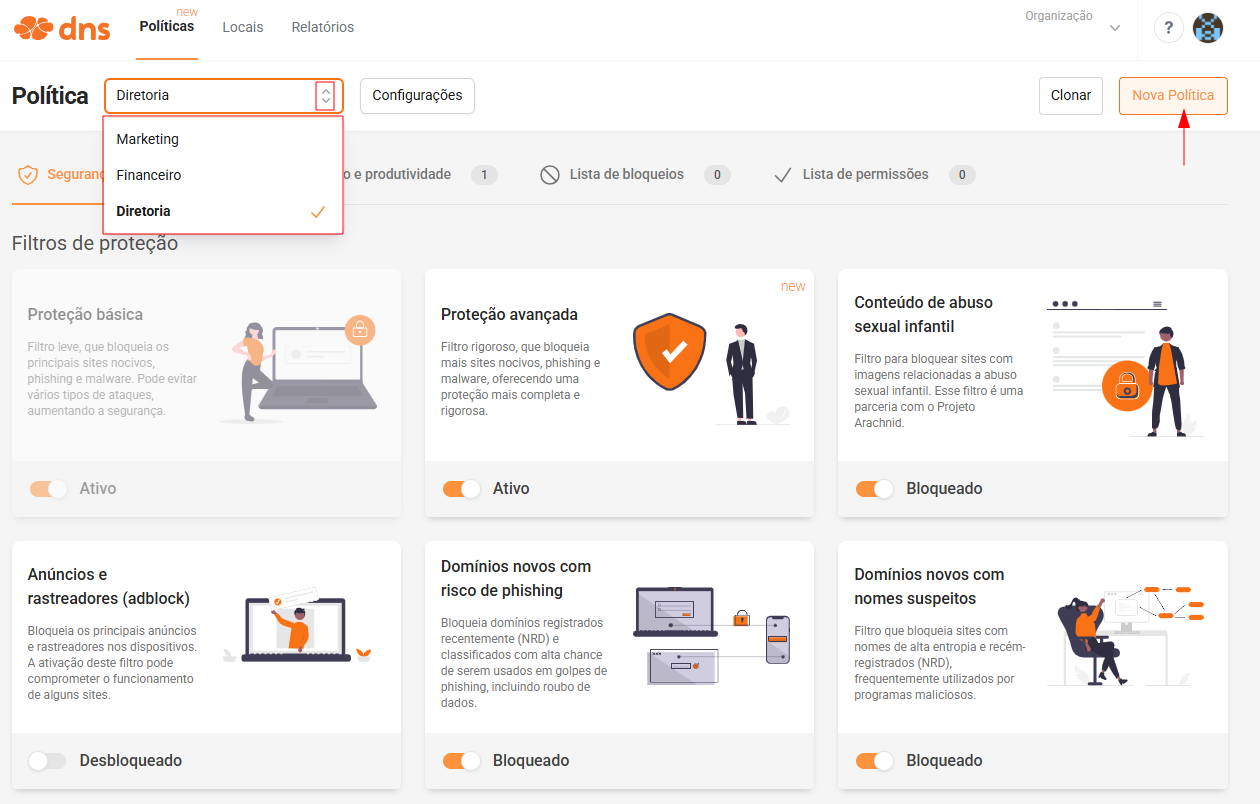
Now, let's proceed by creating the designated spaces for the sectors.
Go to “Locations” and create the locations. At each location, you will need to:
- Link your Public IP or Hostname.
- Select a different segment for each location.
- Link the previously created policy.
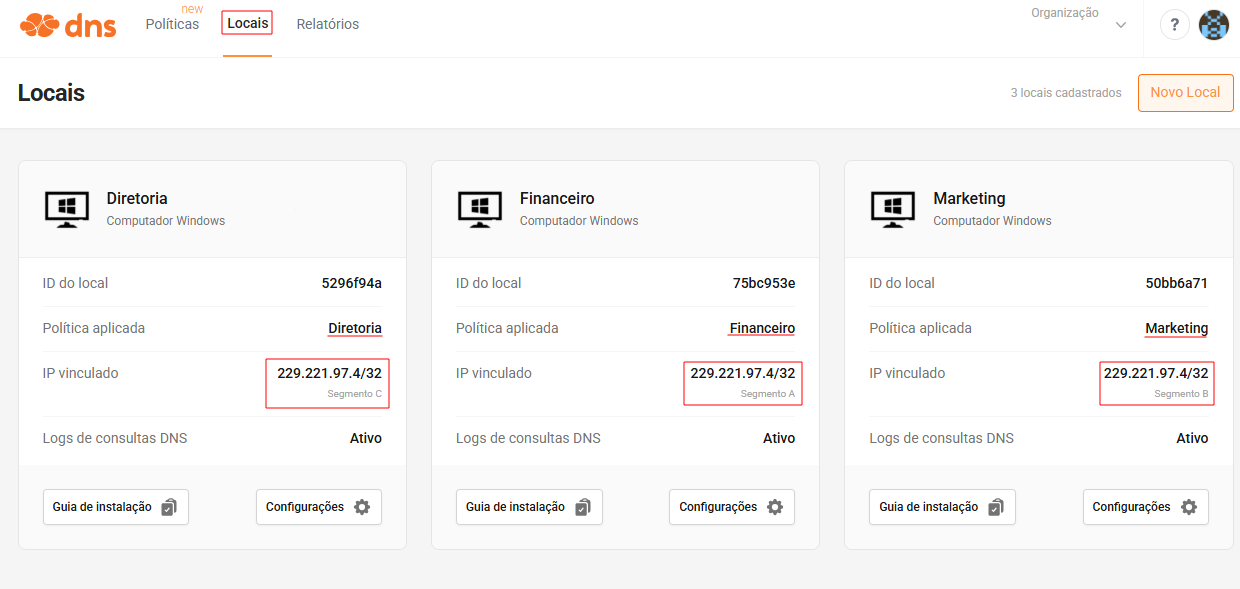
After that, you just need to assign each device to receive the DNS server for each segment. The DNS servers are displayed when you click on “Settings” .
With this adjustment, each device will follow the rules defined in its specific policy.
Scenarios and how to configure devices to use the correct DNS server.
By using the Do53 protocol, Segment53 is easy to configure on the device, requiring only that the device uses the correct DNS servers for resolution. Below are some examples of its use:
1. VLANs
- In this scenario, the sectors are separated by VLANs.
- Each VLAN will assign its devices to receive the DNS server for its segment, as described in the Lumiun DNSlocation.
- Ideal for companies with advanced network infrastructure.
2. Separate Wi-Fi networks using routers in router mode.
- Each sector has a Wi-Fi router for connecting the equipment.
- Each router will have its segment's DNS server in the DHCP.
- Simple and easy setup for small businesses or branch offices.
3. Administrative subnet and visitors
- Network with two main sub-networks: Collaborators and Visitors.
- It allows you to apply a standard policy for employees and a policy with more restricted access for visitors.
- Report for each subnet separately.
4. MikroTik or pfSense
- In this scenario, there is only one network with all the devices connected.
- The separation is performed using the Firewall > NAT rule. In this rule, you insert a previously created Address List. Each Address List can contain a specific group of IPs or a range of IPs from each sector.
- This scenario allows for configuration and management directly on the edge router, even without the use of VLANs.
5. Manually changing the DNS server on the computer.
- In this simplest scenario, each device will have its DNS server changed in the equipment's network adapter, using the server corresponding to the segment.
- Segment53 works in perfect harmony with user restrictions in Windows, where only administrator users can make changes to the device's network adapter.
- Manual configuration, ideal for networks with few devices.
Conclusion regarding Segment 53
Segment53 represents a significant evolution in the application of security policies in corporate networks. By allowing logical network segmentation via DNS, even in environments with a single public IP address, it enables granular control that is highly adaptable to the reality of each sector of the company .
With this approach, the IT team gains the ability to effectively manage different access profiles, ensuring greater security and visibility into the specific needs of each user group. Furthermore, detailed monitoring through network segmentation facilitates decision-making based on real network usage data.
To fully leverage the benefits of Segment53, it is highly recommended that the IT department experiment with creating different segments, monitor reports by sector, and continuously adjust access policies based on user behavior and demands. This practice makes network management smarter, more secure, and more efficient.