


On May 17th, the world celebrates a date linked to the importance of the internet, telecommunications, and the information society. The ITU, the UN agency for digital technologies, highlights that World Telecommunication and Information Society Day is celebrated annually on this date and draws attention to the role of digital networks in life, the economy, and the resilience of organizations.
For companies, this reflection comes at a good time.
Corporate internet is no longer just "the office Wi-Fi" or "the link that keeps computers connected." Today, it's the pathway through which financial systems, ERPs, CRMs, emails, cloud platforms, video calls, AI tools, remote access, mobile devices, suppliers, visitors, and a large part of the operational routine pass.
The problem is that, along with all of that, risks also come along.
And many of them don't appear in an obvious way.
They don't arrive with a flashing red screen. They don't make a sound. They don't crash the network in the first minute. Often, they start with a seemingly ordinary click, a DNS query, logging into a fake page, a browser extension installed, a newly created domain, or a file downloaded from a site that looked legitimate.
That's why, on World Internet Day, it's worth looking at a simple but strategic question:
Is your company's internet being used solely for work purposes, or is it also becoming an open door for attacks?
What exactly is corporate internet?
encompasses Corporate internet the entire connectivity environment used by a company to access systems, websites, applications, cloud services, and external resources. It includes wired networks, Wi-Fi, branch office access, employee devices, visitor equipment, remote access, and increasingly, contracted third-party services.
In practice, corporate internet is the bridge between the company and the digital world.
And this bridge needs to be fast, stable, and productive. But it also needs to be safe.
For a long time, many companies treated internet connectivity as a purely operational matter: contracting a link, installing a router, enabling access, and resolving problems when someone complained. This model no longer reflects current reality.
Today, the internet is a direct part of a company's attack surface. In other words, the more people, systems, devices, and suppliers are connected, the more points there are for an attacker to try to exploit.
Why are the risks of the corporate internet "invisible"?
They are invisible because, most of the time, they don't appear to be attacks.
An employee accessing a fake login page might appear to be just someone checking their email. Malware communicating with an external server might look like regular traffic. An employee copying information to an AI tool without authorization might appear to be productivity. Accessing a malicious domain might last less than a second, but be enough to start a chain of compromises.
Verizon, in its Data Breach Investigations Report 2025, analyzed more than 22,000 security incidents and 12,195 confirmed breaches. The report indicates that credential abuse and vulnerability exploitation remain among the top initial attack vectors, accounting for 22% and 20% of cases, respectively. It also shows that third-party involvement in breaches has doubled to 30%, and that ransomware was present in 44% of breaches.
These numbers help to illustrate an important point: a large portion of attacks don't begin with a cinematic intrusion. They start by exploiting common aspects of corporate routine, such as:
- A login
- One click
- An outdated system
- A supplier
- A malicious domain
- A reused password
- A non-existent access policy
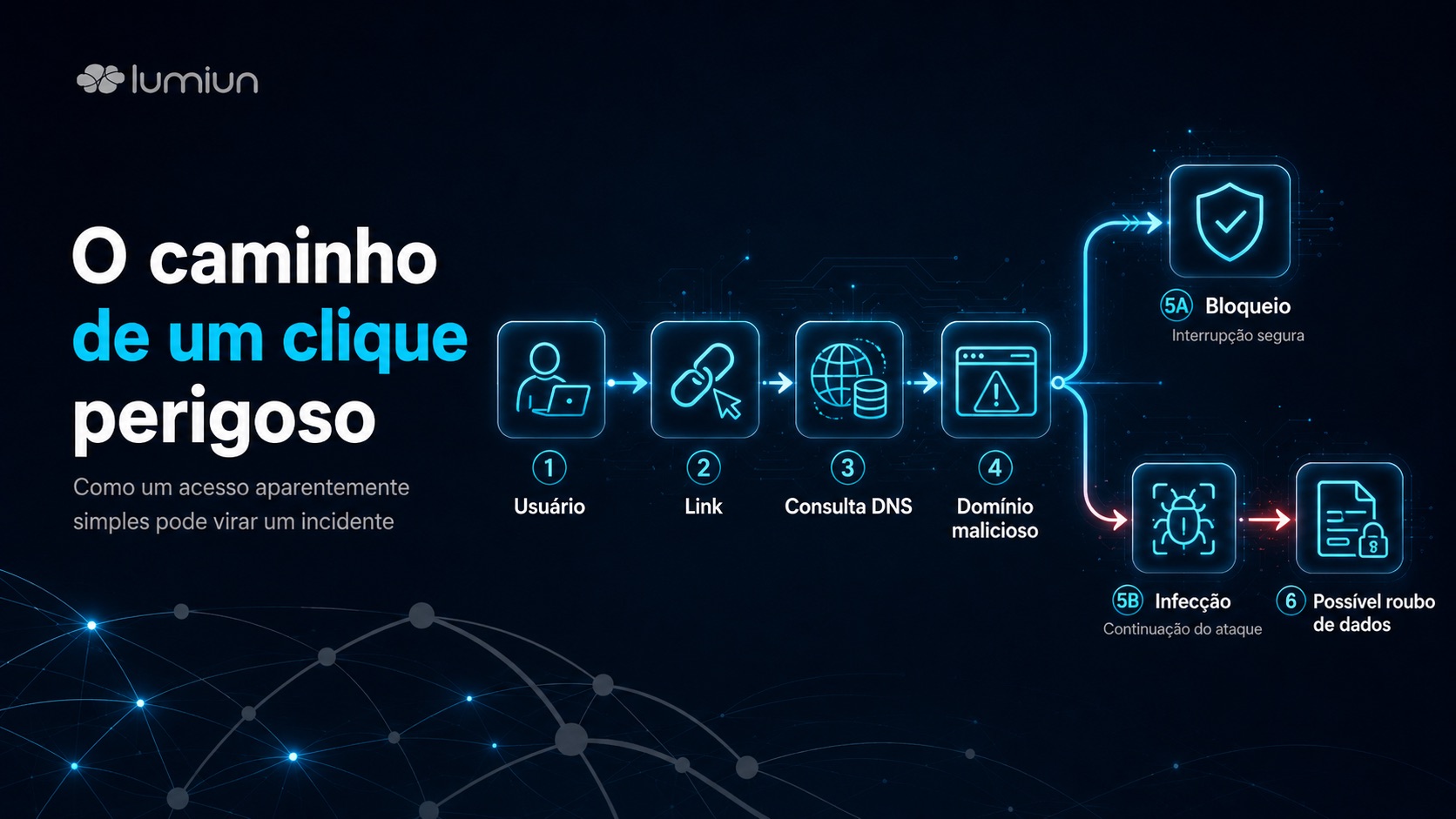
The main invisible risks that pass through the company's network
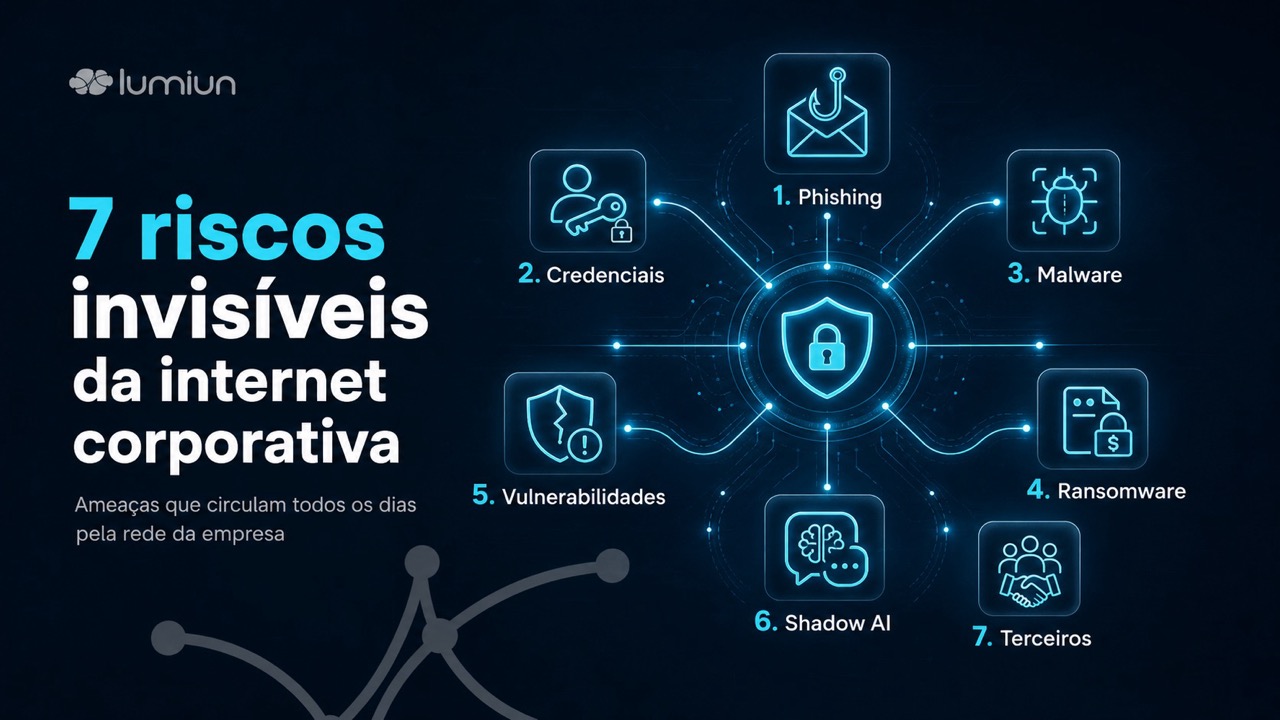
1. Phishing: the scam that becomes routine
Phishing it exploits something difficult to fix with technology alone: trust.
The scam can appear as a bill, a bank statement, a fake password update, a delivery notification, an HR message, a supposed document signature, or even a forged internal memo.
CERT.br . classifies phishing as notifications from fake pages created to gain an unfair advantage, including scams involving banks, credit cards, e-commerce, webmail, corporate remote access, cloud credentials, and other services
The risk isn't just in email. It also appears in instant messages, QR codes, advertisements, social media, shortened links, and sponsored pages. In smaller companies, where there isn't always a dedicated security team, this type of attack can go unnoticed until an account is compromised or an unauthorized transfer is made.
2. Credential theft: when the password becomes the company's key
Stolen credentials are one of the most valuable currencies in digital crime.
With a username and password in hand, the attacker can access email, internal systems, cloud platforms, VPN, financial environment, administrative panel, file repositories, and customer service tools. Depending on the account permissions, they can move around the company as if they were a legitimate employee.
This is one of the reasons why credential abuse appears as one of the main initial vectors in Verizon's DBIR 2025.The report also reinforces the need for measures such as strong password policies, vulnerability remediation, and user awareness.
The problem is that many companies still rely on weak, reused, or shared passwords. And, without multi-factor authentication, login monitoring, and blocking of suspicious access, a leaked credential can become a silent entry point.
3. Malware and infostealers: the “harmless” file that steals data
Malware no longer relies solely on suspicious attachments with strange names. It can be found in fake installers, cracks, browser extensions, compromised websites, malicious ads, seemingly legitimate documents, and links sent in everyday conversations.
Among the most concerning types are infostealers, malicious code designed to steal credentials, session cookies, browser data, tokens, and sensitive information. CERT.br describes malware as notifications about malicious code used to steal information and credentials.
For the company, the danger lies in the interval between infection and detection. A device can continue to function normally while collecting data and communicating with external servers. Without network visibility, this traffic can blend in with regular internet usage.
4. Ransomware: the hijacking that often begins before the lock-in
When ransomware appears, the damage has already begun.
Before encrypting files or disrupting systems, many criminal groups go through prior steps: gaining access, reconnaissance of the environment, lateral movement, data theft, and disabling defenses. In some cases, encryption is merely the final phase of an intrusion that was already underway.
According to Verizon's DBIR 2025, ransomware attacks grew 37% year-over-year and were present in 44% of the breaches analyzed. The report also points to a disproportionate impact on small and medium-sized businesses.
That's why ransomware protection doesn't start with backups. Backups are essential, but prevention begins earlier: with access control, filtering malicious websites, patching vulnerabilities, strong authentication, network segmentation, and the ability to detect abnormal behavior.
5. Vulnerabilities in VPNs, firewalls, and exposed systems
Many companies invest in VPNs, firewalls, routers, servers, and remote systems to enable their work. The problem arises when these resources become outdated, misconfigured, or exposed beyond what is necessary.
Vulnerability exploitation as an initial vector grew 34% in Verizon's DBIR 2025, representing 20% of breaches. The report cites a significant focus on zero-day exploits against perimeter devices and VPNs.
This shows that simply having security equipment installed is not enough. It needs to be updated, monitored, and configured carefully. An outdated firewall, an unpatched VPN, or an improperly exposed service can become a direct entry point into the network.
6. Shadow IT and shadow AI: useful tools that go unnoticed by IT
Shadow IT is the use of systems, applications, and services without the approval or knowledge of the responsible area. With the popularization of generative artificial intelligence, an even more sensitive variation has emerged: shadow AI.
In practice, this happens when employees use external tools to summarize documents, analyze spreadsheets, generate contracts, review proposals, process customer data, or automate tasks without assessing privacy, confidentiality, and compliance risks.
IBM, in its Cost of a Data Breach Report 2025, highlighted the gap between AI adoption and governance: 63% of organizations lacked AI governance policies to manage or prevent the proliferation of shadow AI. The report also points out that organizations with AI-related security incidents frequently lacked adequate access controls.
The point is not to block all innovation. The point is to know which tools are being used, what data is being entered into them, and what policies protect the company against leaks.
7. Third parties and suppliers connected to the operation
The corporate internet doesn't just involve internal employees.
Software vendors, accounting firms, IT providers, business partners, payment systems, customer service platforms, cloud tools, and third-party companies are also part of the digital ecosystem.
When a third party is compromised, the impact can reach the company through credentials, integrations, remote access, APIs, shared documents, or interconnected systems. The DBIR 2025 indicates that third-party involvement in breaches has doubled to 30%, reinforcing that the supply chain has become a significant risk factor.
Therefore, corporate internet security also involves managing third-party access. Who accesses it? From where? With what permissions? For how long? Is there a log? Is there strong authentication?
The risk is not in using the internet. It's in using it without visibility.
The answer to these risks is not to transform the company's internet into a locked, unproductive environment full of meaningless blocks.
The internet is essential for work. The goal of security should not be to prevent its use, but to make that use safer, more traceable, and aligned with the business.
The NIST Cybersecurity Framework 2.0, an international benchmark in cybersecurity risk management, organizes security into functions such as Govern, Identify, Protect, Detect, Respond, and Recover. This logic helps to remind us that security is not an isolated tool, but a continuous risk management process.
In other words, before blocking everything, the company needs to understand what exists on the network, what access is necessary, what risks are acceptable, what data is critical, and what events should trigger an alert.
How to protect the corporate internet without harming productivity
1. Gain visibility into the traffic
You can't protect what you can't see.
The company needs to know which domains are being accessed, which categories consume the most traffic, which attempts were blocked, which devices are connected, and which patterns deviate from the norm.
This doesn't mean abusively monitoring every employee. It means having technical data to protect the organization, investigate incidents, and improve access policies.
2. Apply policies based on profile, not guesswork
Not every sector needs the same access.
The finance department has different risks than marketing. Customer service has different needs than management. Visitor Wi-Fi should not have the same level of access as the administrative network. Personal devices should not be used as corporate devices.
Policies by group, sector, unit, device, and time make control fairer and more efficient.
3. Use DNS filtering and block malicious websites
DNS is one of the first steps in browsing. Before a page opens, the device needs to find out where that domain points. Therefore, DNS filtering is an important layer for blocking dangerous access before the user reaches the website.
In practice, DNS filtering helps prevent employees from accessing fake pages, domains used for phishing, sites associated with malware, inappropriate content, or categories that don't make sense for the corporate environment.
Lumiun Lumiun DNS operates precisely at this layer: it allows you to control and protect internet access through browsing policies, threat blocking, content filtering, and usage reports. This gives the company greater visibility into what passes through the network and allows it to reduce risks without relying solely on user attention.
This type of protection does not replace antivirus, firewall, multi-factor authentication, or backup. But it acts as an important preventative layer because it blocks many risks even before the connection to the dangerous website is completed.
4. Strengthen authentication and credential control
Passwords remain a weak point in many companies.
Use multi-factor authentication, avoid shared accounts, review permissions periodically, remove access from former employees, block weak passwords, and monitor suspicious logins.
IBM recommends strengthening both human and non-human identities with operational controls and modern, phishing-resistant authentication, such as passkeys, to reduce risks associated with credential abuse.
5. Update systems, VPNs, firewalls, and edge devices
Known vulnerabilities are exploited quickly.
Therefore, keeping systems updated is not a bureaucratic task. It's a direct risk reduction action. This applies to operating systems, browsers, plugins, servers, firewalls, routers, VPNs, web applications, and cloud tools.
The increase in the exploitation of vulnerabilities in perimeter devices and VPNs shows that attackers are specifically targeting points that are exposed to the internet.
6. Separate critical networks, guest networks, and unmanaged devices
A single network for everything is simpler to manage, but it also increases the impact of an incident.
Whenever possible, separate environments: administrative, guests, IoT devices, servers, critical systems, and remote access. This segmentation limits the movement of an intruder if any device is compromised.
7. Create clear rules for generative AI
Banning everything might push usage off the radar. Allowing everything could expose sensitive data.
The safest approach is to define a clear policy: which tools can be used, which data cannot be entered, which areas require approval, how access will be logged, and which use cases are permitted.
Microsoft recommends that organizations understand the risks and benefits of AI, adjust their threat models, and also use AI defensively for threat analysis, detection validation, and automated remediation.
8. Prepare incident response plans and maintain records
When an incident occurs, improvisation is costly.
The company needs to know who triggers whom, which systems should be isolated, how to preserve evidence, how to communicate with customers or data subjects, and how to restore operations.
In Brazil, the ANPD (National Data Protection Authority) has regulated the reporting of security incidents involving personal data. The authority emphasizes that the data controller must report incidents that could cause significant risk or harm and maintain records of incidents involving personal data for at least five years.
This reinforces the importance of logs, reports, and event histories. Without records, the company loses its ability to investigate, respond, and be accountable.
Where does Lumiun DNS fit into this strategy?
When we talk about corporate internet security, one of the biggest challenges for companies is seeing and controlling what happens while users are browsing.
Ultimately, a large part of the risks begin outside internal systems: on a malicious domain, a fake login page, a shortened link, a compromised website, a phishing attempt, or access to content inappropriate for the work environment.
That's where Lumiun DNS comes in as a strategic layer of protection.
The solution allows for the application of content filters, blocking of malicious websites, creation of access policies by groups or departments, and monitoring of internet usage reports. With this, the company can transform corporate browsing into a safer, more productive, and manageable environment.
In practice, Lumiun DNS helps answer questions that many companies still cannot answer clearly:
- What categories of websites are most frequently accessed on the web?
- Are there any attempts to access suspicious domains?
- Is the company exposed to phishing, malware, or fake websites?
- Does each sector have an appropriate navigation policy?
- Are there access points that put productivity or security at risk?
- Can management view reports to make decisions?
- Is it possible to reduce risks without blocking the internet across the board?
Corporate internet security cannot depend solely on the "care of each employee." People make mistakes, click, get confused, are in a hurry, and are targets of increasingly convincing scams.
The role of Lumiun DNS is precisely to add a layer of protection before a click turns into an incident.
Quick checklist for World Internet Day
Take advantage of May 17th to do a simple review of your company's corporate internet:
1. Does the company know which devices are connected?
Without inventory, any control is incomplete.
2. Is there a filter against phishing, malware, and malicious domains?
Blocking them before access greatly reduces the risk of the first click.
3. Are browsing policies different by sector, or does everyone have access to everything?
Overly generic controls tend to be inefficient.
4. Is the guest network separate from the corporate network?
Visitors and personal devices should not circulate in the same environment as internal systems.
5. Are multi-factor authentication systems in the main systems?
Primarily email, VPN, financial systems, cloud, and administrative dashboards.
6. Are VPNs, firewalls, routers, and servers up to date?
Outdated edge devices are valuable targets.
7. Does the company have rules for the use of generative AI?
Without a policy, sensitive data could end up in the hands of external tools.
8. Are there browsing logs and reports for investigation?
When something happens, visibility makes a difference.
9. Are the backups tested?
A backup that has never been tested is just a promise.
10. Does the team know how to identify common strikes?
Continuous training reduces risk, especially when combined with technical controls.
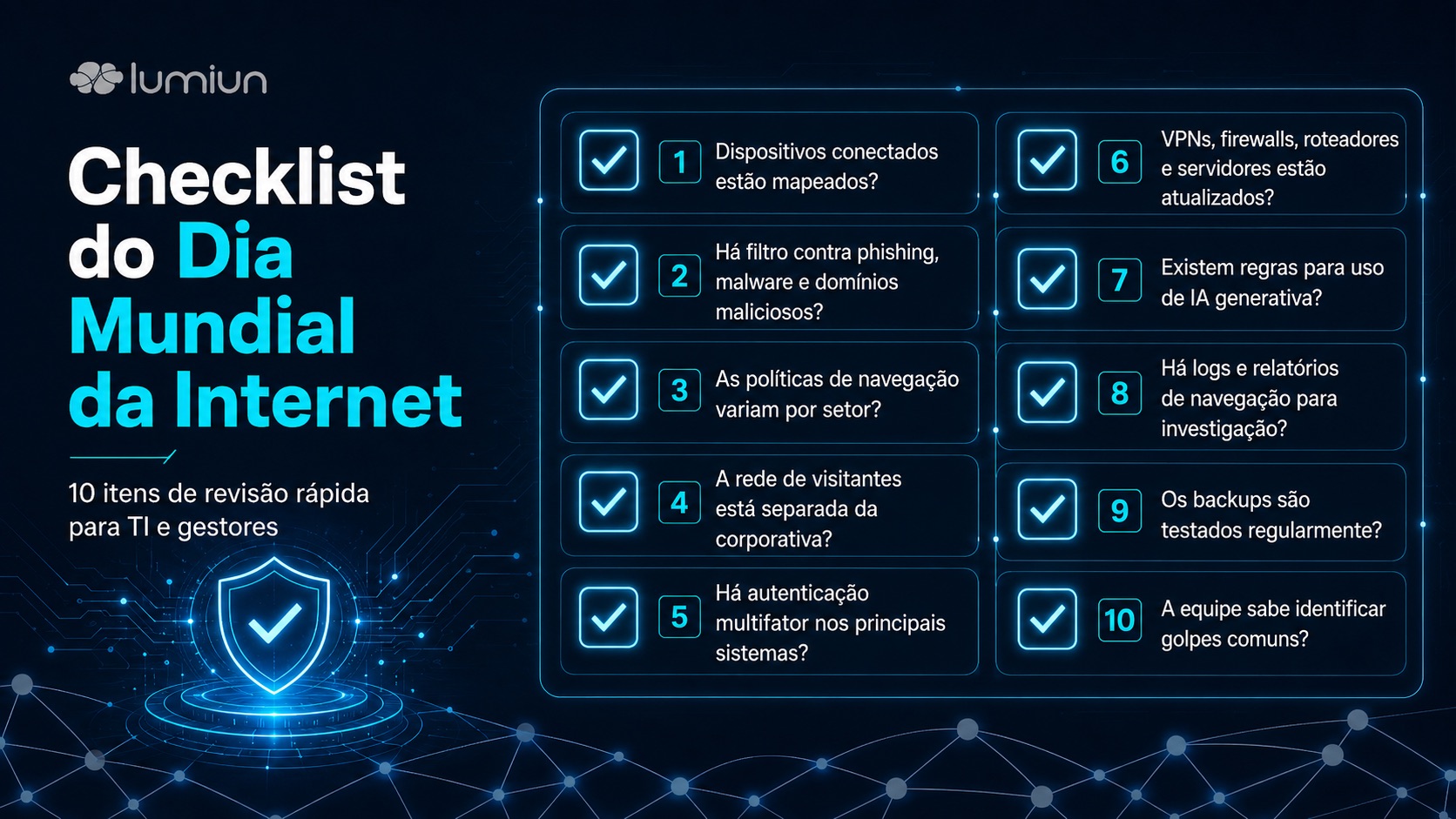
Corporate internet needs management, not just connectivity
The internet has changed the way companies sell, serve, produce, hire, learn, and grow. On World Internet Day, it's worth celebrating this transformation.
But it's also worth recognizing that the same connection that drives the business can carry risks every day.
Phishing, malware, ransomware, data breaches, stolen credentials, shadow IT, shadow AI, vulnerabilities, and third-party access are not distant threats. They traverse the network, often silently, mixed in with regular traffic.
The good news is that the company doesn't have to choose between security and productivity.
With visibility, well-defined policies, DNS filtering, strong authentication, updates, and incident preparedness, it's possible to make the corporate internet more secure without turning the routine into a constant lockdown. Solutions like Lumiun DNS help in this mission by protecting browsing, blocking threats, and giving more control over internet usage within the company.
Ultimately, the question isn't whether your company uses the internet.
The question is: does your company know what passes through it every day?
FAQ
What are the main risks of corporate internet?
The main risks are phishing, credential theft, malware, ransomware, data leaks, access to malicious websites, vulnerabilities in exposed systems, unauthorized use of cloud tools, shadow AI, and attacks involving third parties.
What is a DNS filter?
A DNS filter is a layer of protection that controls which domains can and cannot be accessed. It can block malicious websites, phishing, malware, and other unwanted categories before the page loads.
Does a DNS filter replace antivirus and firewall?
No. DNS filtering complements antivirus, firewall, multi-factor authentication, backup, and other security layers. It acts early in the browsing process, reducing the chance of accessing dangerous domains.
How can you control a company's internet access without monitoring employees?
Ideally, policies should be used by sector, group, time, and device type, focusing on security, productivity, and compliance. The goal is not to abusively monitor individuals, but to protect the network, block threats, and generate visibility for management.
Why talk about security on World Internet Day?
Because the internet is an essential part of how businesses operate. This date is an opportunity to reflect not only on connectivity, but also on resilience, data protection, business continuity, and the responsible use of technology.
Discover Lumiun DNS and see how to protect corporate browsing against phishing, malware, malicious websites, and access outside of company policy.


