


It's undeniable that a large part of your digital life exists on your cell phone , with mobile banking, online shopping, conversations with friends, and sharing moments from your life. We're not at such an advanced level that we're dependent on this technology to survive, but we can't deny that we're connected almost all the time .
Despite taking precautions, living online and storing so much important data and information on our smartphones still leaves us very vulnerable . Without adequate protection, information about you and your business can fall into the hands of third parties, companies that hunt for information, and, most dangerous of all, hackers .
With this in mind, using a virtual private network (VPN) on your mobile phone helps maintain online privacy, at work or at home, at any time or for any task. We've listed some use cases where using a mobile VPN can be extremely relevant .
Reasons to use a mobile VPN
Access the internet with privacy
Your business data, accounts, passwords, balances, and even personal information, such as conversations and investment plans, are private and only concern you. That's precisely where using a mobile VPN is extremely important. By using one, your device's IP address is hidden , preventing any kind of tracking of your browsing activity, unlike search engines that collect your browsing habits to constantly display ads.
Secure public internet
Many companies have remote (who work from home) or external employees (who spend most of their time traveling or away from the company). Some of them, or the vast majority, connect their cell phones to a public Wi-Fi network , or, for home office workers, a network shared among residents of the same building, for example. Unfortunately, this type of connection facilitates access by hackers to their device, which may be sharing passwords, card details, company information, and even systems full of customer information.
A mobile Business VPN helps avoid the dangers of public Wi-Fi by encrypting your connection and preventing third parties from seeing what you're accessing on the network.
Secure remote access
As we mentioned earlier, a VPN creates an encrypted tunnel that protects all your internet access. This feature is extremely relevant when we consider the current pandemic scenario. Many companies have a large portion of their employees working from home, and these employees access company systems and data remotely , some of them via mobile phone. And that's where the big question arises: is this data protected? I believe not!
Maintaining secure remote access for companies with offices and multiple employees is, I believe, the most relevant for using a VPN. Therefore, we've put together a step-by-step guide so you and your team can establish a VPN connection on your mobile phone and keep your personal and company data secure.
How do I set up a VPN on my mobile phone?
There are numerous variations of VPNs for mobile phones, with pros and cons, although your choice should ultimately come down to needs and those of your company. Some good options are NordVPN , ExpressVPN , Perimeter 81 , and Lumiun Business VPN .
For companies experiencing internet security issues, as discussed above, Lumiun's Business VPN is a good solution. In addition to the VPN, it offers numerous tools on a single platform, such as internet access control, content filtering, firewall, internet speed control, and more.
To make it easier, we've created a step-by-step guide on how to install and use Lumiun's Business VPN on your mobile phone.
Step 1
Contracting: Speak with a consultant and request to contract the tool.
Step 2
Lumiun Box : After purchase, you will receive the Lumiun Box to connect to your network. Installation is very simple and requires no technical knowledge. You will have the support of our team at every stage.
Step 3
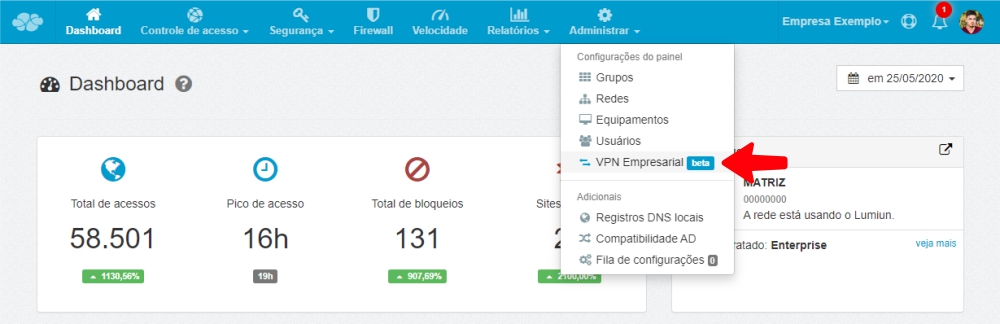
Control Panel: Access the Lumiun control panel and enter your username and password. Within the panel, click on the Manage menu and then Business VPN.
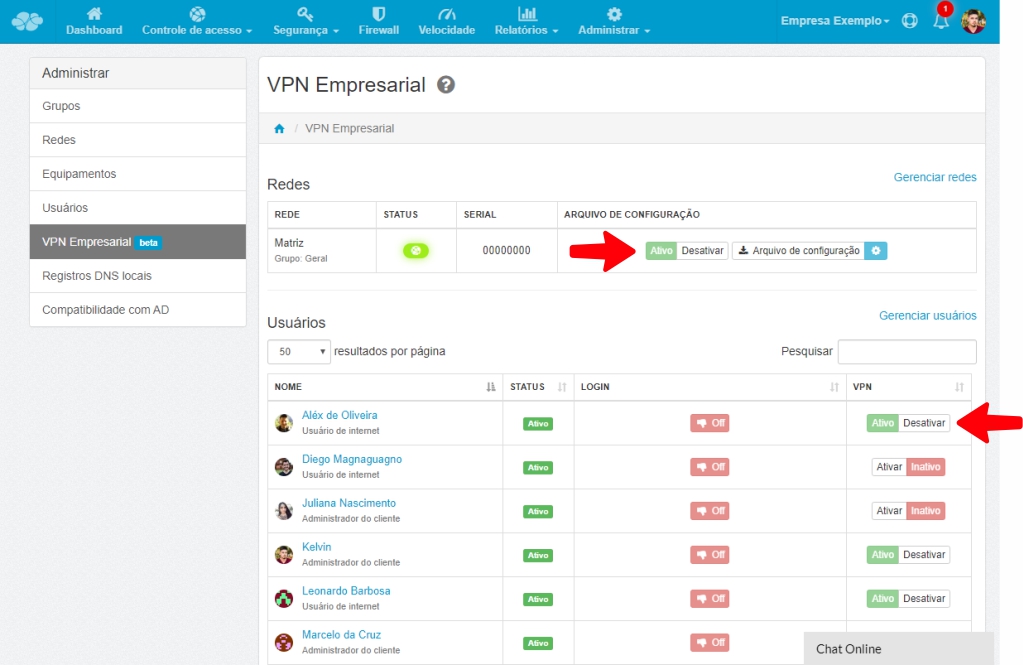
On the Enterprise VPN page, enable the VPN for the network and also enable the users who will be allowed access via Enterprise VPN.
Step 4
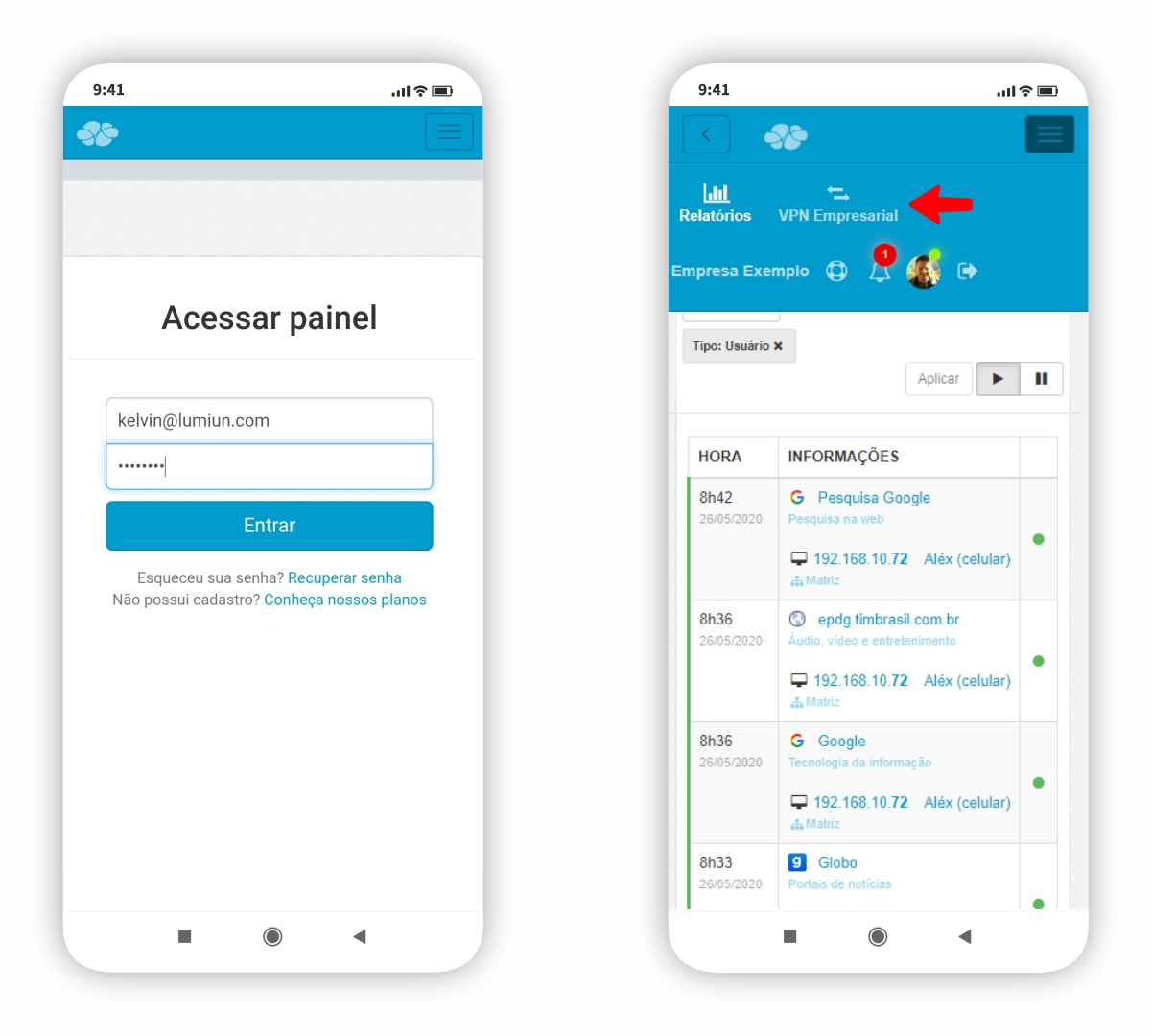
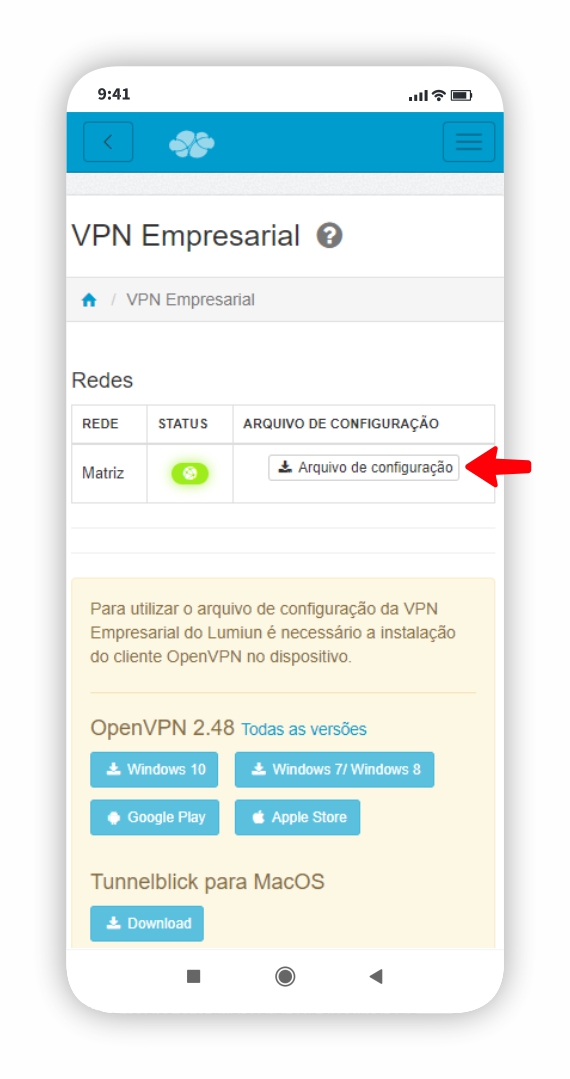
From this point on, you should instruct employees to install the Enterprise VPN on their mobile phones. The first step is to access the Lumiun control panel and download the OpenVPN application.
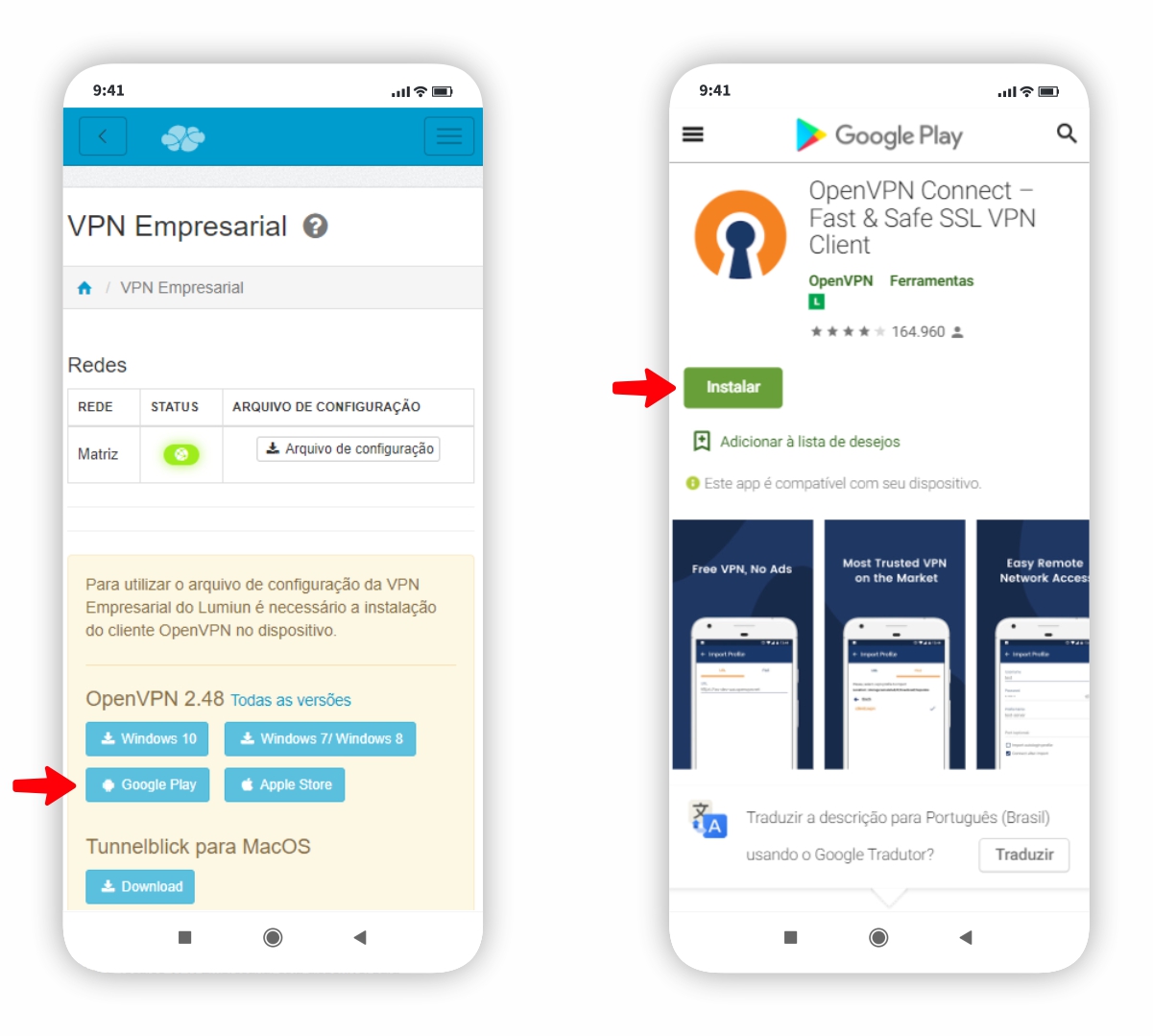
Download the app for the operating system you use on your mobile phone. As an example, we use images of the installation on an Android operating system.
Step 5
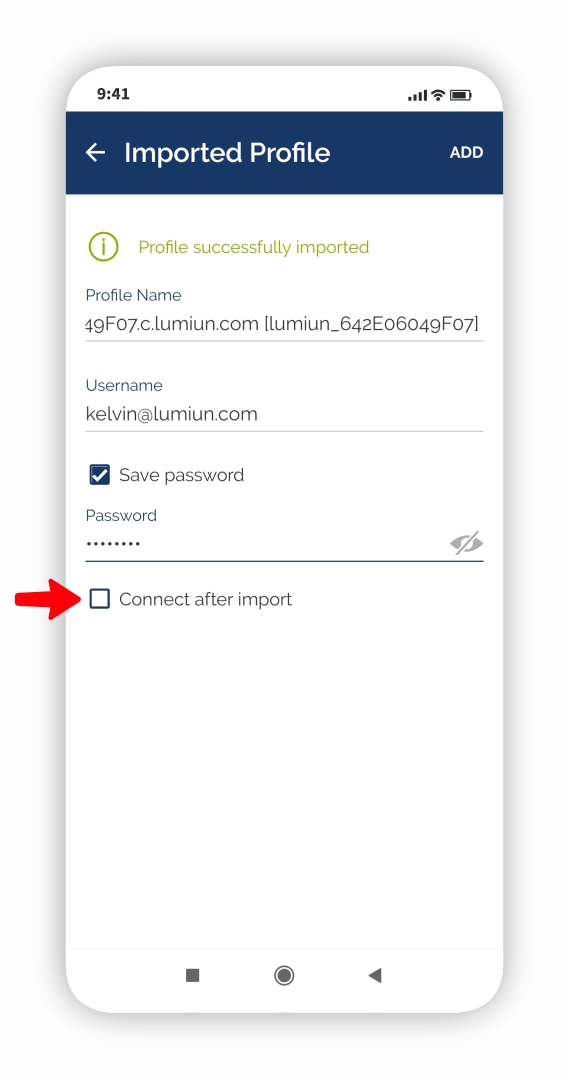
After installing the OpenVPN application, while still in the Lumiun panel, download the configuration file and then open the file; it will be automatically imported by the OpenVPN application.
Step 6
In the app, enter your username and password and click Connect.
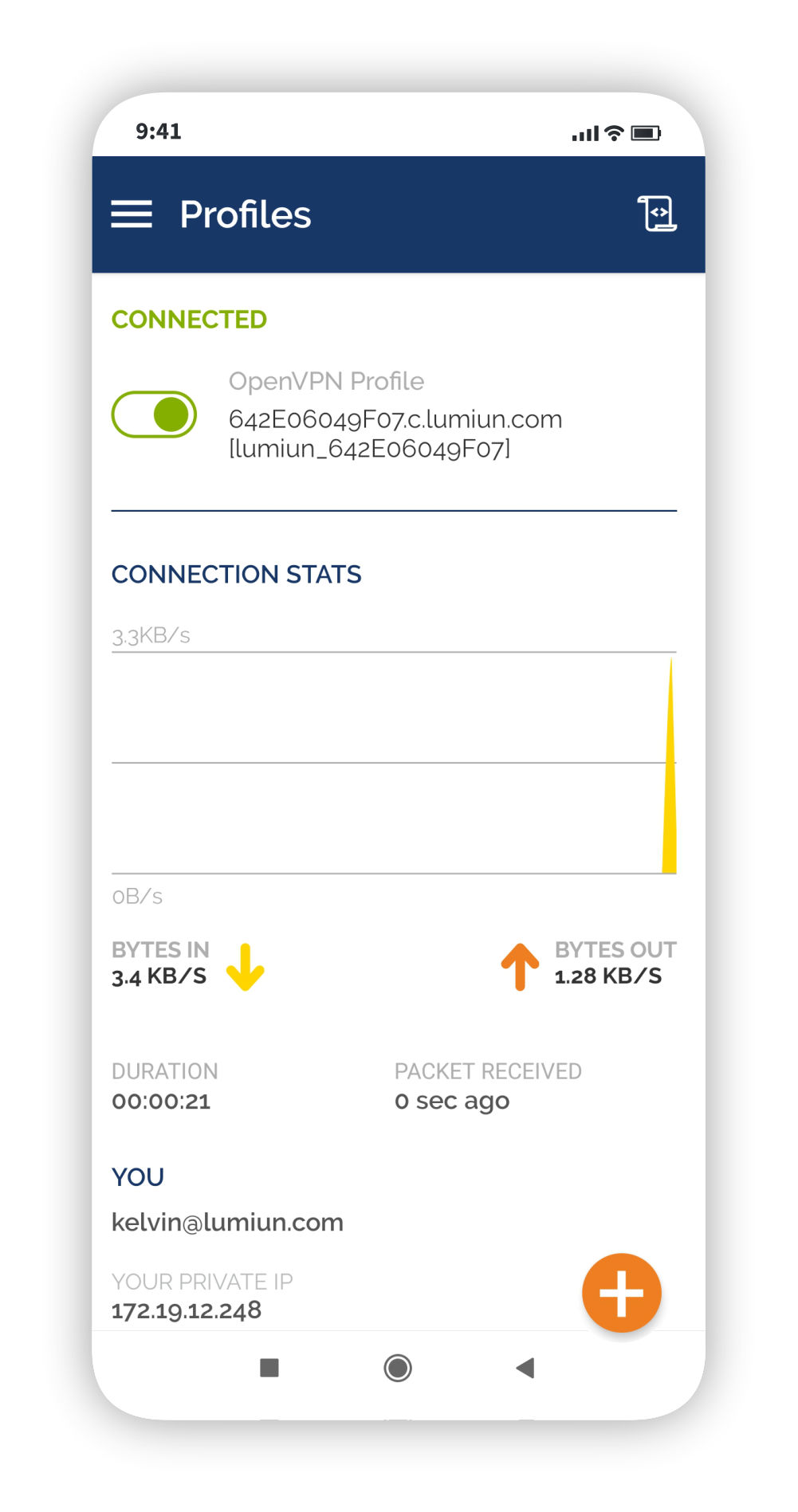
Done! You are now connected to Lumiun's Business VPN. From now on, you are remotely connected to your company's local network, and all your browsing and data will be secure.
Step 6 (extra)
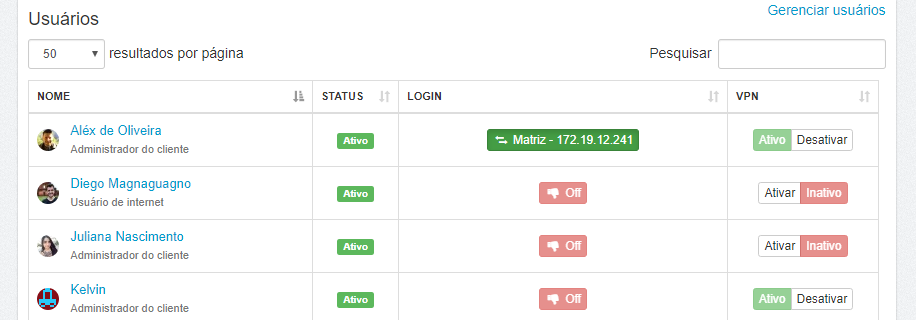
Now you know how to use a VPN on your mobile phone. If you have an Administrator , you can monitor which users are connected via VPN and also which websites they are accessing.
To conclude
Understanding that data security for companies with offices, and especially those with remote access, whether mobile or not, is a concern that few business owners or directors have .
I hope this article on how to use a VPN on your mobile phone makes the process of installing a mobile VPN in your company easier, and helps you succeed in data security and controlling employee productivity. We even discussed employee productivity on the internet in an article here on the blog.
See also the article we published about VPN connections for businesses: Guide: How to create a VPN connection for businesses .
If you want more information about Lumiun's Business VPN, download the presentation and share it with whomever you think it's important to know.
Did you enjoy the article? Then leave your comment below.
To the next!



4 comments
Comments closed