



Email is one of today's most important tools, ubiquitous in corporate and business routines. Many activities require the use of this tool, making secure email a priority for companies and their employees.
The biggest problem with using email is that, while it's extremely functional, it's not very secure . According to the ESET Security Report 2022, in 2022 alone, there was a 226% increase in phishing attacks , which use email as their primary tool.
To help solve this, there are some essential precautions that help provide greater protection for the exchange of information and your resources.
Its lack of security is due to the various intermediary channels through which messages pass, such as email providers and clients, until they reach the end user. But the main security problem with email is directly related to user behavior .
Because it is a tool with a low security standard, email has been used as a gateway for various threats.
How to make your email secure?
Faced with these problems, you might be wondering: What's the best way to secure your email?
There are many people and users in the cyber world who have malicious intentions, making protection tools much more than just a detail: they are essential to guarantee greater privacy and security for this messaging tool.
One of the most common and also very "successful" attacks, phishing uses email as its main resource for carrying out scams, spreading malware, viruses and spam , and many other traps that can compromise information security.
Using social engineering, these criminals trick users into providing confidential information that facilitates scams and undermines company security. Learn more about how this strategy works in the video below:
Main threats that arrive via email
As we've seen, email can be a gateway for various scams and threats, jeopardizing business continuity, information security, and a company's financial health . Here are some of the most common threats that can be deployed through this tool:
SPAM
Spam is a long-standing problem in the digital environment. We've all been bombarded at least once by this type of message, which, besides being extremely annoying, can mask a trap or dangerous strategy for your business.
Typically used for advertising purposes, spam can fill your inbox with unsolicited and unnecessary emails and can also be a channel for cyberattacks.
For this reason, it is very important to be very cautious when opening emails from unknown senders or with fake, too-good-to-be-true promotions.
Phishing
As mentioned earlier, phishing is one of the main scams that can arrive via email . Unlike spam, phishing doesn't rely solely on advertising to reach users. This strategy can come in the form of fake billing messages, emails from known recipients who have been hacked, and other scams, with the main goal being to trick users into providing confidential information .
This criminally collected data can not only harm your security but also contribute to financial scams.
Malware
Malware refers to applications or software that can compromise the security of a company's devices and networks. In this sense, malware includes applications that can cause some type of harm to information, such as viruses, Trojans, spyware , and others.
These applications are used according to the cybercriminal's objective, whether to steal access data, credit card information, corrupt valuable data, prevent user access, among others.
Social engineering
This strategy, as mentioned previously , is used by cybercriminals to deceive and mislead their victims , and is often used in phishing scams. Through it, criminals can effectively disguise their intentions and trick users into providing confidential information.
Social engineering can be a great danger to users, from the most novice to the most experienced.
How to keep your email secure
Now that we understand how email can be used to deploy threats and facilitate various types of scams, we need to find a solution that helps make the tool safer for all users .
To help you, we've put together some essential tips that can make your email a more secure and reliable tool for use within the corporate environment:
Stronger passwords
Although this is a precaution that is frequently publicized, there are still many users who use very simple or easily guessed passwords in their email tools.
Another common mistake is using a single password to access multiple applications or services , thus making the cybercriminal's job easier. It's crucial to provide guidance on creating increasingly strong and complex .
To do this, a combination of numbers, special characters, and upper and lower case letters can be used to make it more difficult to guess and make your email more secure.
We have a complete guide for creating and managing users more securely . Click here to download it for free!
Two-factor authentication
Depending on your email provider or service, you may be able to use two-factor authentication, which is an extra layer of security for your login and services.
To do this, you can use a mobile number, a USB device, a token, or another tool, depending on the email service you use. With this extra access code, you can secure your email and prevent it from being easily hacked by cybercriminals.
Cryptography
Encryption is a feature that helps keep email more secure and ensures data privacy. Depending on the email service, encryption is already built in, as is the case with Gmail , Google's email service.
However, in this case, the encryption service only works when using Google apps or its browser, Chrome . Another detail is that both users must be Gmail users for encryption to work. In any case, it's essential to check whether your email service supports this functionality.
Tools to block viruses and malware
Through phishing scams, cybercriminals can send corrupted files or files contaminated with viruses and malware, causing significant problems for companies. Email antivirus software helps block the main threats present in the online environment, including those received through corrupted links and attachments.
Having a blocking tool helps prevent these threats from installing on your device and causing problems for you.
It's equally important to ensure these tools remain up-to-date so they're prepared to address threats as they evolve.
Prevent opening attachments
As we can see, many of the threats that arrive via email are present in the attachments of these messages . Because of this, it's crucial that employees understand the importance of paying attention to the senders and the attachments they receive.
Blocking the automatic download of these attachments is a smart strategy that helps increase security and ensure secure email. As trustworthy as this file may seem, it's important that it be scanned by a scanning service before the user actually opens it.
One way to avoid scams received through attachments is to implement a cloud service in your company . This way, employees will exchange information through this service rather than through attachments.
Email Security Checklist
The tips we've provided in this article can help increase your email security and prevent various cyberattacks. To help you, we've also prepared a security checklist to help you step-by-step check your email and the key strategies you should adopt to further enhance your protection.
- Check the reliability of your password.
- The internet is full of tips for having a secure password
- and secure password is used for each email account
- Enable two-factor authentication ;
- Use an antivirus and ensure it is updated as needed;
- Update the browsers used;
- Do not open links in emails from senders that you do not know or trust;
- Block automatic download of attachments;
- Ensure strong passwords for home office connections;
- Avoid public networks as they present a greater security risk.
Is failing to protect email a risk?
As we've seen throughout this article, there are several threats that can arrive via email, potentially causing countless problems for your company. Failing to protect your email can pose a significant risk to both your users and your business.
Information leaks, for example, are one of the problems that have been causing significant losses for companies, resulting in penalties and damaging their image in the market.
It's crucial that employees understand the importance of using a secure email address for daily information exchange. To help, the company can establish an awareness policy that helps employees understand the importance of digital security for everyone.
You can also implement a security checklist, like this template we make available for free on our website , so that all users can check the features and practices that should be implemented for secure email, and that ensure greater security for everyone.
Blocking Threats with Lumiun Box
With so many threats present in one of the largest business communication channels—email—it becomes somewhat difficult to "check" whether the email, link, sender, or file we receive is truly safe and from a trustworthy source . Lumiun Box was created precisely for this purpose: to make access to the internet, websites, links, and files, especially in companies, safer and more seamless, eliminating the worry of managers and also improving employee productivity online.
In short, the Lumiun Box Blocks sites categorized as harmful , containing inappropriate content, or chosen by the administrator, such as social media . With several categories available, it's possible to customize blocks and separate user groups . The financial sector, for example, might receive blocks from social media and potentially dangerous sites, while the company's marketing department has free access to social media but an extra layer of protection.
This way, links, files and access to websites that could pose risks to the company's data and information , whether via email or any other internet access channel, will be effectively blocked.
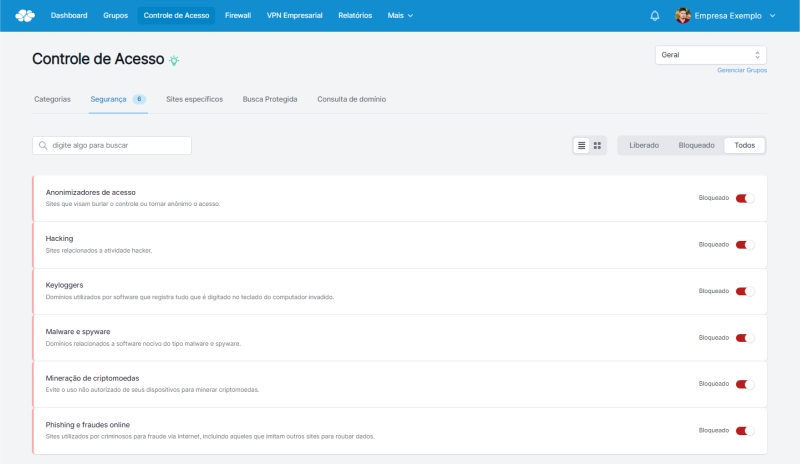
In addition to locks, Lumiu Box has several other features, check them out:
- Enterprise firewall
- Extra protection with door lock
- Business VPN
- Secure and controlled remote access
- Traffic management
- Control access from a single panel
- Management reports
- View personalized and real-time internet access reports
Want to reduce your company's internet security concerns? Get a no-obligation quote and experience the benefits of Lumiun Box .
Until later!


