Quick summary: A corporate DNS filter is a layer of security and browsing control that blocks or allows access based on the domain requested by the user. It helps companies and MSPs reduce access to phishing, malware, ransomware, botnets, inappropriate websites, and unwanted categories before the website loads.
In practice, this allows for the application of browsing policies to users within the company, branch offices, visitor networks, schools, managed clients, and, in some scenarios, remote devices. For MSPs, corporate DNS filtering can also become a recurring network security service, with centralized management, reporting, standardized policies, and resources to manage multiple clients with less operational effort.
Controlling internet access is no longer just a matter of productivity. For companies and clients served by MSPs, browsing is also a gateway for phishing, malware, ransomware, fake pages, unwanted applications, and attempts to circumvent internal policies.
The challenge is to implement this control without making the operation complex. Many IT teams need to protect users at headquarters, in branch offices, in home offices, on guest networks, and across different managed clients, but they don't have the time to maintain manual blocklists or configure separate rules for each environment.
This is where corporate DNS filtering becomes a practical alternative. It operates at the DNS layer, before the website loads, allowing you to block malicious domains, apply rules by category, and organize browsing policies in a centralized way.
For MSPs, this model also opens up an opportunity for recurring service. Instead of offering only reactive support, the provider can deliver DNS security and browsing filtering as part of ongoing customer management, with standardized policies, reports, and resources that reduce operational effort.
In this article, you will understand what a corporate DNS filter is, how it works, what risks it helps to reduce, what limitations should be considered, and what to evaluate when choosing a platform for businesses, branch offices, remote users, and MSP clients.
What is a corporate DNS filter?
A corporate DNS filter is a solution that uses the DNS layer to control which domains can or cannot be accessed in a business or managed environment. Before a browser loads a website, the device needs to query the DNS to find the address corresponding to the domain. It is at this point that the DNS filter can allow, block, or apply an access policy.
DNS functions as a kind of address book for the internet: it translates domain names, such as example.com , into IP addresses used by systems to find online servers. Because this process happens before content is loaded, the DNS filter can prevent access to certain destinations at the very beginning of the connection.

In a corporate environment, this filtering isn't just about blocking websites. It helps create a clear internet security policy, combining threat protection, browsing control, and network usage management.
How does a corporate DNS filter work in practice?
When an employee tries to access a website, the process generally follows these steps:
- The user types an address or clicks on a link.
- The device sends a DNS query to resolve the domain.
- The DNS filter checks whether that domain is allowed, blocked, or suspicious.
- If the domain is open, access continues.
- If the domain is blocked due to threat, category, or policy, access is prevented.
This blockage can happen for different reasons:
- The domain is associated with phishing;
- The domain distributes malware;
- The domain is used by botnets or malicious infrastructure;
- The website belongs to a blocked category, such as betting, games, adult content, or social networks;
- The domain was manually added to a blocklist;
- The policy of that group, branch, client, or device does not allow access.
In practice, this means that a company can block malicious websites for all users, create a more restrictive policy for visitors, release specific tools for marketing, and apply different rules for branches, groups, or remote devices.
Why is corporate DNS filtering important for MSPs?
For MSPs, corporate DNS filtering solves two problems at once: it improves customer security and creates a managed service offering with recurring value.
Many end customers need protection against phishing, malware, and unauthorized access, but lack the internal staff to operate complex tools. An MSP can fill this gap by offering DNS security and browsing filtering as part of a support, infrastructure, or managed security contract.
This helps the MSP to:
- Standardize browsing policies among customers;
- Reduce effort with manual locking;
- Protect users across different networks and branches;
- Demonstrate value with access and block reports;
- Add a layer of security to the portfolio;
- Create recurring revenue with a simpler-to-operate solution.
For MSPs, centralized management becomes even more valuable when the platform allows for the standardized application of policies across multiple clients or environments. Features such as Global Policy help the provider reduce rework, maintain consistent rules, and make bulk changes with greater operational security.
In practice, this prevents the MSP from having to repeat the same configuration for each client whenever there is a policy change, such as blocking a new risk category, adjusting productivity rules, or strengthening controls against circumventing methods.
The important point is that corporate DNS filtering should not be sold as a sole security solution. It complements antivirus, firewall, EDR, backup, MFA, user training, and other layers. The advantage lies in acting early, before the website loads, reducing exposure to malicious domains and unwanted access.
What problems does a corporate DNS filter help solve?
Protection against phishing
Phishing websites mimic legitimate pages to steal passwords, banking information, or corporate credentials. When a domain associated with phishing is identified, the DNS filter can block access before the user reaches the fake page.
This is especially important for teams that use email, cloud systems, ERPs, CRMs, and collaboration tools every day. A single access to a fake page can trigger a credential theft incident.
Reducing access to malware and ransomware
DNS filtering can also help block domains used to distribute malware , host malicious files, or support ransomware campaigns .
This caveat is important: DNS filtering does not prevent all attacks. It reduces exposure and adds a preventative layer, but it needs to be part of a larger strategy.
Navigation and productivity control
In addition to threats, companies need to deal with categories of websites that don't align with their internet usage policies. Gambling, online games, adult content, piracy, streaming, and social media can be blocked or allowed depending on the organization's profile.
The goal is not to monitor every employee click, but to create clear rules for internet use. For the IT team, this reduces manual exceptions. For management, it improves predictability. For the user, it makes the policy more transparent.
Remote user protection
With hybrid teams, laptops working outside the office, and users traveling, controlling browsing solely through the local network may be insufficient. In solutions that offer device agents, corporate DNS filtering can keep policies active even outside the company network.
This point is relevant for MSPs that serve clients with distributed teams. Instead of relying solely on the headquarters router, the provider can also apply policies to remote devices, provided that the chosen solution offers this feature and is configured correctly.
Branch management and multiple environments
Companies with headquarters, branches, Wi-Fi networks, visitors, and different departments rarely need a single policy for everyone. Corporate DNS filtering allows you to separate environments and apply policies tailored to each context.
A simple example:
| Environment | Recommended policy |
|---|---|
| Administrative | Blocking threats, phishing, malware, and risk categories. |
| Marketing | Controlled release of social networks and media tools. |
| Visitors | More restrictive policy, with limited access. |
| Branches | Standardized policy with local adjustments. |
| Remote devices | Protection outside the corporate network, when a compatible agent is available. |
| MSP Customers | Separate policies by client, profile, or contract. |
Does a corporate DNS filter replace a firewall, antivirus, or EDR?
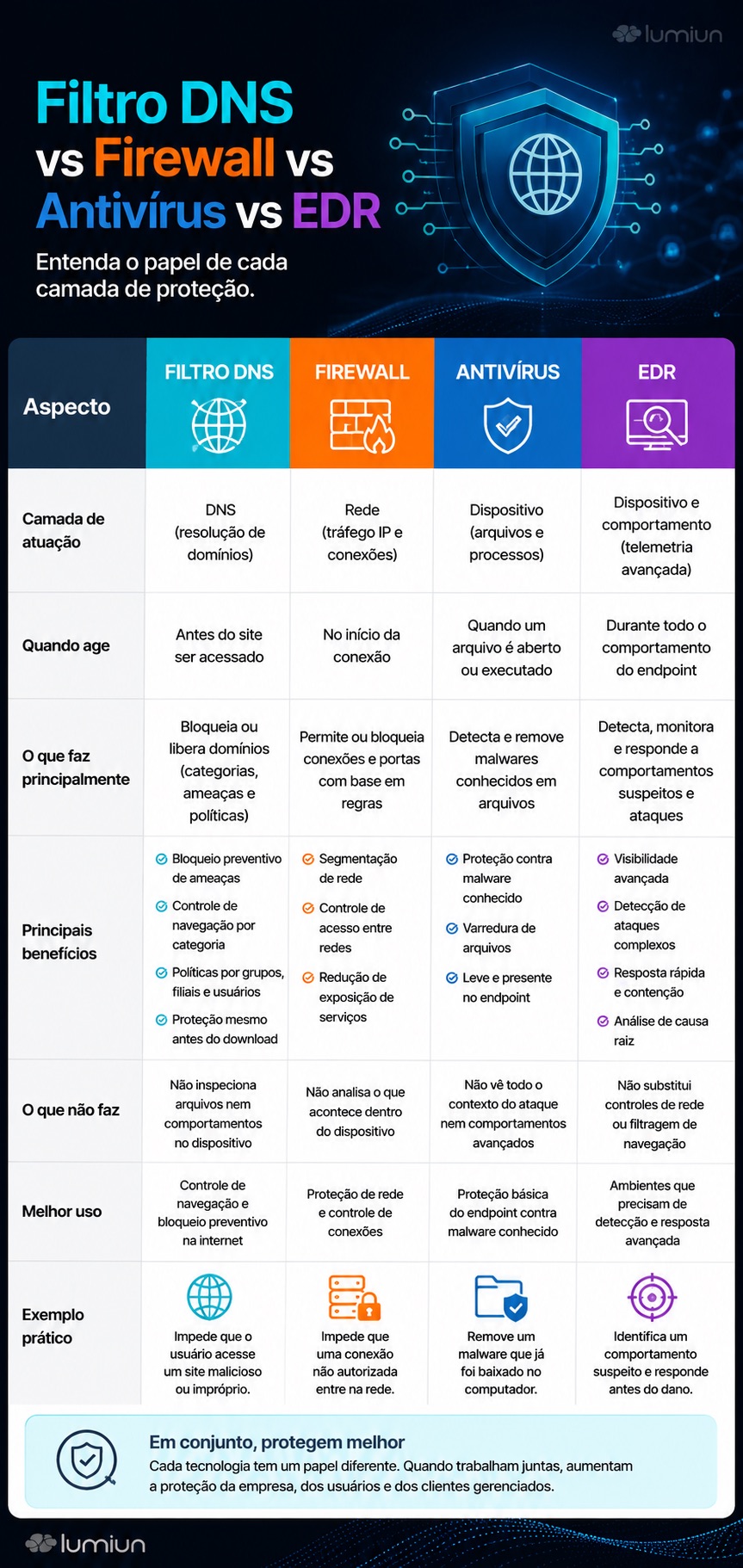
No. A corporate DNS filter does not replace a firewall, antivirus, EDR, backup, MFA, or user training. It operates at a different layer.
The firewall controls network connections based on rules such as IP address, port, protocol, and application, depending on the solution. Antivirus and EDR operate on the device, detecting suspicious files, processes, and behavior. DNS filtering acts before domain access, helping to prevent the user from reaching malicious or unwanted destinations.
In practice, these layers complement each other.
| Layer | Where does it operate? | Example of a function |
|---|---|---|
| DNS Filter | Domain resolution | Block phishing domain before access. |
| Firewall | Network traffic | Control ports, protocols, and connections. |
| Antivirus | Device | Detect malicious files. |
| EDR | Endpoint | Investigate suspicious behavior. |
| MFA | Identity | Reduce the risk of access using a stolen password. |
| Training | User | Reduce clicks and insecure decisions. |
For MSPs, this explanation helps avoid exaggerated promises and improves the perceived value. Corporate DNS filtering is a practical and preventative layer, not a magic solution.
What are the limitations of DNS filtering?
DNS filtering is efficient for many scenarios, but it has limitations that need to be understood before choosing a platform.
1. It acts primarily on domains
The DNS filter decides based on the domain queried. By default, it does not analyze all the internal content of a page or the complete path of a URL.
For example:
- domain:
example.com - Full URL:
https://example.com/area/arquivo.html
If the decision depends on the specific path within the website, other technologies may be needed, such as a proxy, Secure Web Gateway, or web inspection.
2. Not every malicious domain is immediately known
Attackers are creating new domains all the time. Some attacks use newly registered domains, compromised domains, or legitimate services to host fake pages.
However, some corporate DNS filtering solutions offer features to block or restrict newly registered domains, also known as NRDs ( Newly Registered Domains). This type of domain is frequently used in phishing campaigns, scams, and malware distribution, precisely because it may not yet have a consolidated reputation.
By applying a specific policy to suspicious NRDs, the company adds a preventative layer against emerging threats and reduces users' exposure to domains created for short-term attacks.
DNS filtering helps block known or classified threats, but it cannot guarantee that everything will be blocked. Therefore, the correct message is: DNS filtering helps reduce risks, but it does not eliminate all browsing risks.
3. DoH, DoT, VPNs, and proxies can impact the policy
DNS over HTTPS, DNS over TLS, VPNs, proxies, and browsers with their own DNS can alter the path of DNS queries. If the company does not control these methods, some users may be able to circumvent the policy.
Therefore, a good corporate DNS filtering solution should offer features to reduce bypass attempts, guide network configurations, and enable consistent policies.
4. Blockages need to be adjusted
Every policy can generate exceptions. A legitimate domain can be classified in an undesirable way, a category can block a work tool, or an MSP client may need a specific rule.
Therefore, whitelists, blocklists, domain lookup, logs, and block pages are important resources for daily operations.
What should you consider when choosing a corporate DNS filtering platform?
To choose a corporate DNS filtering solution, businesses and MSPs should evaluate more than just basic blocking. The decision needs to consider security, operation, reporting, support, management of multiple environments, and ease of deployment.
1. Centralized management
The solution should allow for the management of policies, locations, devices, groups, and clients from a central dashboard. For MSPs, this is crucial because operations need to scale without requiring manual configuration for each client.
Check if the platform allows:
- separate organizations or clients;
- Apply policies by location, group, or device;
- monitor the status of the environments;
- Access reports by client or unit;
- Standardize policies across multiple scenarios.
2. Global Policy for MSPs
For managed service providers, having a centralized dashboard is not enough. The platform also needs to facilitate the standardization of rules across clients, units, or similar environments.
A Global Policy helps MSPs apply changes more efficiently across multiple linked environments, reducing operational effort and maintaining more consistent security and navigation control policies.
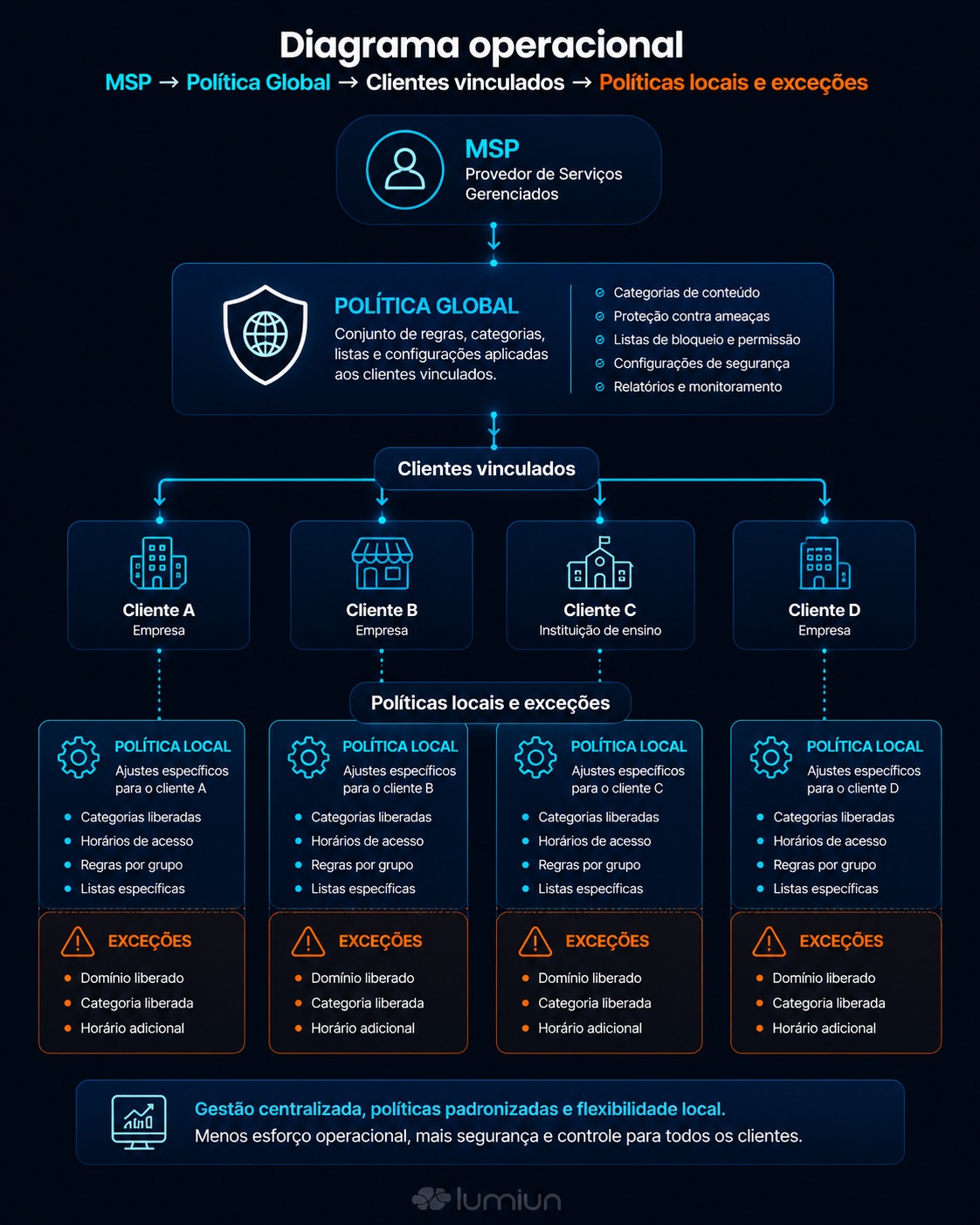
This feature is useful in situations such as:
- Apply a new blocking category for multiple clients;
- Standardize security filters in similar environments;
- Strengthen rules against phishing, malware, and malicious domains;
- Adjust mass productivity policies;
- Reduce repetitive configurations on managed clients.
The important thing is that global changes can affect multiple environments at the same time. Therefore, it's ideal to validate the impact before applying broad changes, especially to clients with specific exceptions.
3. Threat Blocking
A corporate DNS filter should help block domains associated with phishing, malware, ransomware, botnets, and other online threats. It's also worth evaluating whether there are filters for newly created domains, suspicious domains, URL shorteners, cryptocurrency mining, and circumventing methods.
It's also worth checking if the platform offers filters for newly registered domains or those with suspicious names, as these addresses can be used in scams, phishing attempts, and recent malicious campaigns.
This set of features helps reduce user exposure, especially in small and medium-sized businesses that do not have advanced security operations.
4. Control by categories and applications
In addition to threats, the company may need to block categories such as:
- Adult content;
- Betting and gambling;
- Online games;
- Piracy;
- Social media;
- Streaming;
- Advertisements and trackers;
- Specific applications.
Ideally, the platform should allow for a balance between security, productivity, and exceptions. Blocking too much can disrupt workflow, while blocking too little can render the policy ineffective.
5. Resources for remote users
For hybrid teams, branch offices, and laptops outside the network, assess whether the solution allows you to apply policies directly to devices. This feature is useful for maintaining protection even when the user is working from home, traveling, or connected to an external network.
In the case of Lumiun DNS, ActiveNet is the agent used to apply policies to individual devices, available for Windows, with Mac OS and Linux indicated as "coming soon" in validated internal materials.
6. Reports and logs
Reports help answer important operational questions:
- Which domains were accessed most?
- Which categories were blocked the most?
- Which branch or client experiences the most blockages?
- Which filter blocked a website?
- Is the newly configured policy working?
- Is a remote device protected?
For MSPs, reports also help demonstrate value to the end customer. They show that the service is not just "a different DNS," but an active layer of protection, control, and management.
7. Allow and block lists
Custom lists are essential for fine-tuning. With them, the team can allow a necessary domain without allowing an entire category, or block a specific domain that is not being handled by a category.
This feature reduces friction with users and facilitates the operation of the MSP.
8. Blocking page
The blocking page avoids confusion. Instead of the user thinking that the internet is down or that the site is offline, they understand that access has been blocked by a policy.
For MSPs, a customized or white-label page can enhance the professional experience of the service delivered to the client.
9. Support and documentation
DNS filtering seems simple, but deployment can involve routers, firewalls, DHCP, DoH, DoT, dynamic IP, branch offices, remote devices, Wi-Fi networks, and exceptions. Therefore, support in Portuguese, clear documentation, and readily available support channels make a difference in operation.
How can I control employees' internet access without installing software on their computers?
One way to control employee internet access without installing software on every computer is to apply DNS filtering to the network, configuring DNS on the router, firewall, DHCP server, or gateway. This way, devices using that network will query the DNS resolver defined by the company.
This model is useful for:
- Offices;
- Branches;
- Wired networks;
- Corporate Wi-Fi;
- Guest Wi-Fi;
- Schools;
- Environments managed by MSPs.
The limitation is that, outside the network, the policy may cease to be applied if there is no agent, VPN, specific configuration, or other control method. Therefore, companies with remote users should evaluate a solution that also offers device-level protection.
In practice, there are two scenarios:
| Scenario | How it works | When to use |
|---|---|---|
| Agentless control | DNS configuration on the router, firewall, DHCP, or gateway | Local area networks, branch offices, Wi-Fi, and fixed environments |
| Control with agent | Installation on individual devices | Remote users, laptops, home office, and travel |
For MSPs, the ideal approach is to offer both options when the client has mixed environments.
Lumiun DNS as a corporate DNS filtering solution for MSPs
Lumiun Lumiun DNS is a DNS security and browsing filtering solution for businesses, schools, and MSPs. The platform helps block malicious domains, phishing, malware, ransomware, and unwanted website categories using the DNS layer, focusing on simple operation and centralized management.
For MSPs, Lumiun DNS allows them to offer DNS security and browsing control as a managed service, with features to organize clients, apply policies, track reports, and operate multiple environments more efficiently.
One important point for partners is the Global Policy, which helps standardize navigation rules and apply mass changes across linked environments or organizations. This reduces rework, facilitates policy maintenance, and improves the scalability of the MSP's operation.
Among the validated features of Lumiun DNS are:
- DNS filter;
- Blocking malicious domains;
- Filters for newly registered domains that may be at risk of phishing or have suspicious names;
- Access policies;
- Security, privacy, focus, and productivity filters;
- Blocklists and allowlists;
- Free time slots;
- Groups and devices;
- Agent for Windows devices;
- Locations for networks, branches, and environments;
- Reports, statistics and logs;
- Real-time logs;
- Domain lookup;
- Lock page;
- Resources for partners, MSPs, and white label companies;
- Global policy for partners, useful for standardizing rules and facilitating mass changes in linked environments or organizations;
- Specialized support in Portuguese.
For MSPs, the Global Policy is especially relevant because it helps transform DNS filtering into a more scalable operation. Instead of manually adjusting policies for each client, the partner can work with standardized rules and apply changes more efficiently, while maintaining centralized control over browsing and DNS security.
This type of feature is important when the MSP needs to deliver DNS security to multiple clients, but without significantly increasing the time spent on configuring, reviewing, and maintaining policies.
Lumiun DNS does not replace all security layers, but it adds a preventative and centralized layer to reduce browsing risks, block known threats, and improve internet control in corporate and managed environments.
Checklist: Best DNS filter for MSPs
Before choosing a corporate DNS filtering platform for resale or managed service, evaluate:
- Does the solution allow for centralized management of multiple clients?
- Is it possible to apply different policies by client, location, group, or device?
- Does the platform allow you to create or apply global policies for multiple clients?
- Is it possible to standardize rules without losing the flexibility to make adjustments for each client?
- Do bulk changes have sufficient controls to prevent undue impact?
- Can the MSP maintain consistent policies across similar environments?
- Is there a block against phishing, malware, ransomware, and malicious domains?
- Are there filters by category and application?
- Does the platform offer blocklists and allowlists?
- Are there reports by domain, location, device, or group?
- Are there logs by period and logs in real time?
- Does the solution help protect remote users?
- Is there a page blocking feature?
- Is there a white label option for partners?
- Does the support team offer service in Portuguese?
- Is the operation simple enough to scale across multiple clients?
- Are the limitations of the DNS filter clearly explained to the end customer?
Practical example for MSPs
Imagine an MSP that serves 30 small and medium-sized clients. Each client has different needs:
- Accurate accounting to block phishing and gambling websites;
- A school needs to block adult content, games, and inappropriate websites;
- A clinic needs to protect administrative staff and visitors;
- A company with a remote team needs to maintain policies on laptops outside the network;
- A client with branch offices needs to separate policies by unit.
Without a centralized platform, the MSP would have to manually configure blocks on routers, firewalls, or devices. This increases rework and hinders standardization.
With an enterprise DNS filtering solution, the MSP can create policies per profile, track reports, apply exceptions, review blocks, and deliver DNS security as part of the managed service.
When the platform offers a Global Policy, this model becomes more scalable. The MSP can apply a security change across multiple linked environments, such as strengthening blocks against malicious domains or circumventing methods, without repeating the entire process for each client.
Nevertheless, global changes require caution. Customers with specific policies, exceptions, or unique operational needs should be evaluated before any broad changes are implemented.
Comparison table: Corporate DNS filter for end-user enterprise vs. MSP
| Criterion | Final company | MSP |
|---|---|---|
| Main objective | Protect users and control internal browsing | Deliver DNS security and browsing filtering as a managed service |
| Management | Focus on headquarters, branches, groups and devices | Focus on multiple clients, organizations, and environments |
| Access policy | Rules by sector, location, or usage profile | Rules by client, contract, profile, or service standard |
| Reports | Visibility for IT and internal managers | Accountability and demonstrating value to the customer |
| Global Politics | It may not be necessary in simple environments | Very useful for standardizing rules and implementing changes on a large scale |
| White Label | It's usually not a priority | It can strengthen the partner's brand and perceived value |
| Operation | Reduces manual lockouts and improves internal control | It reduces rework and facilitates recurring management |
Frequently asked questions about corporate DNS filtering
What is a corporate DNS filter?
Corporate DNS filtering is a technology that blocks or allows access based on the domain requested by the user. It acts before the website loads and helps companies reduce access to phishing, malware, ransomware, malicious domains, and unwanted website categories.
Is a corporate DNS filter suitable for MSPs?
Yes. MSPs can use corporate DNS filtering to offer DNS security and browsing control to clients, with centralized policies, reporting, and threat blocking. This helps add value to the managed service and create recurring revenue.
What is Global Policy in a DNS filtering solution for MSPs?
Global Policy is a feature that helps MSPs standardize security rules and browsing controls across multiple linked environments or organizations. It facilitates bulk changes, reduces operational rework, and helps maintain consistent policies across managed clients.
In the context of Lumiun DNS, Global Policy is a resource for partners who need to manage policies more efficiently, always considering that global changes can impact linked environments and should be applied with technical validation.
Does a DNS filter block phishing?
DNS filtering helps block domains associated with phishing, reducing the chance of users accessing fake websites.
Does a DNS filter replace a firewall?
No. DNS filters and firewalls operate at different layers. DNS filters control access based on domains. Firewalls control network connections based on rules such as IP address, port, protocol, and application, depending on the solution.
Does a DNS filter replace antivirus software?
No. Antivirus software works on the device, detecting malicious files, programs, and behavior. DNS filtering acts before domain access, reducing exposure to dangerous websites. The two layers are complementary.
Is it possible to control the internet without installing software on computers?
Yes. In many scenarios, it's possible to apply DNS filtering by configuring DNS on the router, firewall, DHCP, or network gateway. For remote users or laptops outside the company, it may be necessary to use an agent, VPN, or another policy enforcement method.
What features should a corporate DNS filtering solution have?
A good solution should offer threat blocking, category filters, blocklists and allowlists, policies by group or location, reports, logs, a block page, protection for remote users, and centralized management. For MSPs, multi-organization capabilities, white labeling, and global policy can also be important.
What are the limitations of DNS filtering?
DNS filtering primarily targets domains, not the entire internal content of web pages. It also relies on identifying malicious domains and can be impacted by DoH, DoT, VPNs, proxies, or external configurations that cause DNS leaks. Therefore, it should be used as part of a layered strategy.
What is the best DNS filter for MSPs?
The best DNS filter for MSPs is one that combines threat protection, browsing control, centralized management, reporting, client-specific policies, standardization features, ease of deployment, reliable support, and scalable operation. The choice should consider the profile of the clients served and the service model offered.
Is Lumiun DNS suitable for MSPs?
Yes. Lumiun DNS is a DNS security and browsing filtering solution for businesses, schools, and MSPs. For managed service providers, it allows them to offer browsing control and threat protection with centralized management, policy enforcement, reporting, partner resources, and a Global Policy for linked environments.
Conclusion
Corporate DNS filtering is one of the most practical ways to add control and security to browsing for companies, branch offices, schools, remote users, and clients managed by MSPs.
It acts before the website loads, helping to block malicious domains, phishing, malware, ransomware, and unwanted website categories. It also facilitates the application of internet usage policies, reduces manual blocks, and improves visibility into access and blockages.
For MSPs, the value lies in the combination of protection, operational simplicity, and recurring service. Instead of treating website blocking as a one-time configuration, the provider can offer DNS security and browsing filtering as part of a continuous security delivery.
Features such as centralized management, reporting, white labeling, and global policy make this operation more scalable. They help the MSP standardize rules, reduce rework, and maintain consistent policies across multiple clients, without losing the need to validate exceptions and the particularities of each environment.
Lumiun DNS helps MSPs, businesses, and schools apply this control in a centralized way, with browsing policies, threat blocking, reporting, and features designed for corporate and managed environments.