


When a company evaluates a Protective DNS solution , the question is rarely purely technical. The IT team needs to understand if the tool truly helps reduce access to malicious domains, phishing, malware, and other threats, but they also need to know if deployment will be simple, if the reports will be useful, and if the policies can be managed without significantly increasing operational routines.
DNS plays a key role in one of the first steps of browsing. Before a website loads, the device needs to discover which address corresponds to the accessed domain. This is where a Protective DNS solution can intervene, analyzing the query and blocking dangerous, suspicious, or incompatible destinations that violate the organization's policy.
In practice, this transforms the DNS layer into a strategic point of protection and control. Instead of relying solely on the user to identify fake links or on tools that act after access, the company adds a preventative barrier against common browsing threats.
But not every DNS protection solution delivers the same level of coverage, visibility, and ease of management. Some are strong in threat intelligence but complex to operate. Others are simple but offer little investigation. There are also important differences in remote user support, logs, group policies, false positive handling, performance, and integration with the existing environment.
In this article, you will see how Protective DNS works and what criteria your company should evaluate before choosing a solution. The idea is to help IT managers and security analysts compare options more clearly, considering not only protection against DNS attacks, but also daily operation, visibility, and the ability to apply a secure DNS configuration in corporate environments.
Initial summary
To choose a Protective DNS solution, evaluate more than just its ability to block malicious domains. A good solution needs to combine protection against phishing, malware, ransomware, and botnets with easy-to-administer policies, good operational visibility, support for remote users, adequate performance, and useful reports for the IT team.
In practice, Protective DNS acts as a preventative layer: before a user accesses a website, the DNS query is analyzed. If the domain is associated with a threat or violates a browsing policy, access can be blocked, redirected, or handled according to the organization's configuration. CISA describes this model as a way to filter DNS traffic based on threat indicators, potentially blocking, redirecting, or sinkhole detection in DNS responses when there is a match with threat intelligence.
Why Protective DNS has come onto companies' radar
Browsing is one of the most common routines within any company. Users access emails, cloud systems, links received via message, supplier portals, productivity tools, and unfamiliar pages every day.
The problem is that some of these accesses can lead to domains used in phishing, malware distribution, fake pages, communication with botnets, or command and control infrastructure. ICANN classifies practices such as botnets, malware, pharming, phishing, and spam as DNS abuse when used as a delivery mechanism for these abuses.
This is where Protective DNS comes in. It doesn't replace firewalls, antivirus software, EDR, user training, or internal policies. But it adds an important layer of DNS security because it acts before the website loads and helps reduce exposure to malicious targets.
For IT managers and security analysts, the question isn't simply "which solution blocks the most?". The correct question is: which solution improves DNS protection without making the operation more complex than the team can handle?
What is Protective DNS?
Protective DNS is a security approach that uses the DNS layer to identify and block access to malicious, suspicious, or unauthorized domains, according to the organization's policy.
DNS is responsible for translating domain names, such as example.com, into IP addresses. Before a website loads, the device needs to perform a DNS lookup. A Protective DNS solution takes advantage of this moment to check if the requested domain is safe, allowed, or blocked.
In practice, a DNS protection solution can help block:
- Domains associated with phishing;
- websites used for malware distribution;
- domains linked to ransomware;
- Communication with botnets and command and control servers;
- newly created or suspicious domains;
- attempts to access unwanted categories;
- Using proxies, VPNs, or external DNS servers to bypass policies, when the solution offers this control.
The important point to understand is that Protective DNS acts on domains. It doesn't analyze all the content of a page like an advanced proxy would, nor does it replace endpoint tools. Its strength lies in blocking access before the connection progresses.
How Protective DNS works in practice
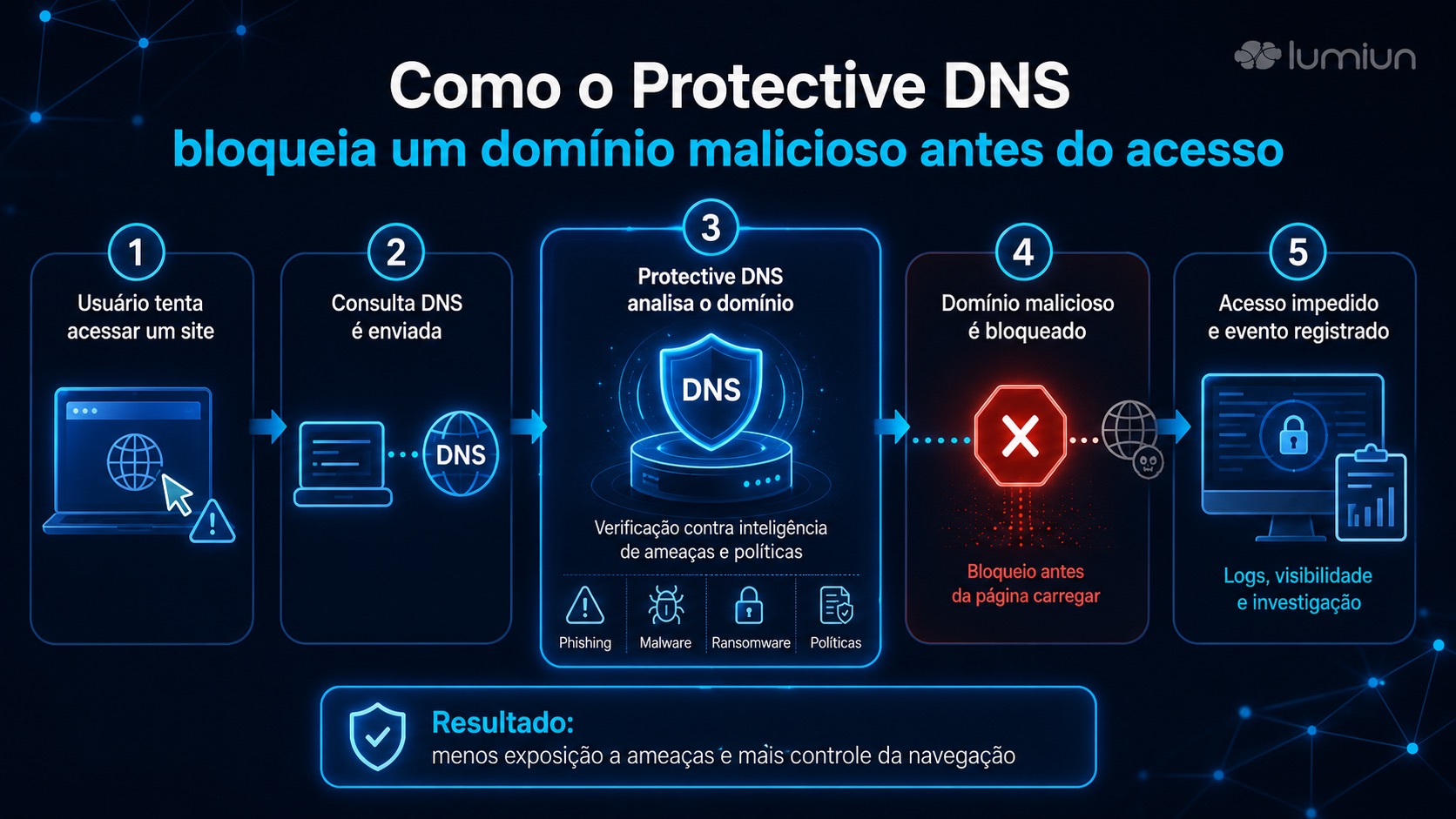
The process can be understood in five steps:
- The user attempts to access a website, system, or online service.
- The device sends a DNS query to discover the IP address of that domain.
- The Protective DNS solution checks the domain against policies, lists, categories, and threat intelligence.
- If the domain is allowed, browsing proceeds normally.
- If the domain is malicious, suspicious, or blocked by policy, the solution prevents, redirects, or logs the event according to the configuration.
For an IT team, this means that protection happens before the destination is accessed. If a collaborator clicks on a known phishing link, for example, the solution can block the domain before the fake page loads.
This model also helps with visibility. DNS logs can show which domains were queried, which were blocked, which groups or networks generated the most events, and where the policy needs to be adjusted.
Protective DNS, DNS filter, DNSSEC, DoH, and DoT: what's the difference?
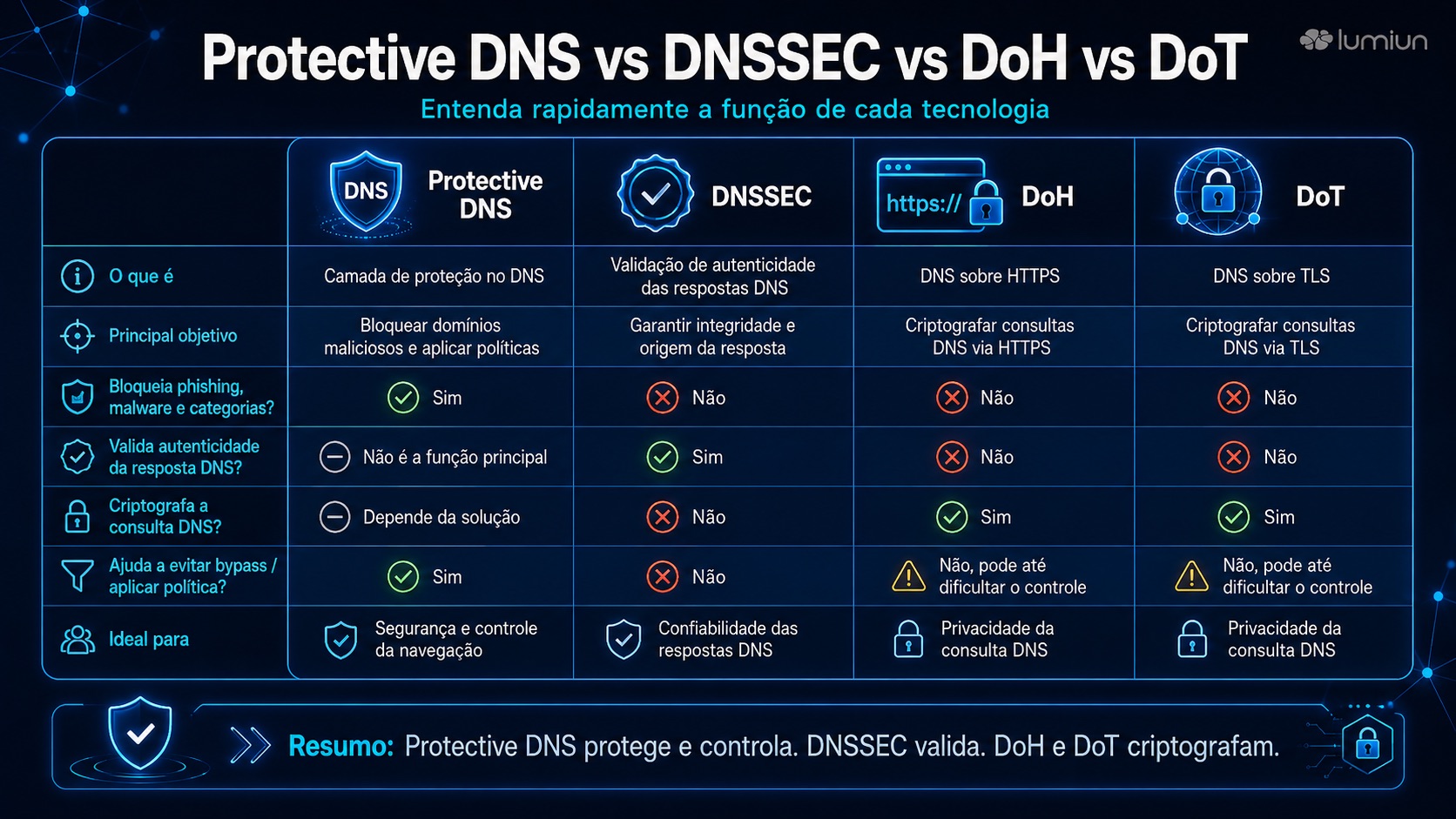
These terms appear together frequently, but they don't mean the same thing.
| Term | What it does | What it doesn't do |
|---|---|---|
| Protective DNS | It uses DNS as a preventative layer to block malicious or unauthorized domains. | It does not replace all layers of security. |
| DNS Filter | Applies blocking or allowing rules based on the domain queried. | It does not inspect all the internal content of a page. |
| DNSSEC | It helps to validate the authenticity and integrity of DNS responses. | It is not a filter for categories or threats per se. |
| DoH | Sends DNS queries over HTTPS. | It alone does not determine whether a domain should be blocked. |
| DoT | Sends DNS queries over TLS. | It does not replace DNS security policies. |
DNSSEC adds origin authentication and integrity to DNS data, but it doesn't have the same goal as a reputation or category-based blocking policy. DoH defines a protocol for sending DNS queries and responses over HTTPS, while DoT deals with the use of TLS to protect DNS queries, especially since traditional DNS queries can travel without encryption.
In the purchasing decision, this matters because a good Protective DNS solution needs to handle these protocols consistently. It's not enough to block malicious domains if users can circumvent the policy using external resolvers, unmanaged DoH, VPNs, or proxies.
What to evaluate in a Protective DNS solution
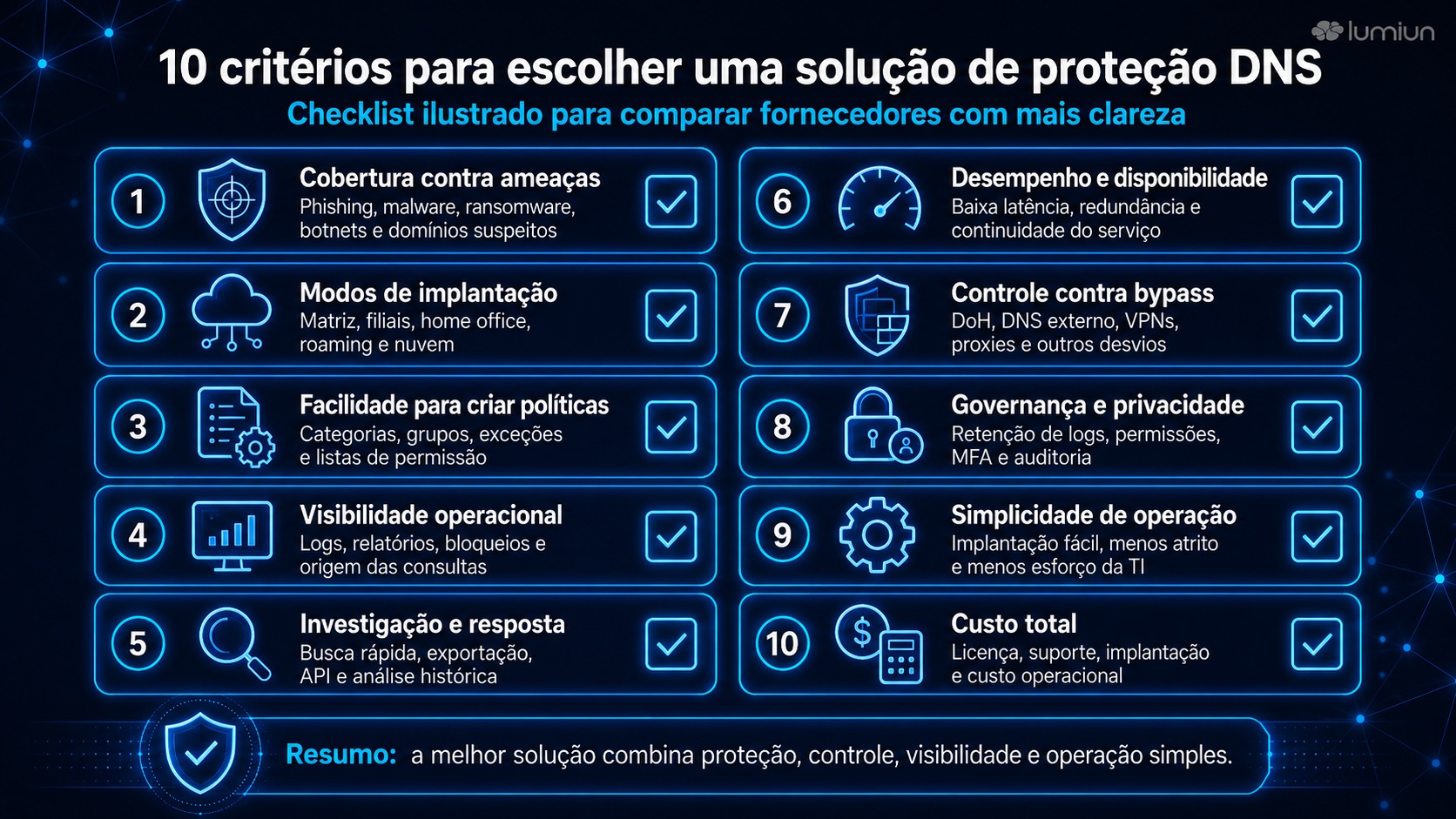
1. Protection against threats
The first assessment should be the level of protection coverage. A Protective DNS solution needs to block more than just a static list of dangerous websites.
Try to understand if the solution offers protection against phishing, malware, ransomware, botnets, command and control attacks, newly registered domains, domains with suspicious names, typosquatting, and other risk-related categories.
It's also worth asking how the threat database is updated. Malicious domains can appear and disappear quickly. Therefore, threat intelligence, continuous updates, and the ability to review false positives are important points.
Questions for the supplier:
- What types of threats does the solution block?
- How is the malicious domain database updated?
- Does the solution identify newly created or suspicious domains?
- How are false positives handled?
- Is it possible to request a review of the classification?
2. Deployment methods
A solution might work well in the office, but fail when the user works from home. This is a common mistake when choosing secure DNS services.
Evaluate whether the solution meets your needs:
- Head office and branches;
- visitor networks;
- remote users;
- Laptops for travel;
- mobile devices;
- cloud environments;
- Clients managed by MSPs.
CISA's own description of Protective DNS considers scenarios where traffic from mobile, roaming, and cloud assets flows directly to the protective DNS service.
In practice, a company with a hybrid work environment should ask: "Is the user still protected when they leave the corporate network?" If the answer depends solely on the DNS configured on the company router, the protection may not follow the device outside the office.
3. Ease of creating policies
DNS protection shouldn't rely solely on manually blocking domains one by one. The solution needs to allow for clear policies by category, group, location, device, or usage profile, according to the environment's needs.
A company might need to block gambling, adult content , and malware for everyone, but allow social media only for marketing. A school might apply a more restrictive policy for students and another for teachers. An MSP might standardize policies per client.
Ideally, the solution should allow for a combination of:
- security categories;
- Productivity categories;
- blocklists;
- whitelists;
- exceptions;
- policies by group, location or device;
- Different schedules or profiles, when applicable.
The rule is simple: the more difficult it is to adjust the policy, the higher the operational cost will be for the IT team.
4. Operational visibility
A protective DNS solution needs to show what's happening. Blocking without logging is of little use for investigation, support, and continuous improvement.
Evaluate whether the solution offers reports and logs with information such as:
- domain consulted;
- date and time;
- Access status: allowed or blocked;
- policy, list or category triggered;
- origin of the query;
- local, group, IP or device;
- Access volume and blockages;
- Most accessed and most blocked domains.
This visibility helps answer practical questions: Why was a website blocked? Is the block justified? Is a device trying to access too many suspicious domains? Is a policy too restrictive for a particular sector?
5. Investigation and response
Logs should not be used solely for passive reference. They need to support diagnosis and response.
A good solution should facilitate incident investigation by allowing filtering of events by domain, device, location, group, time period, and status. In more mature environments, it may also be important to export logs or integrate them with SIEM, monitoring tools, data lakes, or internal security workflows.
Useful questions:
- Is it possible to view historical logs?
- Is there real-time logging?
- Can the reports be exported?
- Is there an API or integration with external tools?
- Does the solution allow for a quick investigation into why a domain was blocked?
- Is it possible to review or release a domain without changing the entire policy?
6. Performance, availability, and latency
DNS is a critical part of browsing. If the DNS protection solution is slow or unstable, users' perception will be poor, even if the protection itself is good.
Rate it:
- resolver latency;
- redundancy;
- Service availability;
- Behavior in case of failure;
- presence of distributed servers;
- impact on branch offices and remote users;
- Supports IPv4 and IPv6.
It's also important to understand the failure policy: in case of unavailability, does the solution operate in fail-open mode, allowing browsing, or fail-closed mode, blocking for security? There is no single answer. More critical environments may prioritize security, while others prioritize continuity. The important thing is that the decision is made consciously.
7. Bypass control
Users, applications, and browsers may attempt to use external DNS, DoH, VPNs, proxies, or other methods to circumvent policies.
Therefore, assess whether the solution offers mechanisms to reduce bypass, especially in environments with a greater need for control, such as schools, visitor networks, remote teams, and companies with sensitive data.
The point is not to promise absolute blocking of all bypass methods. That would be unrealistic. The goal is to make simple bypass more difficult and to align DNS protection with other layers, such as firewalls, endpoint policies, MDM, corporate VPN, and secure browser configuration.
8. Governance, privacy, and data retention
DNS logs can reveal browsing patterns. Therefore, choosing a Protective DNS solution should consider privacy, governance, and access control.
Rate it:
- What data is recorded?
- How long are the logs available?
- Who can access reports?
- if there are permission profiles;
- Whether multifactor authentication exists for administrators;
- if there is a trail of administrative activities;
- How data export occurs;
- where the data is processed or stored;
- Which internal, contractual, or regulatory requirements apply?.
The NIST Cybersecurity Framework 2.0 presents cybersecurity risk management as an organizational practice, not just a technical one. This perspective is useful when evaluating solutions that involve policy, control, visibility, and operational accountability.
9. Simplicity of operation
A technically advanced solution can fail if it is too difficult to operate.
Before hiring, assess how much work will be required to:
- deploy;
- create policies;
- review blockages;
- Answer calls;
- Allow exceptions;
- generate reports;
- Manage branches;
- Keep remote users protected;
- train the team.
For lean IT teams, simplicity is not a detail. It's a security criterion. A difficult tool tends to be misconfigured, underutilized, or abandoned.
10. Total cost
The lowest price does not always represent the lowest cost.
Compare the total cost considering:
- license;
- implantation;
- support;
- training;
- administration time;
- integrations;
- effort to handle exceptions;
- impact on remote users;
- need for additional tools.
A simpler solution to operate can reduce support hours and speed up policy enforcement. A cheap but difficult-to-maintain solution can generate more calls, more manual exceptions, and less visibility.
Practical matrix for comparing DNS protection solutions
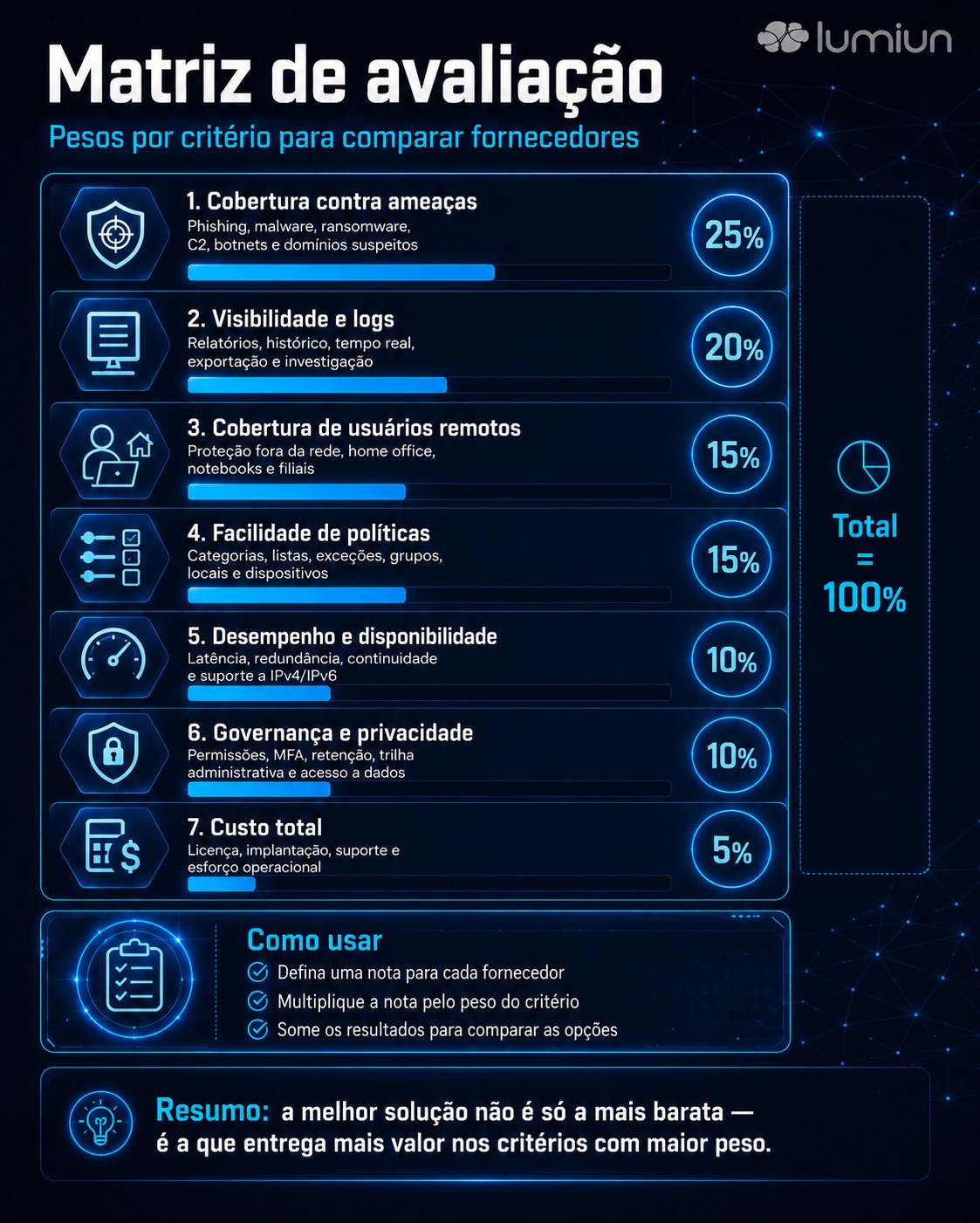
A simple way to evaluate suppliers is to create a weighted matrix. Example:
| Criterion | Suggested weight | What to watch out for |
|---|---|---|
| Protection against threats | 25% | Phishing, malware, ransomware, C2, botnets, suspicious domains. |
| Visibility and logs | 20% | Reports, logs by period, real-time, export, and investigation. |
| Remote user coverage | 15% | Off-network protection for laptops, home offices, and branch offices. |
| Policy ease | 15% | Categories, lists, exceptions, groups, locations, and devices. |
| Performance and availability | 10% | Latency, redundancy, IPv4/IPv6, and fault behavior. |
| Governance and privacy | 10% | Permissions, MFA, retention, administrative trail, and data access. |
| Total cost | 5% | Licensing, deployment, support, and operational effort. |
The distribution can change depending on the context. A school might give more weight to category-based control and protected search. An MSP might prioritize centralized management and client-based reporting. A company with remote work might increase the weight of off-network protection.
Checklist for evaluating a Protective DNS provider
Use this checklist during a demonstration, proof of concept, or RFP.
Protection
- What categories of threats are blocked?
- Does the solution cover phishing, malware, ransomware, botnets, and C2?
- Is there protection against newly created or suspicious domains?
- Are there TLD-based blocks, URL shorteners, or bypass methods?
- How does the solution handle false positives?
Implantation
- Does it work across headquarters, branches, and separate networks?
- Does it protect users working from home?
- Is there an agent for endpoints or another method for remote devices?
- How is the solution configured on routers, firewalls, or gateways?
- Does it support IPv4 and IPv6?
Management
- Is it possible to create policies by group, location, or device?
- Are there blocklists and allowlists?
- Does the solution allow exceptions without releasing entire categories?
- Is there a clear blocking page for the user?
- Are there access profiles for administrators?
Visibility
- What reports are available?
- Are there real-time logs?
- Is it possible to view logs by time period?
- Is there a CSV or API export option?
- Do the logs show the domain, origin, policy, and reason for the block?
Governance
- Who can access the reports?
- Is there MFA for administrators?
- Are there any records of administrative activities?
- What is the log retention policy?
- Is it possible to meet internal privacy and audit requirements?
Operation
- How long does it take to implement?
- Does support help with the initial setup?
- Does the solution generate many false positives?
- How are classification reviews conducted?
- Is the tool simple enough for the team's routine?
Common mistakes when choosing a Protective DNS solution
Choosing solely based on price
Price matters, but it can't be the only criterion. A solution lacking good visibility, adequate support, or that is difficult to operate can cost more in the long run.
Ignore users outside the network
If the company has laptops in home offices or teams traveling, the protection needs to extend to those devices. Otherwise, the policy only works within the office.
Avoid testing for false positives
Improper blocks can affect legitimate tools. Test how the solution handles exceptions, whitelists, and domain review.
Do not involve network, security, and support
Protective DNS affects security, connectivity, user experience, and support. The decision should involve those who administer the network, those who respond to incidents, and those who handle support requests.
Confusing DNSSEC, DoH, and Protective DNS
DNSSEC, DoH, and DoT are important, but they are not a replacement for a DNS protection policy. They solve different problems.
Do not make a pilot
A proof of concept with real-world cases helps to understand performance, coverage, ease of use, and impact on operations.
How to test a Protective DNS solution before purchase
The pilot program must simulate the company's actual routine. Simply activating the solution on a small network and verifying that the internet works is not enough.
Test scenarios such as:
- Access to known phishing domains in a controlled environment;
- Attempting to access blocked categories;
- Remote user outside the corporate network;
- Release of a legitimate blocked domain;
- Consulting logs to investigate a blockage;
- Exporting reports;
- creating different policies by group or location;
- Attempting to bypass the system using an external DNS server, proxy, or VPN;
- impact on corporate tools;
- Latency perceived by users.
Document the result. The best solution is not the one that appears most complete in the demonstration, but the one that solves real-world cases with the least operational friction.
Run an internet security test and see if your company's users are protected against the main threats.
Where does Lumiun DNS fit into this assessment?
Lumiun Lumiun DNS can be evaluated as a DNS security and browsing filtering solution for businesses, schools, and MSPs that need to block malicious domains, phishing, malware, ransomware, and unwanted website categories with simple operation and centralized management.
In practice, it helps apply browsing policies at the DNS layer, combining security, internet access control, and visibility for IT teams. This is useful for companies that want to reduce exposure to online threats without creating a complex security operation.
It also makes sense for schools that need to control content categories and for MSPs that want to offer managed browsing filtering and DNS security to different clients.
The main point is to treat Lumiun DNS as a complementary layer. It does not replace antivirus, firewall, EDR, backup, MFA, or user training. It helps reduce browsing risks and improves control over access to domains and website categories.
Essential criteria in 1 minute
Before choosing a Protective DNS solution, check if it:
- Blocks phishing, malware, ransomware, botnets, and suspicious domains;
- It protects users both inside and outside the corporate network
- Enables policies by group, location, or device;
- It offers reports, logs, and quick investigation capabilities;
- It facilitates blocklists and allowlists;
- It handles DoH, DoT, external DNS, and bypass attempts;
- It has good availability and low latency;
- Enables administrative access control;
- provides adequate support;
- It reduces risk without unduly increasing the complexity of the operation.
FAQ about Protective DNS
What is Protective DNS?
Protective DNS is a security approach that uses the DNS layer to block access to malicious, suspicious, or unauthorized domains, according to the organization's policy. It helps reduce risks before the website loads.
Is Protective DNS the same as a DNS filter?
These are closely related concepts. DNS filtering is the technology that blocks or allows access based on the domain being queried. Protective DNS is a security approach that uses this layer to protect against threats such as phishing, malware, ransomware, botnets, and C2 attacks.
Protective DNS replaces firewall?
No. Protective DNS and firewalls operate at different layers. Protective DNS controls domain name resolution. The firewall controls network traffic based on rules such as IP address, port, protocol, and application, depending on the solution.
Does Protective DNS replace antivirus or EDR?
No. Protective DNS helps prevent users from accessing malicious domains before connecting. Antivirus and EDR operate at the endpoint, analyzing suspicious files, processes, and behaviors.
What should a DNS protection solution block?
A DNS protection solution should help block domains associated with phishing, malware, ransomware, botnets, command and control, suspicious newly created domains, typosquatting, and unwanted categories, in accordance with the organization's policy.
Do DoH and DoT interfere with DNS filtering?
Problems can arise when users or applications use external resolvers not controlled by the organization. Therefore, a good solution should consider how to handle encrypted DNS, browser policies, endpoints, and bypass attempts.
Is DNSSEC a Protective DNS solution?
No. DNSSEC helps validate the authenticity and integrity of DNS responses, but it wasn't created to block categories of websites, phishing attempts, or malicious domains by policy.
How do you evaluate the effectiveness of a Protective DNS solution?
Evaluate threat coverage, intelligence updates, false positives, log visibility, remote user support, policy ease, performance, availability, and integration with security operations.
Does Protective DNS help against ransomware?
It helps reduce exposure to domains used in malicious campaigns, suspicious downloads, or communication with criminal infrastructure. However, it does not prevent all ransomware attacks and should be used in conjunction with other layers of security.
Is Protective DNS suitable for small businesses?
Yes. Small businesses are also exposed to phishing, malware, and malicious websites. Protective DNS can be a practical layer to improve internet security without requiring a complex operation.
Conclusion
Choosing a Protective DNS solution isn't just about hiring a resolver with threat blocking. It's about deciding how the company will implement DNS security, control browsing, protect users, and gain visibility into access and blocks.
The best choice combines threat protection, ease of management, coverage for remote users, useful reports, a good browsing experience, and proper governance.
For businesses, schools, and MSPs that need to protect browsing without adding excessive complexity, Lumiun DNS can be considered a DNS security and browsing filtering solution focused on blocking malicious domains, category control, and centralized management.
The next step is to test the solution in a real-world pilot program, with policies, users, and scenarios similar to the organization's routine.


