


If you're responsible for managing the computer network, you know how complex it is to control internet usage in your company using conventional tools. This tends to get worse when internet control is in a company with branches and the professional needs to keep everything running perfectly.
In this article I will list the problems that a company with branches typically faces in ensuring data security and preventing loss of employee productivity due to internet access.
Finally, let's explore a platform that will help us increase information security and enhance employee focus in the workplace.
Data security

When you're an IT analyst or director at a company with branches, it's crucial to make important decisions regarding network control and security. This is especially true when the internet is the primary tool for the company's full operation. Adding to this responsibility, the volume and sophistication of cyberattacks aimed at harming organizations are constantly increasing; we even published an article with tips on how to protect against these attacks. Therefore, it's essential that IT professionals are knowledgeable about tools that can help block these attacks to prevent data loss, reduced productivity, and decreased revenue.
Furthermore, the budget for investing in network security and internet control is always limited in most small and medium-sized businesses. With this in mind, it's necessary to study the entire network landscape, act quickly, and find an integrated solution to improve digital security without overspending and overburdening team productivity.
Employee productivity

The internet is the main culprit against focus and productivity in companies. The waste of time is so great that, according to research , employees are interrupted an average of 14 times a day by internet tools. And worse, after an interruption, it can take an employee more than 20 minutes to return to the original task.
Multiplying that by the number of employees your company has gives you the total number of wasted hours per day. And that doesn't even include time available for rest.
Without any kind of control or policy regarding internet access, it's normal for employees to spend some of their time accessing personal email, social media profiles, watching YouTube videos, messaging on WhatsApp, or researching topics of interest.
Therefore, controlling internet access in a company with multiple branches is a fundamental policy in team management, as it reduces wasted time by increasing focus, in addition to preventing various security problems related to accessing harmful websites or common internet scams.
Multiple branches or multiple problems?

Some say that the synonym for multiple branches is multiple problems . Well, depending on the case, that analogy isn't wrong.
After years of interacting with professionals responsible for managing companies' networks and internet, we've heard many accounts of problems that cause unwanted expenses, in addition to the security and productivity headaches described above.
See what the main problems are with internet use in a company with branch offices.
Scalability
In most cases, companies do not have a tool for internet security and access control. And when they do, this tool is not scalable to other branches.
For most professionals, news of a new branch is usually seen as good news: " Wow! We're growing!! 🚀" , they think. But the IT manager thinks: "Damn it! I'll have to install and configure everything again! 😥" , he complains.
Traditional solutions for managing internet access control often rely on the installation and configuration of servers, along with infrastructure costs. This is a time-consuming process that increases costs for the company.
Displacement
Companies face unnecessary travel expenses every time a new branch opens or a network or computer problem occurs at a distant branch.
And let's not even include the time lost due to the professional's commute.
But rest assured! From now on, I'll show you how to solve these problems using a single platform and at a low cost.
Internet access management with Lumiun
Lumiun is a service for managing internet access in companies. On a single platform you will find the following features:
- Access control:
- Allowing and blocking applications, websites, and website categories. Including by time of day;
- Safesearch , and YouTube to ensure that inappropriate content is not displayed in search results;
- Domain search where Lumiun scans and finds its category, reputation, description, recent visits, and even a preview of the page.
- Security:
- Option to set the minimum reputation level to access a website;
- Blocking websites that belong to categories considered harmful, such as hacking, malware, phishing, etc.
- Firewall:
- Forget the old and difficult concept of implementing firewall rules on your network. With Lumiun, you can add blocking and allowing rules by port, protocol, source, and destination with just a few clicks. Furthermore, there are predefined settings to assist even those less familiar with the subject.
- Business VPN:
- Lumiun's Business VPN is a solution that brings external collaborators closer together, uniting them all on a single network, increasing security and productivity.
- Speed:
- With this feature, you can limit the amount of download and upload speeds for groups of devices. This way, you can distribute your internet bandwidth as you see fit or according to the needs of each group.
- Reports:
- All these resources are useless if it weren't possible to track the results. With Lumiun, you can monitor in real time which websites are most accessed or blocked, access by period, security blocks, firewall logs, devices that consume the most internet bandwidth, external collaborators connected to the VPN, and much more.
Connect the Lumiun Box in each branch
With Lumiun, managing the internet for all your branches is very easy. First, you must connect the Lumiun Box . From then on, internet access requests from your network will be checked against Lumiun's servers. This will make your network faster and more secure! This check evaluates the access rules created for your network, considering criteria such as website category, security level and reputation, and time of the request.
If the request is approved, access occurs normally. There are no other interventions that could modify the traffic or generate problems. If the request is blocked, the user sees an informational page, which can be customized for their company.
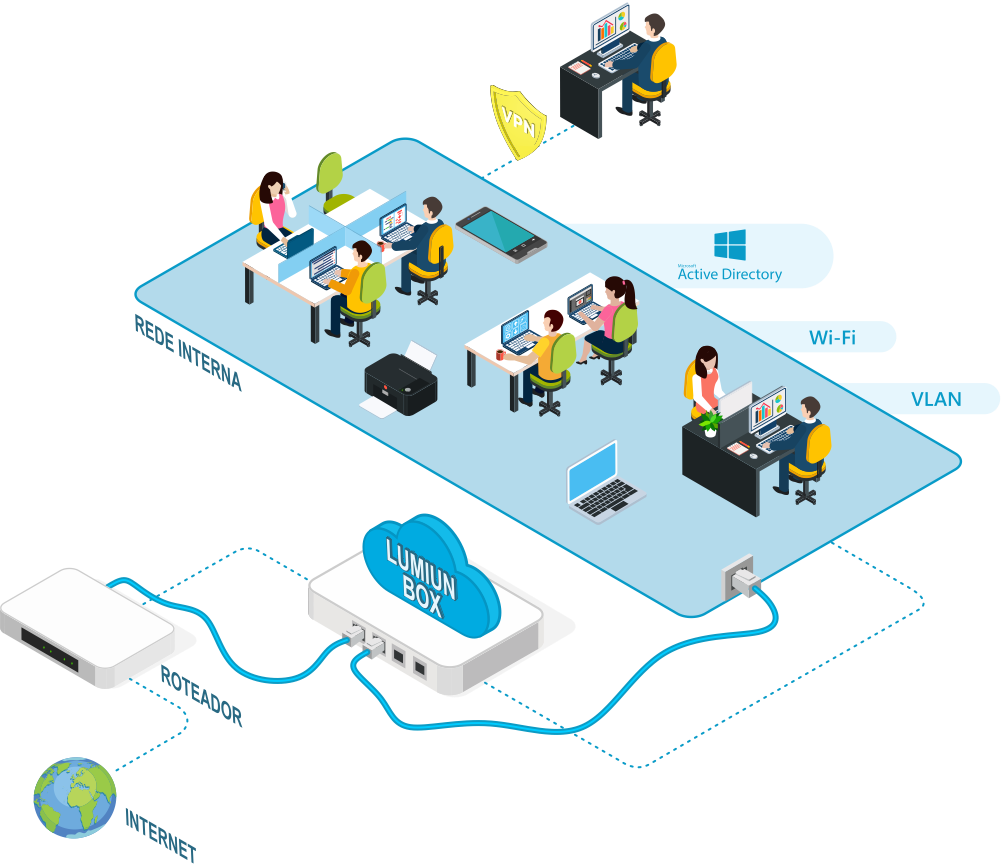
Everything is simple, requiring no technical knowledge or server installation and configuration.
You might be wondering: what if the equipment stops working? Will I have to buy another device and configure everything again? No! The Lumiun Box equipment is simply an intermediary to identify devices on the network, redirect DNS requests to our servers, apply firewall rules, and add internet speed limits. All configuration data is saved in the cloud, accessible through the control panel. If the equipment stops working, which rarely happens, we will send you another one free of charge. Then, simply replace the equipment and all your settings will be applied automatically.
Control Panel
After connecting the Lumiun Box to the branch network, you must access the control panel and complete the configuration. The Lumiun Control Panel is available at app.lumiun.com , accessible from anywhere or any device. Enter your email and password and, if you are an administrator, take advantage of all available features.
Okay, so far I've only shown how to configure and access Lumiun. But the intention of this article is to demonstrate how efficient Lumiun is for controlling internet usage in a company with branch offices. See below.
Advantages and benefits of Lumiun
After accessing the Lumiun control panel, the first page displays an access summary and internet status for all branches. See a portion of the dashboard in the two images below:
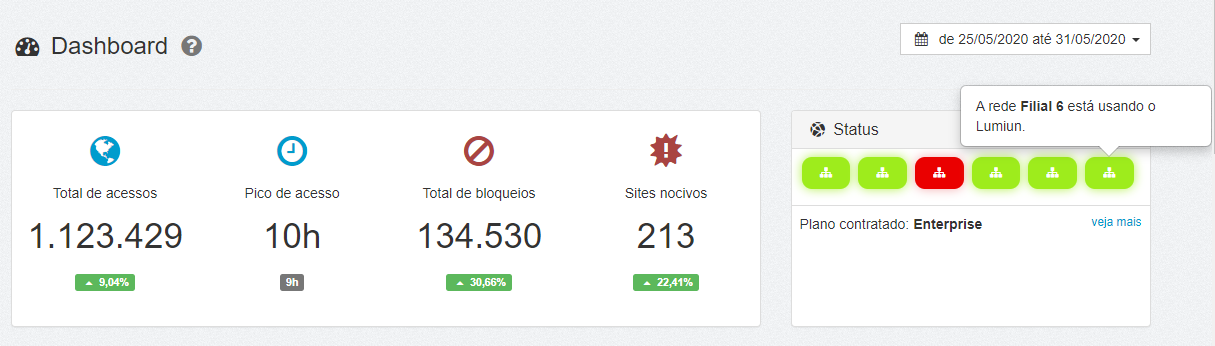
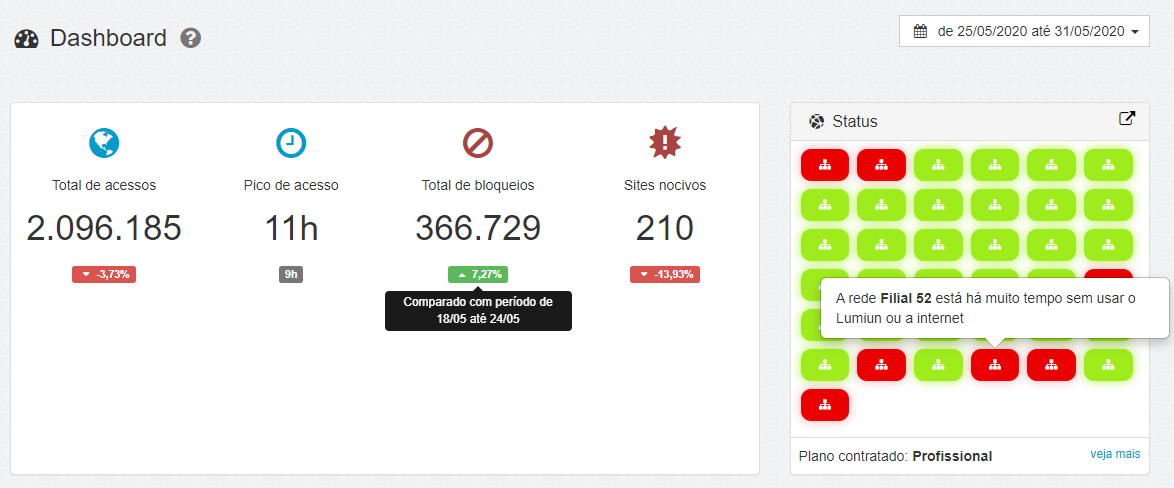
Notice that the card on the left displays some insights about access during the period selected at the top of the image. The card on the right displays the status of all networks registered in Lumiun. Green means the network is working normally, orange means it has been disconnected for a maximum of 2 hours, and red means it has been disconnected for more than 2 hours.
See another view of the registered networks, with more details:
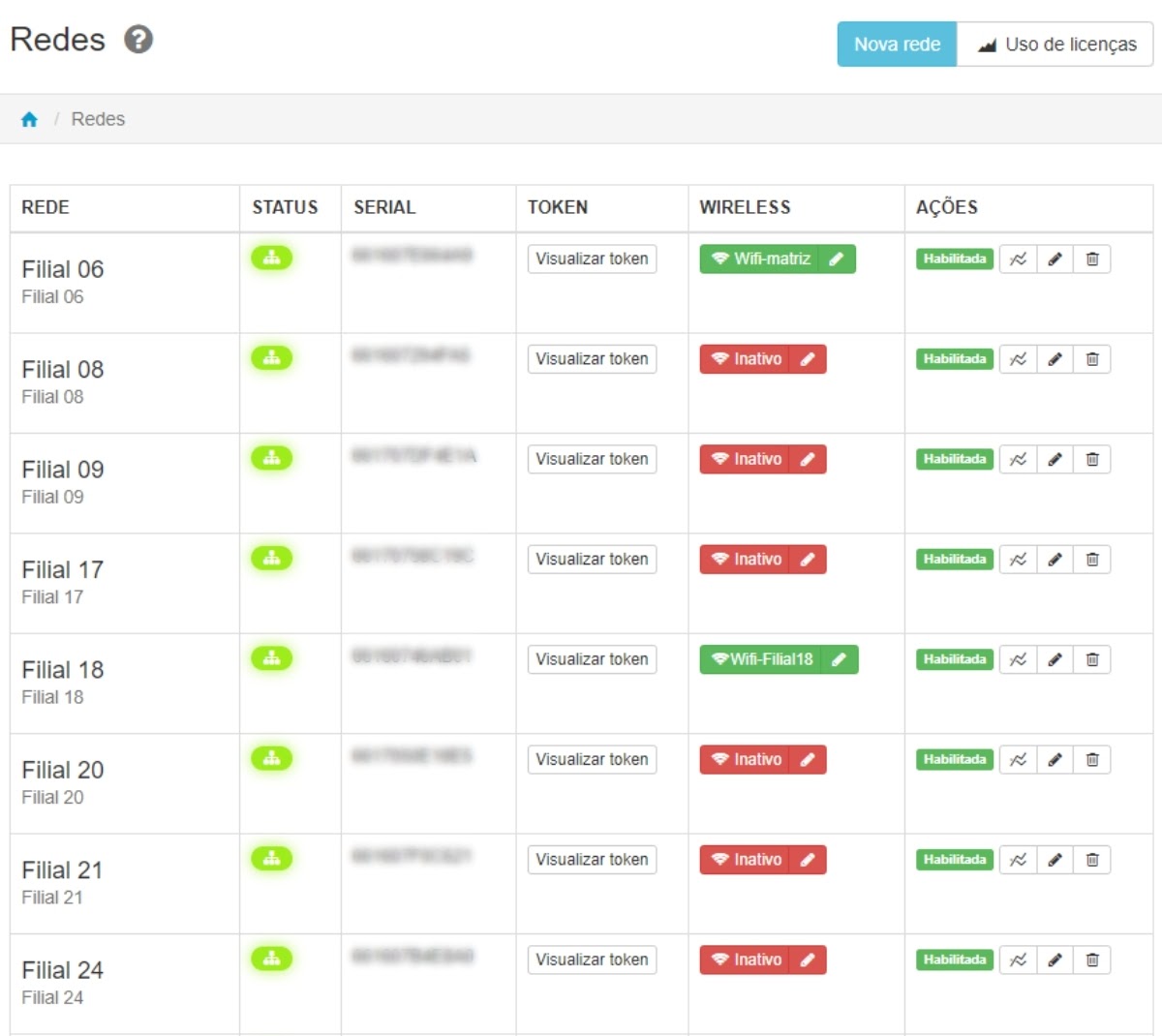
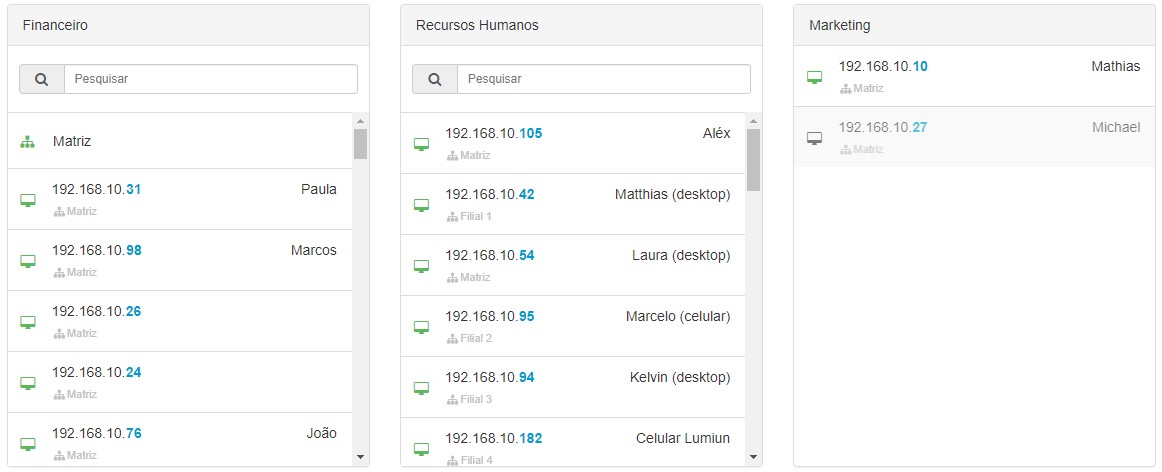
Another great benefit of Lumiun is grouping devices (computers, laptops, cell phones) regardless of their physical location into a single group and applying access rules to everyone.
For example, you can create a group called "Finance" and drag the equipment belonging to the finance department of each branch. Any rule changes in the group will be automatically replicated to all equipment. See an example in the image below:
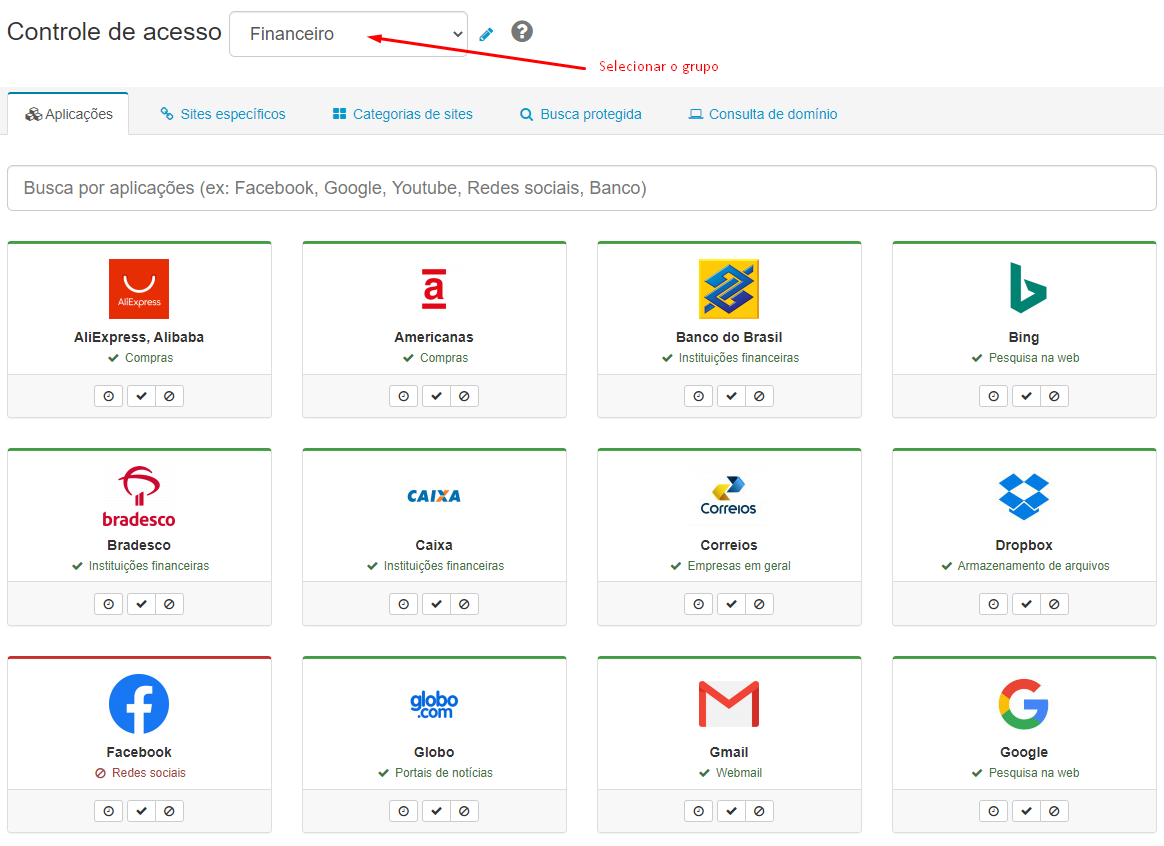
With the groups defined, simply access a feature, such as "Access Control," and apply the rules for allowing and blocking access, as illustrated in the image below:
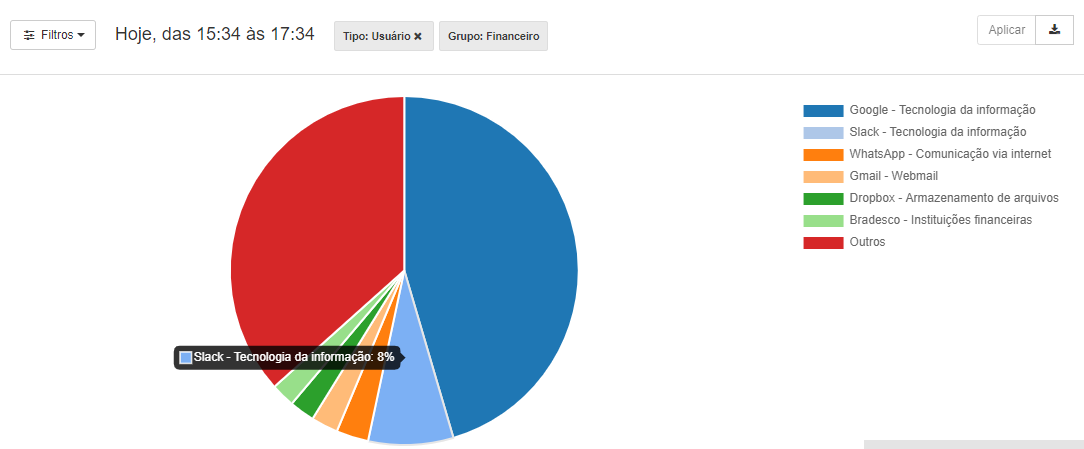
With the access policy in place, it's time to track the impact of the actions through reports. Lumiun offers various analytical and management reports that aid in decision-making.
"Most Accessed Sites" report , filtered by the Financial group.
Facebook application report filtered by the Finance group.
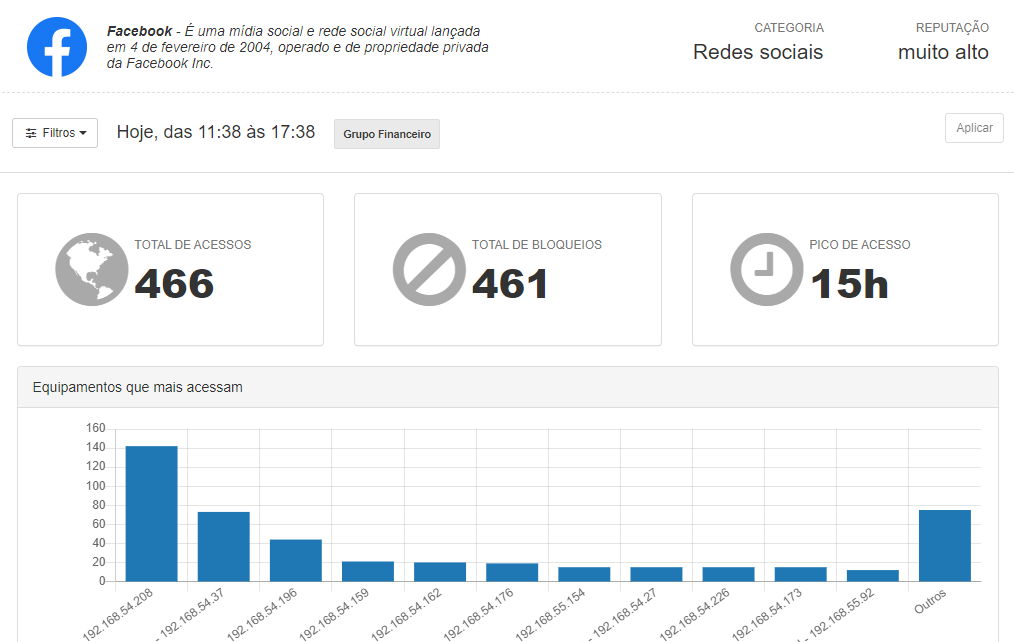
With Lumiun you can obtain complete information about internet usage in your company, branch, or specific equipment. Discover all the reports available on the Lumiun website .
In practice
I understand if you still have doubts about Lumiun's efficiency. Most of our clients also doubted that a single tool could do so much in such a simple way without the need for extensive courses or training.
This was the case with MB Farmácias, which hired Lumiun to manage its 36 branches and increase the safety and productivity of its 500 employees.
Before Lumiun, MB suffered from cyberattacks, and its owner wanted something that could increase employee focus by preventing access to websites outside the scope of work. After implementing the service, the company no longer had problems with attacks, which also increased the confidence of its clients, ensuring the protection of sensitive data. "I feel secure having control over access in my company," said owner Eder Fernandez.
Learn more about the MB Farmácias success story .

The cherry on top
If you've read our previous articles here on the blog, you probably know that Lumiun has launched the Enterprise VPN . But for those who are here for the first time, please note that the VPN feature is included in the Lumiun Enterprise package.
Business VPNs are proving to be an important ally for companies in the current pandemic scenario. Through this resource, employees working remotely can connect to the local network of any branch and access files, servers, and remote desktops securely and with encryption.
I hope this article has helped you find a solution for controlling internet usage in a company with branches. But if you still have questions, you can schedule a no-obligation demonstration. See how it all works in practice.
If you have any questions, you can also write them in the comments below or send an email to alex@lumiun.com .
Until next time!


