


Advertisements for products and services are everywhere. When we are browsing social media, on our news website, in emails, on search engines.
We often see advertisements and don't even realize what they contain, perhaps because we are bombarded with so much information.
In addition to privacy concerns, advertisements can pose a risk to security , considering that ad networks can be hijacked, altering what should be an offer or benefit to a malicious website or file. This attack is called malvertising.
What is malvertising?

The name is a combination of "malware" and "advertising." Basically, hackers pay for ads on trusted websites that can:
- Pointing to malicious websites
- Forcing malware download just by viewing the ad
- Using the visitor's device resources for cryptocurrency mining
There is no common location where the ads can be displayed or an appearance that can be distinguished from a real advertisement. Pop-ups, banners, text, and even buttons can be infected with malware.
Earlier this year, the New York Times and BBC websites featured ads containing malware, according to a KnowBe4 .
The growth of the attack

The first instance of the attack occurred in late 2007, affecting sites such as MySpace through a vulnerability in Adobe Flash.
Back in 2011, Spotify, which was still only a computer application, was hit by malware that affected users who didn't have antivirus software installed. The ad was a forced malware download, and users didn't even need to click on the ad to be affected.
In 2017, the attack even managed to bypass ad blockers, infecting the devices of users who were using the blocking tool precisely for this purpose.
That same year, reports of YouTube ads containing malware were already emerging.
In 2018, it was considered one of the main online threats, where some hackers modified previously used scripts, absorbing so many resources from the victim's computer that it could barely function.
In 2019, 1 in every 250 ads was still malicious.
Some examples of real attacks
Below you will see images that we have collected here at Lumiun and that are still displayed daily with fake offers for various products.

Notice that the advertiser's name is "Mega Ofertas" (Mega Offers), while the layout is that of Lojas Americanas, a well-known online retailer. Furthermore, the product price is completely out of line with the average price of a similar product, and the destination link is "VEMCOMPRARBARATOO.COM" (COMEBUYCHEAPLY.COM) with a spelling error. There are many clues in this case.
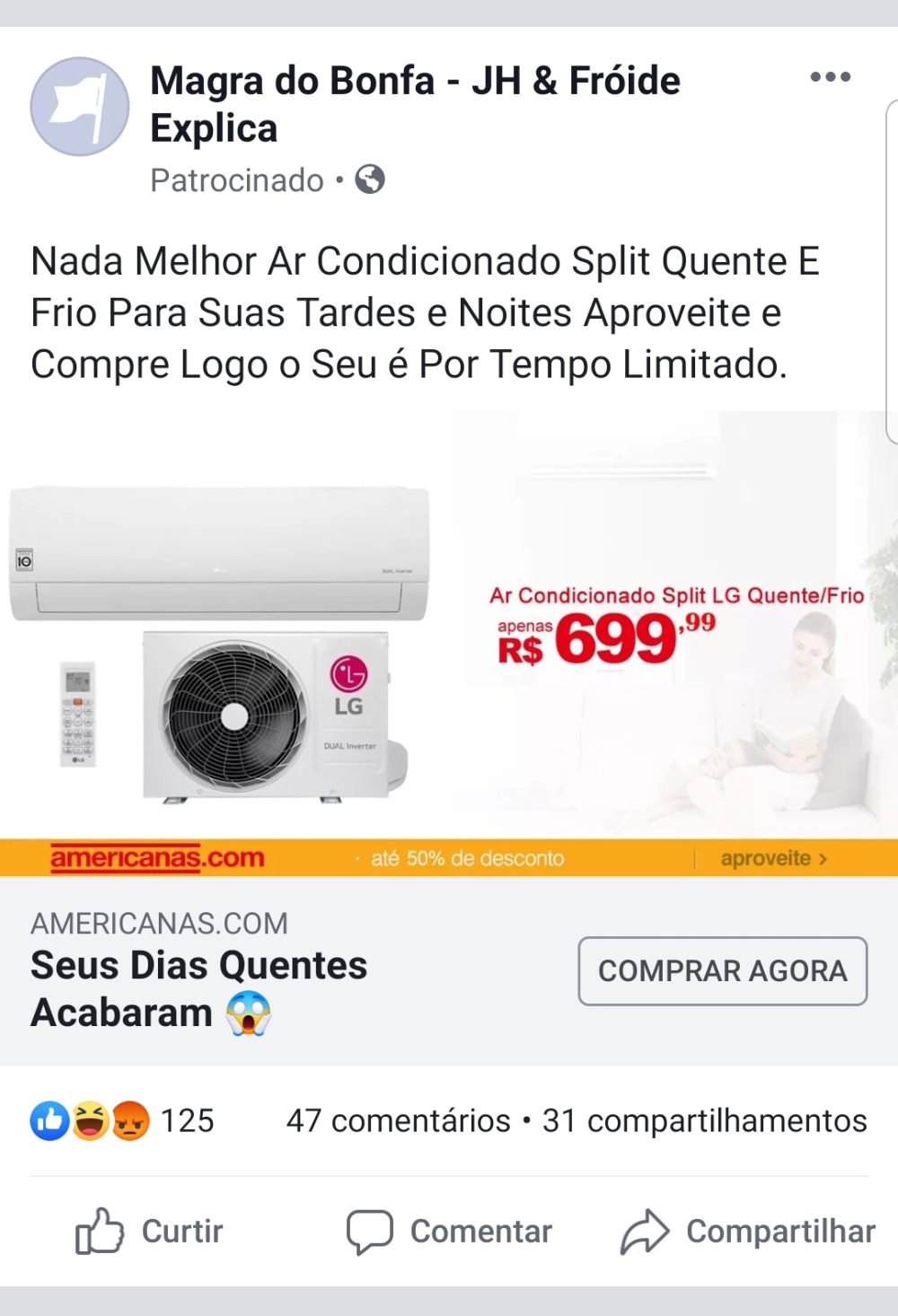
Another fake ad using the Americanas website. Notice that the advertiser's name at the top is rather comical and unusual. Furthermore, once again, the product price does not reflect reality.
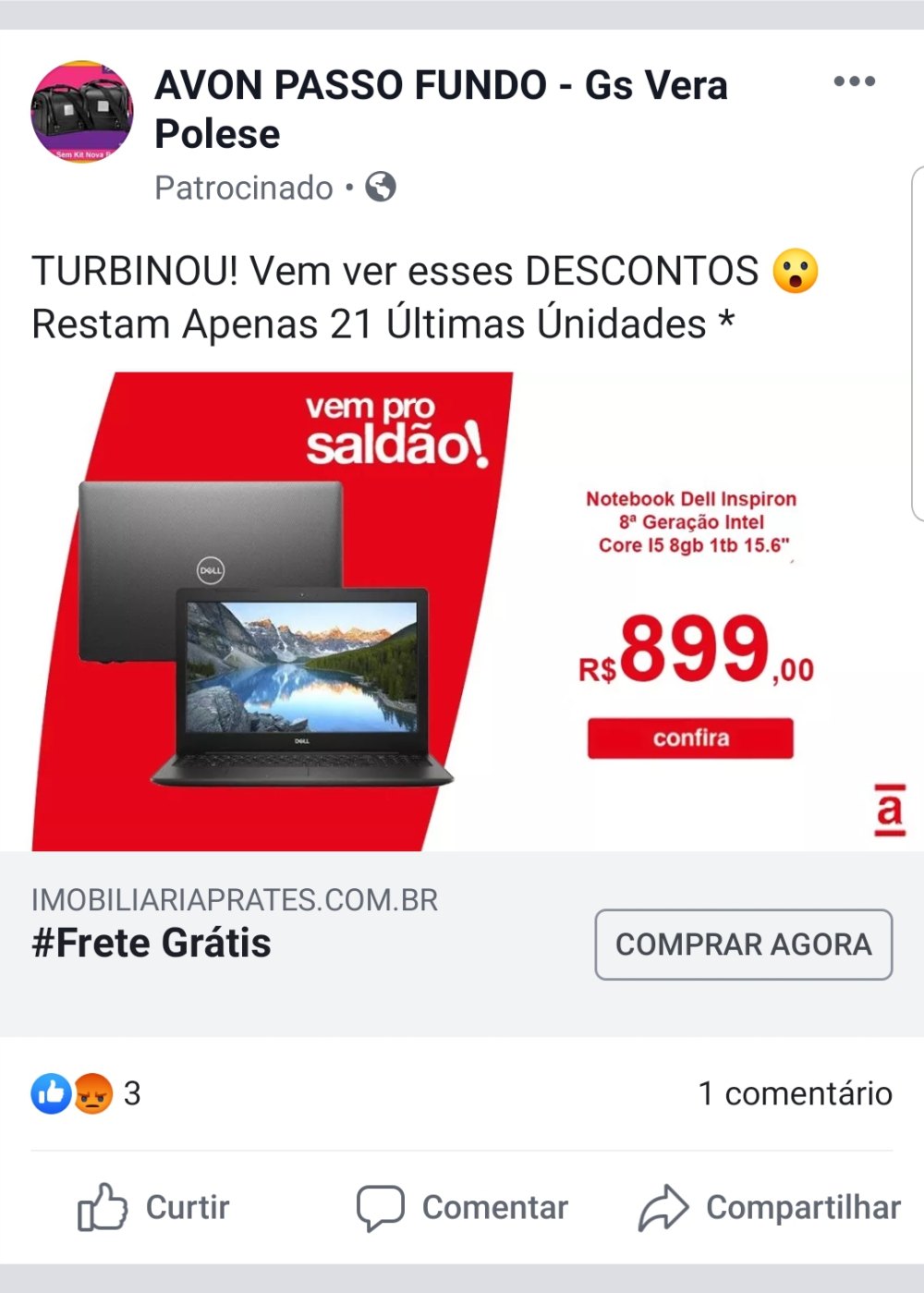
In yet another advertisement using the Lojas Americanas branding, this attack is a little easier to identify. The first sign is the advertiser's name at the top, with an image that doesn't match the company at all, and the name "AVON PASSO FUNDO," referring to another company, clearly indicates a scam. In addition to the product price, the destination website also displays "IMOBILIARIAPRATES.COM.BR," which is completely different from the business area of the advertised product.
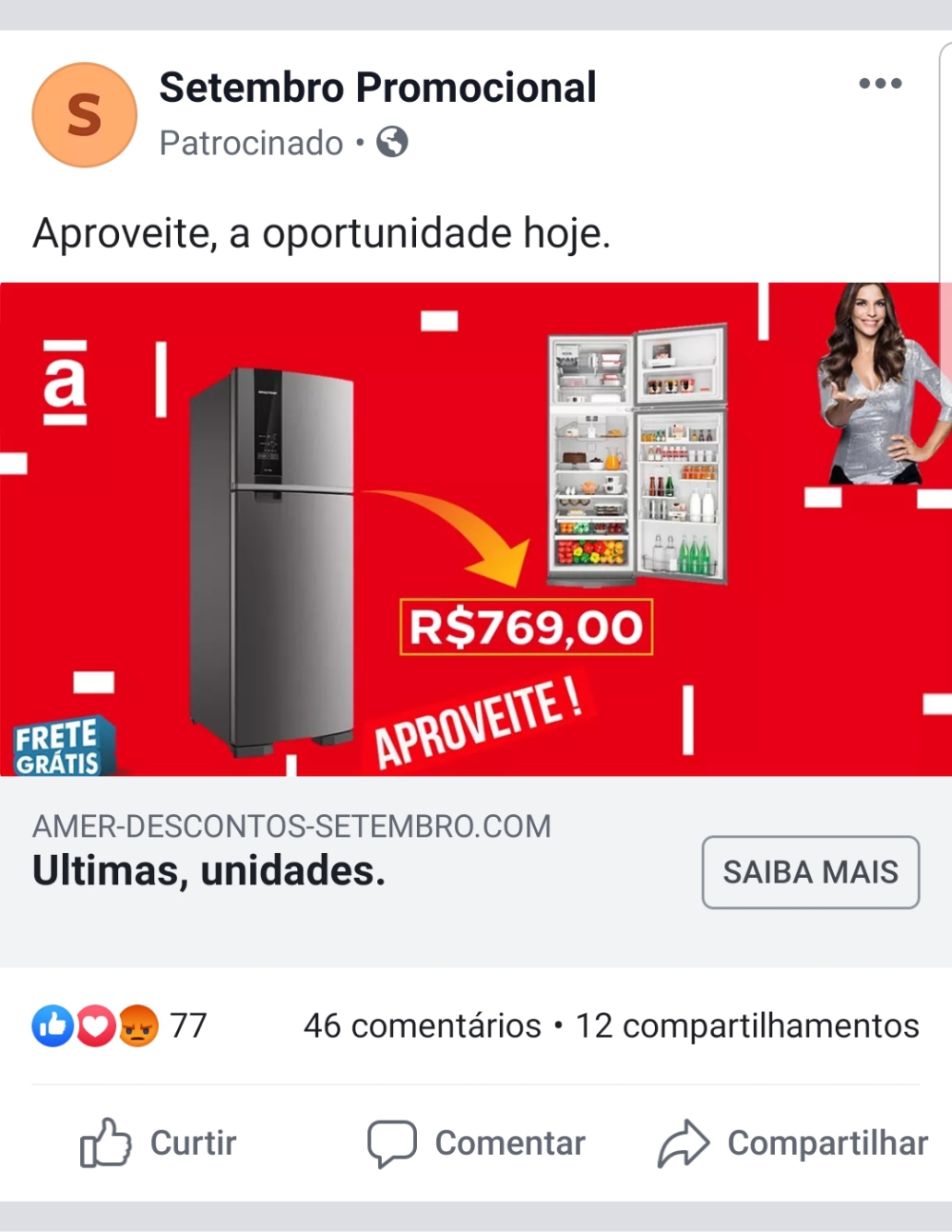
Who wouldn't want a brand new, giant refrigerator with multiple functions for a fraction of the usual price? That's exactly why this scam has become so popular. As in the other examples above, the advertiser's photo is generic, the name at the top is different from the ad, and the price and destination link are strange.
How to protect yourself?

There are several habits and tools to protect yourself from malvertising attacks. Constant improvements in the advertising systems of large companies have improved the filtering of content that may be harmful to ad recipients. However, with each improvement, new ways for hackers to introduce harmful material into advertising channels emerge.
With that in mind, we've listed below some common practices that greatly help maintain the information security of professionals and companies.
1 – Don't click on suspicious links
Although reputable websites can be targeted by this type of attack, the sites that contain the highest number of dangerous ads are those with low relevance.
Audits and systems for detecting this type of attack are present on trusted websites known to most internet users.
Therefore, when accessing a and unreliable website
2 – Beware of “freebies”
Donations and giveaways are handled by NGOs. Hackers just want you to click. Ads promising free gifts or free purchases should be avoided at all costs.
The main strategy in this case is to make the advertisement seem as attractive as possible, and what could be more attractive than easy, effortless money?
"Congratulations, you've been selected to win a free X product." Don't click, because you haven't been selected to win anything, or rather, you've been selected to fall victim to a malvertising scam.
When you see an advertisement that seems too good to be true, remember that it most likely isn't.
3 – What are the links' addresses?
Over the years, large companies like Google and Facebook have done a good job of requiring that a website's display URL match the destination URL.
This prevents click fraud. If an ad can use any display URL it wants, it can pretend to be Volkswagen giving away a free car, when in reality, it's hackers trying to capture your data.
When you hover your mouse over a link, and the URL preview is hidden or doesn't match the product or brand in the ad, don't click it.
4 – Ad blockers
Ad blockers don't protect against all malvertising schemes and certainly won't protect you from malicious websites in general, but they are still a good layer of protection if you follow the previous tips.
As I said before, new strategies to bypass ad blockers are created daily, implementing a digital arms race of protection and attack all the time.
5 – Web content filter
Perhaps the most effective solution for malvertising attacks is DNS-level content filtering . DNS filtering can assess the content rating of a website and block it before any malware can even install itself on the user's device.
Furthermore, blocking websites considered harmful can protect the user against cyberattacks in general, such as phishing and data hijacking.
The best layer of protection for businesses is one that doesn't depend on the knowledge and goodwill of users, and only systems that block access to websites can achieve this.
Lumiun is a Brazilian internet access control tool, with payment in local currency (R$) and support entirely in Portuguese. Specializing in improving information security for companies and professional productivity, Lumiun offers features such as a firewall , web content filtering , and a Business VPN for secure remote access.
You can find more detailed information in our presentation , available for free download.
To conclude
In conclusion, it is important to emphasize that the vast majority of social engineering attacks in companies occur due to a lack of knowledge and excessive consumption of content outside the scope of work, harming the security of company data and also the productivity of the team.
Our goal here at Lumiun is to help companies identify their needs in this regard, and implement systems and processes that align with the organization's overall objective.
Until next time!


3 comments
Comments closed