


When an employee clicks on a phishing link, tries to access an unknown website, or uses a laptop outside the company network, security depends not only on antivirus software or firewalls.
Before a page loads, there's usually a prior step: the DNS lookup. This is when the device tries to find out which address corresponds to the accessed domain. The DNS filter uses this step to decide whether access should be allowed, blocked, or treated as a risk.
This article doesn't focus on repeating the basic explanation of what a DNS filter is. For that, it's worth reading the content about corporate DNS filters. We also won't go into a complete list of purchasing criteria; that topic has already been covered in the article about what to evaluate in a Protective DNS solution.
Here, the aim is to show how DNS filtering protects a company's internet connection in practice, especially in scenarios with remote users, multiple units, and clients managed by MSPs.
Quick answer: how does DNS filtering protect a company?
DNS filtering protects the company by blocking malicious, suspicious, or unwanted domains before the website loads. It can prevent access to phishing pages, malware, ransomware, botnets, and website categories that are incompatible with the organization's policy.
In practice, when a user tries to access a website, the query goes through a DNS resolver with security policies. If the domain is associated with a threat or a blocked category, access may be interrupted before the browser loads the page.
This model is useful for businesses, schools, and MSPs because it adds a preventative layer of internet security and facilitates browsing control without relying solely on manual blocking on each computer. CISA describes Protective DNS as a way to actively filter DNS queries and block, redirect, or apply a sinkhole when there is a match with threat indicators.
Why is DNS filtering a practical protection for businesses?
DNS filtering is useful because it works at a common stage of browsing. Whenever a user accesses a domain, the device needs to resolve that name before connecting to the destination.
This creates a simple and efficient control point.
Instead of waiting for the user to reach the website and then trying to contain the problem, the DNS filter can block access before loading. This helps reduce exposure to fake pages, malicious downloads, domains used by botnets, and content inappropriate for a corporate environment.
Cloudflare explains DNS filtering as the use of DNS to block malicious websites and filter harmful or inappropriate content, giving organizations more control over what can be accessed on managed networks. The same source emphasizes an important limitation: attacks create new domains rapidly, so no single filter can block them all.
What happens when a user clicks on a malicious link?
Imagine that an employee receives a fake email simulating a password update. The link leads to a page that looks like the company's real service, but the domain was created to steal credentials.
Without a DNS filter, the browser can load the fake page. From there, the risk depends on the user's behavior: they might enter their login, password, MFA code, or other sensitive information.
With DNS filtering, the flow changes:
- The user clicks on the link.
- The device sends a DNS query to discover the domain address.
- The DNS resolver checks if the domain is allowed, blocked, or suspicious.
- If the domain is associated with phishing, malware, or another blocked category, the DNS response may be denied, redirected, or handled according to policy.
- The website either fails to load or the user sees a blocked page.
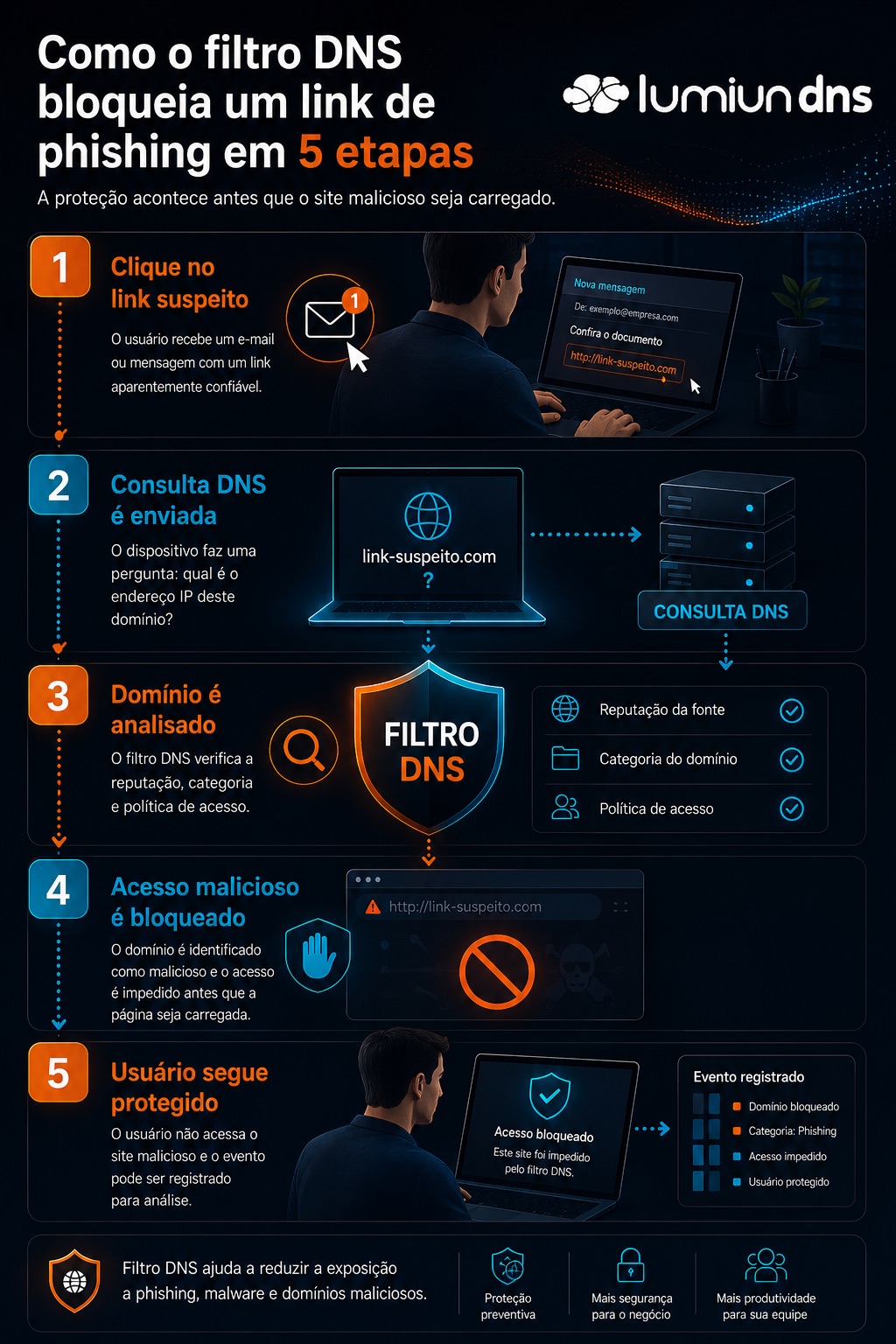
For the company, this reduces the chance of a click turning into an incident. For the MSP, this blocking also helps demonstrate value to the customer, because the protection happens in a visible and measurable way.
In what situations does DNS filtering make a difference?
DNS filtering isn't just useful against phishing. It helps in several common scenarios in daily corporate life.
1. Accessing phishing websites
Phishing websites attempt to trick users into stealing credentials, banking information, or corporate access.
DNS filtering can block domains associated with fake pages before the user sees the login form. This doesn't eliminate the need for training, MFA, and email security, but it reduces exposure when someone clicks on a dangerous link.
2. Accessing pages containing malware
Some websites are used to distribute malicious files, redirect users, or load dangerous scripts.
By blocking domains known to host malware, DNS filtering makes it harder to access the point of infection. This protection is especially important for companies with users who access many external websites throughout the day.
3. Communication with botnets and criminal infrastructure
Many malware programs rely on domains to communicate with command and control servers, also known as C2 servers.
When a DNS security solution identifies and blocks these domains, it can help disrupt some of this communication. This doesn't replace EDR, antivirus, or incident investigation, but it adds a useful barrier.
4. Blocking inappropriate categories
In addition to security, DNS filtering also helps control browsing activity.
The company may block categories such as adult content, gambling, games, piracy, proxies, unauthorized VPNs, or other types of websites that do not comply with its internet usage policy.
The goal shouldn't be to monitor every click an employee makes. The aim is to create clear rules to reduce risks, prevent inappropriate access, and keep browsing aligned with the work environment.
5. Protection in guest networks
Guest networks often include devices that the company does not directly manage.
In these cases, applying DNS filtering at the network level helps protect the environment against access to malicious domains and inappropriate content, even without installing agents on visitors' devices.
For schools, this can also be useful in student networks, labs, and shared environments.
Does the DNS filter protect remote users?
Yes, but it depends on how the protection is applied.
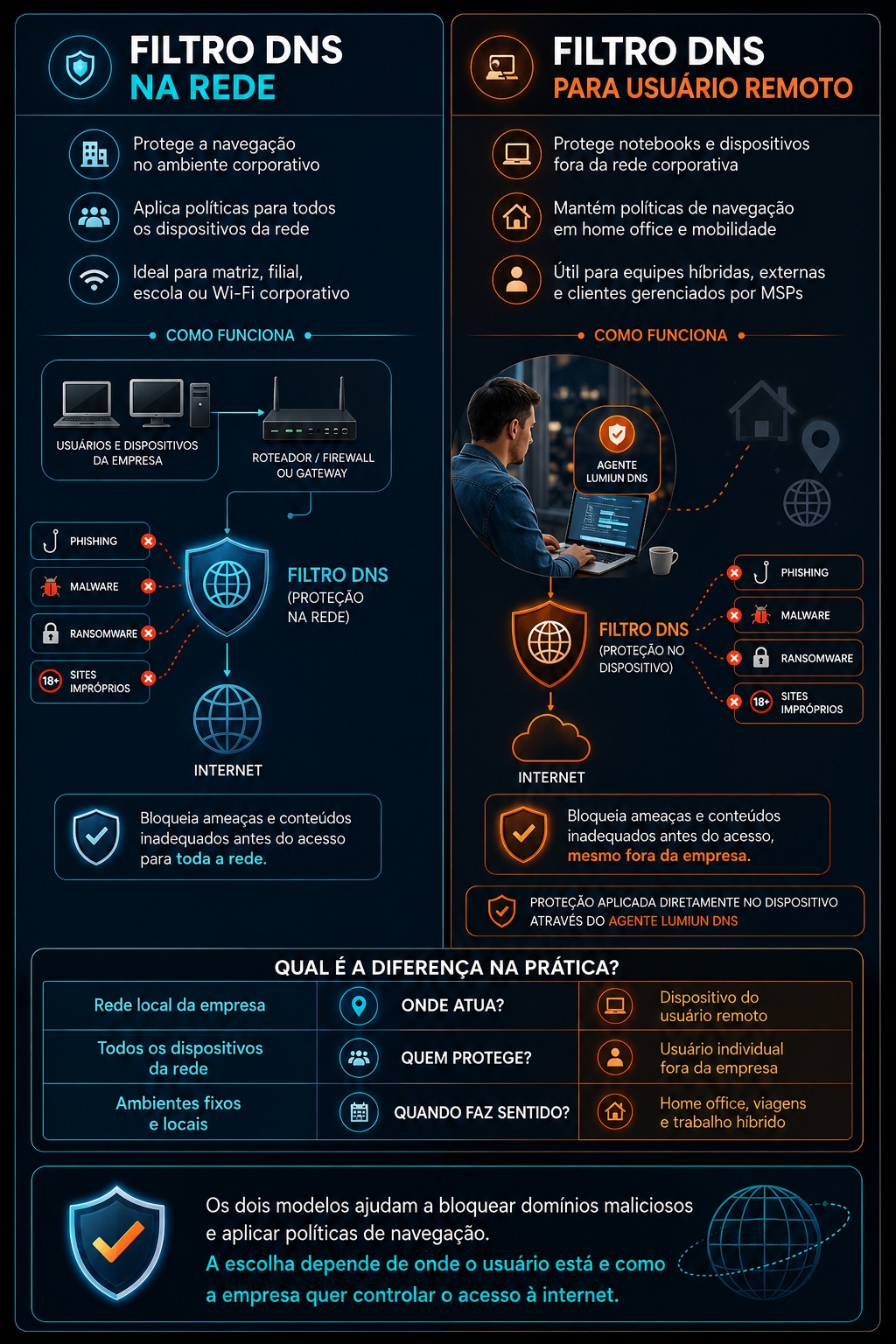
If the DNS filter is configured only on the office router or firewall, it protects devices while they are on that network. When the user takes their laptop home, travels, or uses another connection, the policy may no longer apply if there is no additional configuration.
To protect remote users, the company needs to ensure that DNS queries continue to pass through the protected service. This can be done through different methods, such as an on-device agent, VPN, MDM, or managed DNS configuration.
In practice, the important question isn't just "does the solution have DNS filtering?". The correct question is:
How does the policy remain active when the user is outside the company network?
For MSPs, this is an important operational difference. Clients with hybrid or remote teams need protection that extends to the device, not just the physical office network.
Is it possible to control web access without installing software on computers?
In many scenarios, yes.
When a DNS filter is configured on the network, such as on the router, firewall, gateway, or DHCP server, devices in that environment can use the protected DNS without individual installation on each computer.
This is useful for:
- offices;
- branches;
- schools;
- laboratories;
- administrative networks;
- Corporate Wi-Fi networks;
- visitor networks;
- MSP clients with a simple structure.
However, there is a caveat: this model works best when the device is within the controlled network. For remote users, laptops on the go, or teams working from home, it may be necessary to use an agent or other management method to keep protection active.
Therefore, web access control without software is possible on the network. For protection outside the network, it is necessary to plan the path of DNS queries.
Why is DNS filtering useful for MSPs?
For MSPs, DNS filtering is valuable because it combines security, control, and ease of operation.
An MSP typically manages multiple clients with varying levels of maturity, budget, and infrastructure. Creating manual rules in each environment, reviewing site-by-site blocks, and responding to support tickets without visibility is time-consuming and reduces margins.
With a DNS-based browsing filtering solution, the MSP can standardize policies, apply rules per client, track reports, and deliver a clear layer of protection against common threats.
In practice, DNS filtering for MSPs helps in four ways.
1. Standardize policies among clients
The MSP can create policy templates for different customer profiles.
For example:
| Customer profile | Recommended initial policy |
|---|---|
| Administrative office | Blocking phishing, malware, gambling, adult content, and piracy |
| School | Blocking of adult content, games, gambling, malicious websites, and safe searching |
| Clinic or doctor's office | Protection against phishing, malware, and non-work-related categories |
| Company with visitors | Restrictive policy for guest Wi-Fi and a balanced policy for employees |
| Client with remote team | Policy applied by device, not just by network |
This avoids starting from scratch with each deployment.
2. Reduce operational effort
Manual blocking requires constant maintenance. A category-based policy, combined with allowlists and blocklists, reduces this effort.
If a legitimate tool is blocked, the MSP can create a specific exception instead of allowing an entire category. If an inappropriate domain escapes categorization, it can be added to the blocklist.
3. Demonstrate value with reports
Access and blocking reports help the MSP demonstrate what is being protected.
They also help answer questions such as:
- Which categories generate the most blocks?
- Which locations or devices appear to be unprotected?
- Which domains were blocked most often?
- If there are many attempts to access proxies, VPNs, or prohibited categories;
- If a policy is blocking legitimate tools.
The key is to avoid turning reports into individual surveillance. The focus should be on management, security, diagnosis, and policy improvement.
4. Create a recurring security offer
DNS filtering can be offered as part of a managed internet security service.
For the end customer, the proposition is easy to understand: block dangerous websites, reduce exposure to scams, and control inappropriate categories.
For the MSP, the value lies in recurring revenue, standardization, and the ability to deliver security without excessively increasing operational complexity.
What should be configured first in a DNS filter policy?
A good implementation starts simple. Then, the policy evolves based on reports, calls, and the needs of each environment.
Layer 1: Security
The first step is to block categories linked to threats.
Prioritize:
- Phishing;
- malware;
- ransomware;
- botnets;
- malicious domains;
- suspicious domains;
- Newly created, high-risk domains;
- Unauthorized cryptocurrency mining;
- Use URL shorteners when it makes sense.
This layer should be applied to all users whenever possible.
Layer 2: Inappropriate content
Next, define categories that don't match the environment.
Common examples:
- adult content;
- betting and gambling;
- piracy;
- online games;
- unauthorized proxies and VPNs;
- High-risk or low-reputation websites.
In schools, this layer tends to be more restrictive. In companies, it must respect internal policies and work routines.
Layer 3: Productivity
This includes categories that can be blocked or allowed depending on the user's profile.
Examples:
- social media;
- streaming;
- entertainment;
- shopping;
- music;
- news;
- Generative AI tools.
The best approach is to avoid a one-size-fits-all rule. Marketing may need social media. IT may need access to technical forums. Administrative teams may have other needs.
Layer 4: exceptions
Every policy needs well-controlled exceptions.
Use whitelists to allow necessary tools without opening up an entire category. Use blocklists to block specific domains that haven't been handled by category.
This fine-tuning reduces calls and avoids overly rigid policies.
Layer 5: protection against bypass
Users can try to bypass the filtering by using VPNs, proxies, Tor, or external encrypted DNS.
Blocking bypass methods helps maintain policy effectiveness, but it shouldn't be treated as perfect protection. Bypass techniques evolve, and the company may need to combine DNS filtering with firewall rules, device management, and administrative policies.
What can't a DNS filter resolve on its own?
DNS filtering is a preventative layer, not a complete cybersecurity solution.
It helps block access to malicious domains and unwanted categories, but it has limitations.
The DNS filter does not replace:
- firewall;
- antivirus;
- EDR;
- MFA;
- backup;
- email security;
- user training;
- Patch management;
- Incident response;
- internal security policies.
There are also situations where DNS filtering may not be sufficient. For example:
- attacks hosted on legitimate platforms;
- malicious domains that have not yet been classified;
- Use of specific URLs within permitted domains;
- malicious files received through other channels;
- devices outside of policy;
- Users with administrative privileges attempting to change settings.
NIST treats DNS as an integral part of the corporate network architecture and positions DNS security as an additional layer within defense-in-depth and Zero Trust strategies. This reinforces the role of DNS filtering as a complement, not a replacement, for all other layers .
How can I tell if my DNS filter is working?
The best way to evaluate a DNS filter is not just to look at the total number of blocks. It's about understanding whether the policy is reducing risk without hindering operations.
Some useful indicators:
| Indicator | What to watch out for |
|---|---|
| Most blocked domains | It helps identify recurring categories, threats, or excessive blocking |
| Categories with the most blocks | It shows whether the policy is aligned with actual use |
| Locations or networks with low traffic | This could indicate a configuration problem |
| Unprotected devices | Helps find laptops that are outside the policy |
| Release requests | They show where policy can be too restrictive |
| Bypass attempts | They indicate the use of proxies, VPNs, Tor, or external DNS |
| Phishing and malware blocking | They help demonstrate the value of protection |
| Volume per MSP customer | Supports periodic reports and reviews |
For MSPs, this data can feed into review meetings with clients. It doesn't need to be a complex presentation. A simple overview with blocks, categories, and recommended adjustments already helps the client perceive value. Run a security test on your internet right now and find out if the connection you're using is truly secure.
How does Lumiun DNS fit into this scenario?
Lumiun Lumiun DNS is a DNS security and browsing filtering solution for businesses, schools, and MSPs. The platform helps block malicious domains, phishing, malware, ransomware, and unwanted website categories using the DNS layer, focusing on simple operation and centralized management.
In practice, Lumiun DNS can be used for:
- apply internet access policies;
- Block malicious domains;
- Control website categories;
- Use blocklists and permission lists;
- Organize policies by location, group, or device;
- Support remote user protection with an agent on compatible devices;
- Monitor access and blockage reports;
- To facilitate the operation of MSPs with multiple clients.
For businesses, this helps make browsing safer and more aligned with internal policies.
For schools, it helps to block inappropriate content and protect students, teachers, and administrative staff.
For MSPs, it allows them to offer DNS security and browsing filtering as a managed service, with more standardized policies and centralized management.
The important point is to maintain the right expectations: Lumiun DNS adds a layer of protection and control to browsing, but it does not replace firewalls, antivirus software, EDR, backups, MFA, or user guidance.
Practical example: MSP serving a company with hybrid users
Imagine an MSP that serves a company with 60 employees, a headquarters, a branch office, and 20 laptops used for home office work.
Without DNS filtering, the MSP relies on local rules, manual guidance, antivirus, firewall, and reactive support. When a remote user accesses a malicious website outside the company network, visibility may be limited.
With DNS filtering, the MSP can structure a layered policy:
- Head office and branch office: application of protected DNS on the network.
- Remote laptops: using an appropriate method to keep the policy off the network.
- Default policy: blocking phishing, malware, ransomware, botnets, adult content, gambling, and piracy.
- Policy by profile: exceptions for areas that require specific tools.
- Monthly reports: relevant blocks, most triggered categories, and adjustment recommendations.
- Continuous review: analysis of release requests and workaround attempts.
This model transforms DNS filtering into a recurring service, not just a technical setting.
Implementation checklist for enterprises and MSPs
Before implementing a comprehensive policy, it's worth following a simple checklist:
- Define which networks, locations, and devices will be protected.
- Separate users by usage profile when necessary.
- Start with safety lockdowns for everyone.
- Add inappropriate categories according to internal policy.
- Validate the impact of tools used at work.
- Create whitelists for legitimate exceptions.
- Enable reports to track blocks and adjustments.
- Plan for protection for remote users.
- Document the internet usage policy.
- Review the policy periodically based on real data.
The most efficient implementation is not the most restrictive. It's the one that reduces risks, keeps the routine running, and can be managed without excessive effort.
FAQ about DNS filtering for businesses and MSPs
Does the DNS filter protect remote users?
Yes, as long as the remote device continues to use the protected DNS. If protection is only configured on the office network, it may not follow the user when working from home or traveling. For this, the company can use an on-device agent, VPN, MDM, or other managed configuration.
Does the DNS filter work without installing software?
Yes, in controlled networks. DNS filtering can be configured on the router, firewall, gateway, or DHCP server, protecting devices connected to that network. For users outside the network, an additional method may be necessary to keep the policy active.
Why is DNS filtering useful for MSPs?
DNS filtering helps MSPs offer DNS security and browsing control as a managed service. It facilitates policy standardization, reduces manual blocking, improves visibility, and helps demonstrate value to the customer through reporting.
Does DNS filtering block phishing?
DNS filtering helps block domains associated with phishing before the page loads. It doesn't block all scams, especially when the attack uses new, compromised domains or legitimate platforms, but it reduces exposure to known fake pages.
Does the DNS filter block malware?
DNS filtering can block domains used to host malware, distribute malicious files, or participate in attack campaigns. It complements antivirus and EDR, but does not replace endpoint protection.
Does a DNS filter replace a firewall?
No. Firewalls and DNS filters operate at different layers. A firewall controls network traffic based on rules such as IP address, port, protocol, or application. A DNS filter controls access based on the domains queried.
Does DNS filtering replace antivirus software?
No. Antivirus software protects the device against malicious files, programs, and behavior. DNS filtering acts before domain access, helping to prevent the user from reaching dangerous destinations.
What is the difference between a DNS filter and Protective DNS?
DNS filtering is the term used for the technology of blocking or allowing access based on domains. Protective DNS is a broader approach to DNS security, generally associated with the use of threat intelligence, policies, and responding to malicious queries.
What should be configured first in a DNS filter policy?
Ideally, start with security categories such as phishing, malware, ransomware, botnets, and malicious domains. Then, add categories that are inappropriate for the environment, productivity rules, whitelists, and blocks against circumventing methods.
How can you tell if the policy is being too restrictive?
Monitor reports, release requests, and user tickets. If legitimate tools are repeatedly blocked, the policy may need adjustment. The goal is to balance security, productivity, and business continuity.
Conclusion
DNS filtering protects a company's internet connection because it acts before websites load. It uses the DNS resolution step to block malicious, suspicious, or incompatible domains that violate the company's browsing policy.
In practice, this helps reduce exposure to phishing, malware, ransomware, botnets, and inappropriate categories. It also facilitates browsing control in companies, schools, and clients served by MSPs.
The value of DNS filtering becomes even clearer when it is applied methodically: policies per profile, protection for remote users, whitelists, reports, and periodic reviews.
For those still understanding the concept, the next step is to read the article about corporate DNS filtering. For those already comparing solutions, it's worth consulting the guide on what to evaluate in a Protective DNS solution.
Lumiun DNS helps businesses, schools, and MSPs implement this layer of DNS security and browsing filtering, with blocking of malicious domains, category control, and centralized management.


